
Fact-checked product guide
What the Creality Space Pi can—and cannot—do for damp filament
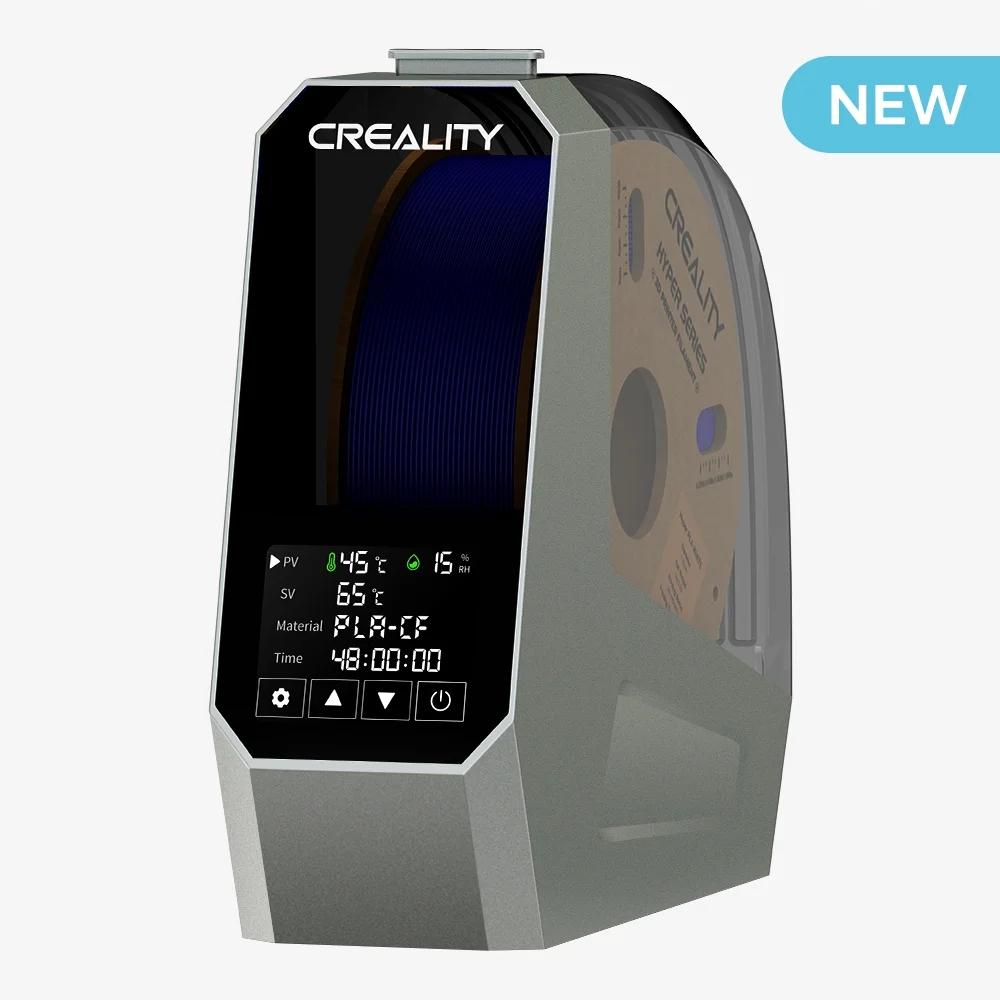
The single-spool Space Pi is a heated filament dryer with circulating air, a touch display, and the ability to feed filament while drying. It can be useful when moisture is genuinely the problem, but it is not a cure for every print defect.
Bottom line: The Space Pi is most attractive for printing moisture-sensitive filament directly from a heated enclosure. Its verified operating range is 45–70°C with a timer of up to 48 hours. It does not contain a Raspberry Pi or advertise remote smartphone control, despite the incorrect claim in the original version of this article.
Disclosure and review basis: This page contains an affiliate link. If you buy through it, I may receive a commission at no additional cost to you. This is a specification-based guide using current manufacturer information, not a hands-on laboratory review. Prices and availability can change.
Verified Creality Space Pi specifications
The following details are listed by Creality for the single-spool Space Pi. Do not confuse this model with the Space Pi Plus, X4, or X4L; those products have different capacities and temperature limits.
Creality also lists real-time chamber humidity monitoring, material presets, and parameter memory after power loss. Confirm the included power version, plug, spool fit, return terms, and the latest specifications for your region before ordering. See the official Space Pi product page.
How to tell whether moisture is actually the problem
Many printing polymers are hygroscopic: they absorb moisture from the surrounding air. When damp filament reaches a hot nozzle, that moisture can turn to steam and disrupt extrusion. Sensitivity and absorption rate vary by polymer, formulation, humidity, exposure time, and storage.
Possible moisture symptoms
Popping or sizzling at the nozzle, increased fine stringing, a rough or foamy surface, inconsistent extrusion, and unexpectedly brittle filament or parts can justify a controlled drying test.
Problems drying will not fix
A partial clog, worn nozzle, incorrect flow, excessive temperature, loose belts, poor first-layer calibration, wet build plate, or bad model geometry needs its own diagnosis.
The useful test is before and after: keep the model and slicer settings unchanged, dry the filament according to its manufacturer’s instructions, then print the same small test again. If the symptom improves repeatably, moisture was likely contributing.
Which Space Pi features are genuinely useful?
Heated air circulation
A built-in fan circulates air around the spool instead of relying only on heat at the base. Even so, spool winding, load, venting, room conditions, sensor placement, and dryer design can affect the temperature and drying rate throughout the chamber.
Printing directly from the dryer
The feed-through path is valuable for materials that can begin absorbing moisture again during a long print. Check that the spool rotates freely and that the filament path does not add sharp bends or excessive drag.
Material presets and manual control
Presets make setup faster, but they are not universal truth. Follow the filament manufacturer’s drying temperature and duration first. Different blends under the same material name can have different limits, and the plastic spool itself must tolerate the chosen temperature.
Humidity and temperature display
The display helps you observe chamber conditions and progress. The humidity reading is not a direct measurement of water inside the filament. A falling relative-humidity number alone does not prove that the center of a full spool is dry.
Important limitations before you buy
| What it offers | What to keep in mind |
|---|---|
| 45–70°C adjustable heat | Some engineering polymers may call for drying temperatures above 70°C. Use the filament maker’s instructions and select equipment that can safely meet them. |
| One spool inside the chamber | It is not the best capacity choice for multi-material systems, production queues, or users who routinely prepare several spools. |
| Dry while printing | Tube routing and spool friction still matter. A dryer cannot compensate for a poor filament path. |
| Up to a 48-hour timer | Longer is not automatically better. Excessive heat or time can deform spools or affect material; use approved settings. |
| Chamber humidity display | It does not measure internal filament moisture and should not be interpreted as a laboratory moisture reading. |
| Heated drying | A heated dryer is not the same as long-term dry storage. After drying, use a sealed container with appropriate desiccant when the spool is not in use. |
Temperature warning: Do not raise the temperature simply to shorten the cycle. Confirm both the filament and spool can tolerate the setting. Keep vents unobstructed, use the supplied power equipment, and follow Creality’s operating and placement instructions.
A practical drying workflow
- Document the symptom. Photograph the surface and record the printer, material, nozzle, temperatures, profile, and room conditions.
- Check for a simpler cause. Inspect the nozzle, filament path, slicer selection, and first layer before assuming moisture.
- Find the filament maker’s instructions. Use its temperature and duration when available; do not rely on a generic chart alone.
- Confirm spool fit and heat tolerance. The spool must turn freely and withstand the selected drying temperature.
- Load and route carefully. Avoid crossing the filament, pinching it under the lid, or creating a sharp feed angle.
- Set temperature and time. Select the conservative validated setting, keep the dryer clear of obstructions, and monitor the first cycle.
- Repeat the same print test. Keep other variables unchanged so the result tells you whether drying helped.
- Store the spool properly. Move dry filament to a sealed container with maintained desiccant unless you will continue printing from the dryer.
Drying, printing, and storage are different jobs
Drying
Uses controlled heat and airflow over time to reduce moisture in filament.
Printing from a dry box
Limits exposure while a moisture-sensitive spool feeds into the printer.
Sealed storage
Slows moisture return between jobs using a sealed container and maintained desiccant.
Desiccant maintenance
Requires replacement or regeneration according to its instructions. Saturated desiccant cannot protect the spool effectively.
A dryer can be part of a good filament workflow, but it does not eliminate the need for storage. If you are still building your foundation, read 3D Printing for Absolute Beginners before treating new equipment as the first solution.
Who should consider the Creality Space Pi?
It makes sense for: someone who uses one spool at a time, prints PETG, TPU, nylon-family or other moisture-sensitive materials, needs to feed filament while it stays warm, and can work within a 70°C maximum.
It may not be the right fit for: someone who only uses fresh PLA in a dry environment, needs to dry multiple spools, requires temperatures above 70°C, or wants remote/app control. Compare the total workflow—not just the sale price.
Kevin’s take: Buy a dryer to solve documented moisture exposure, not because every string or rough surface has been blamed on wet filament. The Space Pi’s feature set is practical for a single-spool station, but capacity and temperature ceiling are the deciding limits.
Quick knowledge check
Does a lower chamber humidity reading prove the filament is fully dry?
No. It describes air near the sensor, not moisture throughout the filament. Use a validated time and temperature, then compare repeat prints.
Will a filament dryer fix every stringing problem?
No. Stringing can also come from excessive nozzle temperature, travel behavior, retraction, a leaking nozzle, or the model itself. Drying is one controlled test.
Can the Space Pi be controlled remotely through a Raspberry Pi?
No such feature is listed by Creality for this product. The original article’s Raspberry Pi and smartphone-control claim was incorrect.
Is a heated dryer the same as a sealed storage box?
No. Drying removes moisture with controlled heat and airflow; sealed storage slows moisture return after drying.
Frequently asked questions
What temperature range does the Creality Space Pi use?
Creality lists an adjustable range of 45–70°C for the single-spool Space Pi.
How long can the Space Pi run?
The listed timer range is 0–48 hours. Choose the duration recommended by the filament manufacturer rather than assuming the longest cycle is best.
Can I print directly from the dryer?
Yes. The unit is designed to feed filament while drying. Verify smooth spool rotation and a low-friction path to the printer.
Does the Space Pi support 2.85 mm filament?
Creality lists compatibility with both 1.75 mm and 2.85 mm filament. Check the spool’s physical dimensions before purchase.
Does the Space Pi have Wi-Fi or app control?
Creality’s current product information does not list Wi-Fi, an app, a built-in Raspberry Pi, or remote control for the single-spool Space Pi.
Should I dry every spool before printing?
No. Dry filament that shows credible moisture exposure or when the material manufacturer specifies pre-drying. Avoid unnecessary heat cycles.
