
Learn the faster, stronger alternatives.
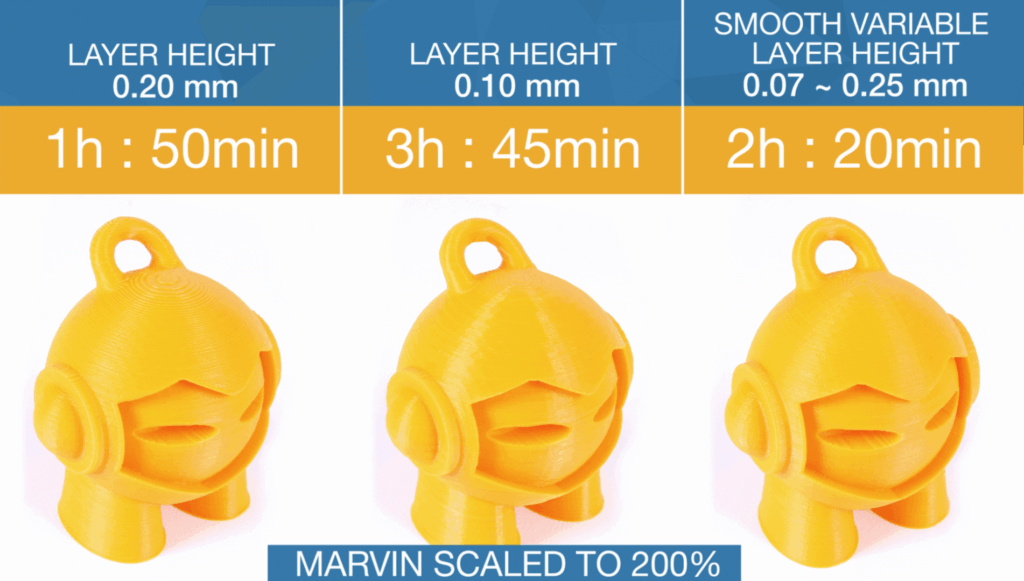
Most 3D printing enthusiasts default to 0.2mm layer height because it is the “standard” profile in slicers like Cura and Prusa Slicer. However, recent benchmark data suggests that 0.2mm is often the least efficient choice for modern high-speed printers. By shifting to adaptive layers or specific volumetric offsets, you can reduce print times by 30% without sacrificing surface quality.
The Efficiency Gap: Why 0.2mm is a Trap
The 0.2mm layer height has long been considered the “sweet spot” between speed and detail. On older machines, this was true. But with the advent of high-flow hotends found on modern Creality machines (available at Creality Official Store), the bottleneck is no longer the motion system—it is the volumetric flow. When you print at 0.2mm, you are often underutilizing the melting capacity of your nozzle. Moving to a 0.24mm or 0.28mm layer height increases the volume of plastic extruded per second, allowing the printer to reach its maximum flow rate faster. Conversely, for detailed parts, dropping to 0.12mm provides a massive jump in visual quality that 0.2mm simply cannot match.
| Layer Height | Print Time (Standard Benchmarking) | Strength Rating | Best Use Case |
|---|---|---|---|
| 0.12mm | Slow (+45%) | High Detail | Miniatures / Scans |
| 0.20mm | Baseline | Average | General Prototyping |
| 0.24mm | Fast (-18%) | Stronger Bonds | Functional Parts |
| 0.28mm | Very Fast (-32%) | Maximum Strength | Industrial Brackets |
Maximizing Your Workflow with Better Hardware
To truly move away from inefficient standard settings, you need hardware that can handle the increased data processing and physical demands of optimized paths. If you are focused on high-fidelity reproduction, using a high-end scanner like those from 3DMakerpro allows you to capture geometry that justifies lower layer heights. For those running print farms or heavy functional projects, sourcing consistent filament is critical. Using high-quality material from COEX 3D ensures that when you push your layer heights to 0.28mm, the layer adhesion remains structural rather than just aesthetic.
The Technical Case for 0.12mm
Stepping motors move in discrete increments.
For most printers with a 1.8-degree lead screw, 0.12mm or 0.16mm
aligns better with the “magic steps” of the motor,
leading to less vertical banding.
The Technical Case for 0.28mm
Wider layers have more surface area for thermal bonding.
If you are printing structural components, 0.28mm
results in a part with fewer “seams” and
higher impact resistance.
Strategic Internal Resources
Optimizing your layer height is only one part of the equation. To fully master your machine’s output, consider these deep dives:
- Explore our guide on Advanced Slicer Settings to understand volumetric flow limits.
- Check out our review of the latest Creality K1 Max to see how high-speed hardware handles 0.28mm layers.
- Learn about post-processing techniques for different layer heights at 3D Printing by Kevin.
Recommended Gear for Optimized Printing
* Best High-Speed Printers:** Creality
* Precision Scanning:** 3DMakerpro (Global)
* Reliable Components:** HONG KONG CHAORONG CO.
* Premium Filament:** COEX 3D
—
Frequently Asked Questions
Does layer height affect dimensional accuracy?
Yes. While the X and Y axes are largely unaffected, Z-axis accuracy is dependent on your layer height being a multiple of your lead screw’s pitch. 0.2mm is common, but 0.12mm or 0.24mm often yields smoother vertical transitions. Is 0.2mm ever the right choice?
It remains a safe “middle ground” if you are unsure of your filaments’ cooling capabilities, but it is rarely the most efficient choice for time-sensitive or highly detailed projects.
