
Turn a Creality Ender 3 into a faster, cleaner, more reliable printer with a ~$20 Klipper setup. Real-world tuning tips, speed gains, and Ender 3 vs Bambu X1C comparisons.
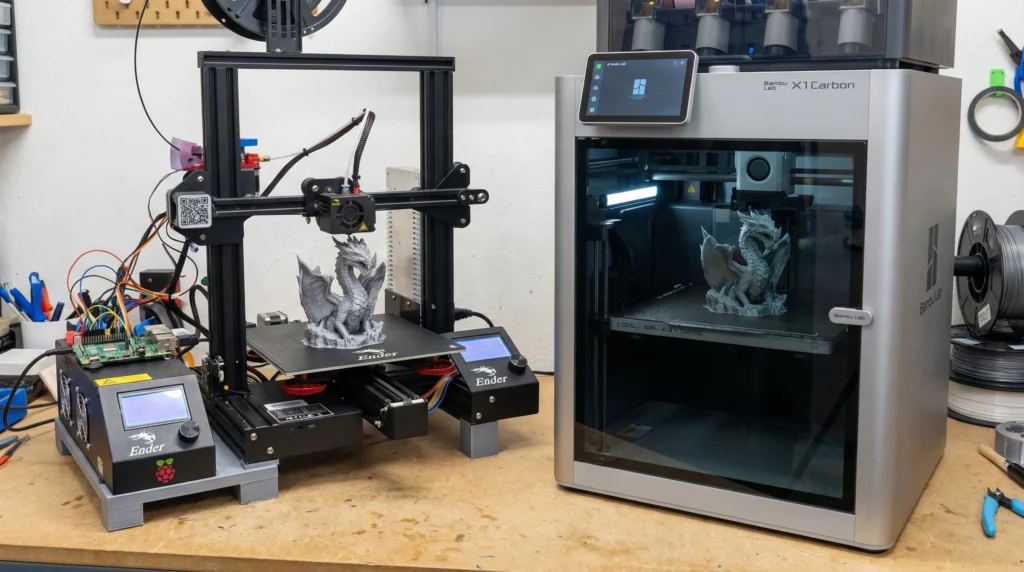
Many people believe you need to spend thousands on a high-end 3D printer to get fast speeds, clean surfaces, and reliable results. Printers like the Bambu Lab X1 Carbon are often seen as the only way to achieve professional-quality prints without frustration.
After years of hands-on printing, I’ve learned something surprising. With one simple, low-cost upgrade, a well-tuned budget printer can deliver results that look shockingly close to machines costing ten times more. In my case, a roughly $20 Klipper firmware upgrade transformed my Creality Ender 3 into a printer that consistently produces smooth, accurate, and dependable parts for everyday use.
This article shares my real-world experience, explains how the upgrade works, and shows where budget printers can realistically compete with premium systems—and where they still can’t. If you care about print quality, value, and learning how your machine really works, this comparison may change how you think about 3D printing upgrades.
Introducing the Competitors: Ender 3 vs. Bambu Lab X1 Carbon
What Is the Creality Ender 3?
The Creality Ender 3 is an open-frame Cartesian 3D printer known for its affordability, massive user base, and nearly endless upgrade potential. It offers a respectable build volume, straightforward mechanics, and a design that encourages learning through hands-on tuning.
I purchased my Ender 3 through Creality’s official store via AWIN because replacement parts, upgrades, and documentation are widely available. In its stock configuration, the Ender 3 produces decent prints, but it’s limited by conservative firmware, modest motion control, and manual calibration.
Who Is the Ender 3 Best For?
The Ender 3 is ideal for beginners who want to understand the fundamentals of 3D printing, hobbyists who enjoy modifying their machines, and professionals who value flexibility over automation. It rewards patience, curiosity, and experimentation.
Ender 3 Pros and Cons
Pros: Affordable entry point, enormous community support, easy access to parts, and unmatched customization freedom.
Cons: Slower stock performance, louder operation, manual bed leveling, and greater reliance on user tuning for reliability.
What Is the Bambu Lab X1 Carbon?
The Bambu Lab X1 Carbon is a premium CoreXY 3D printer built for speed, automation, and ease of use. It features automatic bed leveling, enclosed printing, high-speed motion systems, and advanced software that minimizes setup and tuning.
Its price reflects a polished, almost appliance-like experience designed for users who want excellent results immediately with minimal learning curve.
Who Is the Bambu Lab X1 Carbon Best For?
The X1 Carbon is best suited for users who print frequently, value time over tinkering, and want reliable results straight out of the box. It shines in high-throughput environments and for users who prefer automation over manual control.
The $20 Klipper Upgrade That Changed Everything
What Is Klipper Firmware?
Klipper is an open-source 3D printer firmware that shifts complex motion calculations from the printer’s control board to an external single-board computer. This allows even inexpensive printers to execute advanced motion planning, higher accelerations, and precise vibration compensation.
For this upgrade, I used an inexpensive Pi Zero–class board and a MicroSD card. Klipper itself is free, and the total hardware cost came in at roughly $20, assuming you already have basic accessories.
Why Klipper Is a True Game Changer
Once installed and tuned, Klipper unlocks performance that stock firmware simply cannot match. Print speeds can double while maintaining surface quality, ghosting and ringing are dramatically reduced, and advanced tools like input shaping allow precise vibration control.
These improvements don’t turn an Ender 3 into a fully automated flagship printer, but they do allow it to produce surface quality and dimensional accuracy commonly associated with far more expensive machines—especially for single-material prints.
Real-World Print Quality and Performance Comparisons
Before installing Klipper, my Ender 3 produced functional parts with visible ringing and longer print times. After tuning Klipper, those same parts printed faster, cleaner, and with noticeably sharper corners.
In side-by-side comparisons with the Bambu Lab X1 Carbon’s standard and fine profiles, my Klipper-equipped Ender 3 delivered nearly indistinguishable results for most everyday prints such as brackets, enclosures, tabletop accessories, and fixtures.
Where Bambu still leads is extreme speed, multi-material printing, and long unattended runs. However, for the majority of practical hobby and light professional prints, the quality gap is far smaller than the price gap suggests.
Ease of Use, Reliability, and Long-Term Value
Bambu Lab’s ecosystem is designed for convenience. Setup is fast, calibration is automatic, and failures are rare. In contrast, a Klipper-modified Ender 3 requires learning and occasional adjustment—but rewards that effort with flexibility and low-cost maintenance.
Because the Ender 3 uses open hardware and standard components, repairs are inexpensive and quick. You are not locked into proprietary parts, and long-term ownership costs remain low.
Who Should Choose Each Path?
If you already own an Ender 3 and enjoy learning how your printer works, a Klipper upgrade offers exceptional value. If you want minimal setup, enclosed printing, and automation at every step, Bambu Lab remains a strong—though expensive—choice.
Big Results Without a Big Price Tag
With a modest investment and some patience, I turned a budget Ender 3 into a printer that consistently punches far above its weight. While premium machines offer undeniable convenience, they are no longer the only path to impressive results.
If you value control, learning, and long-term flexibility, Klipper is one of the smartest upgrades you can make. For many users, it delivers the kind of print quality that once required a four-figure budget—without locking you into a closed ecosystem.
Frequently Asked Questions
Is Klipper really a $20 upgrade for an Ender 3?
Klipper itself is free, but you usually need a small external computer (like a Pi Zero–class board or a low-cost alternative), plus a MicroSD card and a cable. If you shop carefully and already have basic accessories, the total can be around $20. Costs vary based on availability and what you already own.
What does Klipper actually improve on the Ender 3?
Klipper improves motion planning and control by offloading calculations to an external device. With proper tuning, you can reduce ringing and ghosting, increase usable acceleration, improve corner sharpness, and often print faster while keeping similar surface quality compared to stock firmware.
How fast can an Ender 3 print with Klipper?
Many Ender 3 setups can run comfortably in the 60–150 mm/s range after Klipper tuning, depending on your hotend flow, cooling, part geometry, and layer height. In practice, speed is limited more by volumetric flow and cooling than firmware alone.
Does Klipper make an Ender 3 print like a Bambu Lab X1 Carbon?
For many single-material, everyday prints, a well-tuned Ender 3 running Klipper can achieve surface quality and dimensional results that are surprisingly close to premium printers. However, the X1 Carbon still leads in automation, extreme speed, enclosed printing, and consistent unattended runs.
Is Klipper hard to install for beginners?
Klipper isn’t difficult if you can follow step-by-step guides, but it does require careful setup. You’ll flash a MicroSD card, connect the external device to the printer, load a configuration file, and run calibration steps. Most beginners succeed by following one reliable guide from start to finish.
Do I need a Raspberry Pi to run Klipper?
No. A Raspberry Pi is common, but Klipper can run on many low-cost alternatives, including other single-board computers and even some routers or mini PCs. The key requirement is a device that can run Linux and maintain a stable USB connection to your printer.
What calibrations matter most after installing Klipper?
The biggest wins usually come from input shaping, pressure advance, correct extruder rotation distance, and dialing in safe acceleration limits. These settings reduce vibration artifacts, improve corners, and help keep print quality stable at higher speeds.
Will Klipper reduce ringing and ghosting on the Ender 3?
Yes. Input shaping is designed to counteract resonance in the motion system, which is a major cause of ringing and ghosting. When tuned correctly, you’ll see crisper corners and cleaner walls, especially on printers like the Ender 3.
Does Klipper improve reliability or cause more failures?
Reliability typically improves after tuning because motion control becomes more predictable and repeatable. During setup, incorrect configuration can cause issues like layer shifts or poor first layers until settings are corrected. Once dialed in, many users report fewer failed prints than with stock firmware.
Will installing Klipper void my Ender 3 warranty?
It can, depending on the seller and warranty terms. Firmware changes and modifications may affect warranty coverage. If your printer is new and you’re concerned, check your warranty policy and keep stock firmware available so you can revert if needed.
What upgrades pair best with Klipper for even better results?
Klipper pairs well with improved part cooling, a consistent bed surface like PEI, and basic frame stiffening. If you want higher speed without quality loss, upgrading the hotend for better volumetric flow can also help.
Who should choose Bambu Lab instead of upgrading an Ender 3?
Choose Bambu Lab if you want a fast, automated, enclosed printer with minimal setup and a polished workflow. It’s ideal for people who print frequently, want consistent results with less tuning, or need multi-material features without building a modded setup.
