
Multicolor 3D printing used to be a tradeoff: you could have color, or you could have simplicity. Creality’s new SPARKX i7 is trying to break that deal by making multicolor feel less like a hobby inside a hobby—more like a push-button upgrade for everyday makers.
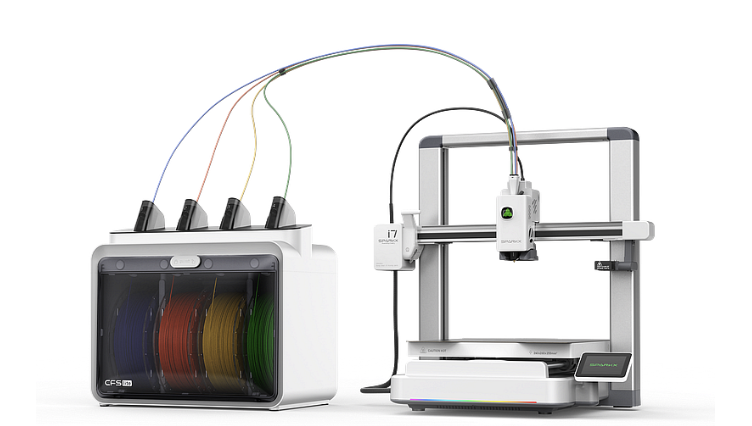
This is a first-look launch guide built from official product information and early third-party coverage. I haven’t run my own long-term test prints on the SPARKX i7 yet, so wherever performance is uncertain, I’ll call out what should be verified before you buy.
DisclosureIs the SPARKX i7 Worth Watching?
Yes—especially if you want multicolor prints without the usual setup friction. The SPARKX i7 is positioned as an entry-level multicolor system with app-driven workflow and simplified maintenance (including quick-swap parts). The smart move is to compare it against your real goal: “easy multicolor for everyday projects” versus “maximum control and tuning.”
If you need a printer immediately, buying a proven platform is still the safest path. But if you can wait for early owner feedback and firmware maturity, the i7 could be one of the more beginner-friendly routes into multicolor this year.
SPARKX i7 at a Glance (What’s Confirmed)
| Category | Launch snapshot |
| Core idea | Beginner-friendly, AI-assisted workflow with multicolor focus |
| Color system | 4-color workflow via CFS Lite (combo configuration) |
| Build volume | 260 × 260 × 255 mm |
| Setup positioning | Marketed as “from box to first print” in under 5 minutes |
| Waste positioning | Marketed as “50% less-waste multicolor” |
| Maintenance angle | Quick-swap parts / quick-swap hotend positioning |
| Workflow ecosystem | Creality Cloud app + library workflow is a central part of the pitch |
Important: “Under 5 minutes” and “50% less-waste multicolor” are marketing claims. They may be achievable under certain conditions, but the real question is how consistent the experience stays across different filaments, models, and day-to-day use.
What Makes SPARKX i7 Different (In Plain English)
Creality is pitching SPARKX i7 as multicolor for people who don’t want to become full-time printer technicians. That means three things matter more than raw specs:
1) “Photo to Print” thinking for beginners
The i7’s AI story is about shortening the distance from “I have an idea” to “I have a print.” For beginners, this can be a big deal because the steepest learning curve often isn’t the printer—it’s modeling, slicing decisions, and workflow complexity.
2) A simplified 4-color system (CFS Lite)
Multicolor systems live and die by reliability: feeding consistency, clean swaps, and manageable waste. The i7 is positioned around a simplified 4-color accessory workflow meant to reduce friction. The practical upside is obvious: faster “set it up and go” for signs, gifts, desk organizers, toys, and color-coded functional parts.
3) Maintenance that’s designed to feel less scary
Quick-swap parts (including the hotend positioning) matter because multicolor printing increases the number of “events” during a print. More swaps and more movement mean you want recovery to be painless when something does go wrong. The goal is less downtime and fewer moments where a beginner simply gives up.
Who the SPARKX i7 Is For (And Who Should Skip It)
| Best for | Why it fits |
| Beginners who want multicolor without a deep tuning phase | The entire product pitch is “less friction” and app-driven workflow |
| Everyday projects: signage, home organization, gifts, decor, school projects | Multicolor matters most when the goal is visual clarity and fast wins |
| Makers who value convenience and speed of setup | Creality emphasizes quick setup and simplified maintenance |
| Not ideal for | Why to skip |
| Power users who want granular slicer control and deep tinkering | “Easy workflow” products can place a ceiling on control |
| Large-format builders who frequently print tall parts | 260 × 260 × 255 mm is versatile, but not “big volume” territory |
| Anyone who needs a proven platform this week | New launches often improve after the first firmware and community feedback cycle |
Should You Wait for the SPARKX i7 or Buy a Proven Multicolor Printer Now?
This is the decision point that matters. Most buyers don’t regret the printer they bought. They regret the weeks they lost trying to force the wrong workflow to fit their goals.
| If you… | Best move | Reason |
| Want the easiest “first multicolor printer” experience and can wait | Wait for early owner reports + first firmware cycle | You’ll learn how the CFS Lite behaves with real filaments and real models |
| Need dependable prints on a deadline | Buy proven now | Time-to-results beats new-feature excitement when reliability is urgent |
| Care most about minimizing purge waste | Wait for independent waste comparisons | “Less waste” depends heavily on model, color layout, and slicer strategy |
| Mostly print fun, visual projects where color is the point | Keep SPARKX i7 on your short list | This is the exact buyer profile the i7 is targeting |
What I would verify in a hands-on test: color transition, cleanliness, purge waste on typical models, long-print stability, CFS Lite feeding consistency with third-party spools, and whether the “easy workflow” stays easy after weeks of real use.
How SPARKX i7 Fits Into Multicolor Printing (Your Quick Roadmap)
If you’re new to multicolor, the printer is only half the battle. Success comes from understanding which multicolor method you’re actually buying into.
| Multicolor method | What it is | What it costs you | What you gain |
| Single-nozzle + color feeder (SPARKX i7 style) | One nozzle, automated filament swaps | Purge waste, swap time, higher workflow dependency | Accessible multicolor with a simpler hardware footprint |
| Toolchanger / multi-nozzle | Multiple tools/nozzles handle different colors/materials | Higher cost and complexity | Cleaner swaps, less waste in many cases, more flexibility |
| Manual color changes | You pause and swap filament by hand | Time, attention, inconsistent results | Lowest cost entry to “some color” |
Internal link idea: If you want the full breakdown (waste strategies, slicer workflows, filaments that behave best, and what to buy), link this section to your multicolor pillar: Multicolor 3D Printing: The Complete Guide.
SPARKX i7 FAQs
Does the SPARKX i7 print in multiple colors?
Yes. The SPARKX i7 is positioned as a 4-color-capable printer using Creality’s CFS Lite system (in the combo configuration).
What is the SPARKX i7 build volume?
260 × 260 × 255 mm.
Is the SPARKX i7 good for beginners?
It’s designed to be beginner-friendly with a simplified workflow and quick setup positioning. The best confirmation is how it performs for real owners after the first firmware and support cycle.
Will it actually waste less filament in multicolor prints?
Creality markets “50% less-waste multicolor,” but real waste depends on your model, number of color changes, purge settings, and slicer strategy. Look for independent side-by-side comparisons on typical prints before treating that number as universal.
What should I look for before buying?
Pay attention to early owner feedback about feeding reliability, color transition cleanliness, purge waste on common prints, and whether the app-driven workflow remains stable over time.
My Take (Without the Hype)
The SPARKX i7 is exciting for one reason: it’s aimed at the people who want multicolor results, not multicolor drama. If Creality’s simplified system proves reliable in the real world—and if the workflow stays stable after the first wave of updates—this could become a default recommendation for beginners who want multicolor without the usual pain.
For now, I’d treat it as a smart “watch list” printer unless you’re comfortable being an early adopter. Either way, it’s a strong signal that multicolor is moving from “advanced hobbyist” toward “everyday maker.”

