
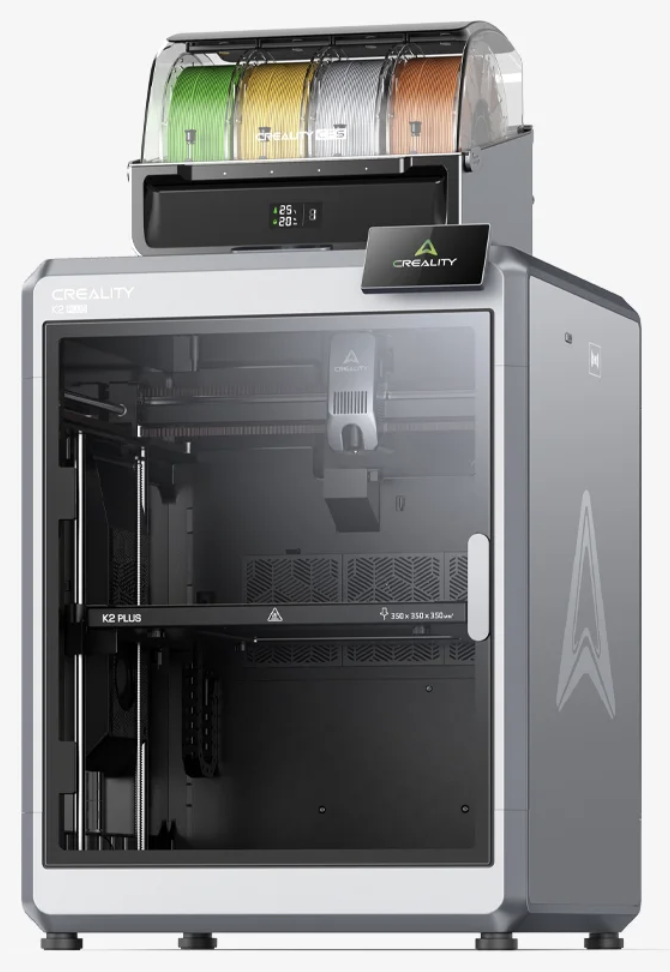
Yes, multicolor 3D printing finally works. A new generation of tightly integrated printers and color systems has turned what used to be a fragile science experiment into something you can rely on for real projects, not just YouTube demos.
If you’ve ever tried to juggle manual filament swaps, unreliable purge towers, or clunky add-on boxes, you already know how painful multicolor used to be. In this guide, we’ll walk through why it finally works, the machine that cracked it for everyday makers, and how you can build a multicolor setup that fits your budget and goals.
Why Multicolor 3D Printing Used to Be a Nightmare
For years, multicolor FDM printing lived in the “looks cool on paper” category. The idea was always exciting. The reality was usually wasted filament, failed prints, and hours of troubleshooting.
Most setups suffered from at least one of these problems:
- Endless manual filament swaps that turned a two-hour job into an all-day babysitting session.
- Unreliable external color boxes that never quite synced with the printer’s motion system.
- Calibration drift that left color layers slightly misaligned, ruining otherwise good models.
- Huge purge blocks that wasted more filament than the actual part required.
If you’re still choosing your first machine, it’s worth understanding the basics first. I walk through the fundamentals in my guide to the different types of 3D printers, and my beginner’s guide to choosing a 3D printer dives into what really matters before you add color into the mix.
The Breakthrough: A Printer and Color System Designed Together
The real breakthrough in multicolor wasn’t just faster hardware. It was integration.
Instead of treating color as an afterthought—a box bolted onto the side—the new generation of machines was engineered as a complete system. The printer, toolhead, motion control, slicer, and color unit all speak the same language. That’s why they finally feel “plug-and-print” instead of “plug-and-pray.”
Today, one class of machine in particular stands out as the turning point: compact core-XY and bed-slinger printers paired with their own dedicated multi-material units. Think of a printer that arrives with:
- A tightly integrated multi-spool feeder designed by the same company.
- Automatic flow, vibration, and input-shaping calibration are built into the firmware.
- A slicer that knows exactly how to purge, park, and switch filaments.
- Smart filament management, including tangle detection and runout recovery.
That’s the combination that finally cracked multicolor for everyday users.
Here’s What “Multicolor That Actually Works” Looks Like
When multicolor 3D printing works the way it should, your experience looks very different from the old days of DIY hacks and forum-deep configs.
On a modern, well-integrated machine, you should expect:
- Simple, visual color assignment: you pick colors per part or per mesh in the slicer, not in a spreadsheet of G-code scripts.
- Automatic calibration: the printer measures and compensates for nozzle offsets, resonance, and extrusion—without you chasing test prints all weekend.
- Reliable tool changes: filament switching happens repeatably, with smart purge strategies that balance speed and waste.
- Consistent first layers: because the machine’s core printing performance is strong, you’re not fighting basic bed adhesion while you experiment with color.
In other words, the machine doesn’t just “support” multicolor. It’s built around it.
Need a Reliable Base Printer Before You Go Multicolor?
If you’re still building your first setup, it can make sense to start with a robust single-color machine before stepping into multicolor. A solid core printer will serve you for years—whether you stay with one filament or upgrade to a color system later.
Many of my readers start with Creality’s latest generation because they combine strong hardware with an approachable price. If you’re comparing options, you can browse current models and pricing here:
Explore Creality 3D Printers (Affiliate)
Disclosure: This is an affiliate link. If you choose to purchase through it, I may earn a small commission at no extra cost to you. It helps me keep testing machines, dialing in profiles, and sharing real-world results here at 3D Printing by Kevin.
The Ideal Multicolor Workflow for Everyday Makers
So what does a realistic, day-to-day multicolor workflow look like on the machines that finally made it practical? It’s much simpler than you might expect.
- Design or download your model. This could be a logo plate, character figure, game piece, or functional part with color-coded zones.
- Assign colors in the slicer. You select which parts or meshes get which filament. The slicer automatically generates tool changes and purge operations.
- Load filaments into the color unit. You drop in up to four different filaments (or more, depending on the system) and assign each spool to a slot in software.
- Run the built-in calibration checks. The printer quickly verifies nozzle offsets, flow, and vibration compensation.
- Start the print and walk away. The machine handles filament switches, purges, and layer changes without constant babysitting.
Instead of hacking together half a dozen tools, everything happens in one ecosystem—the printer, the color system, and the slicer.
Where 3D Scanning Fits into the Multicolor Picture
Once multicolor printing becomes reliable, you quickly start thinking beyond simple color swaps. That’s where 3D scanning becomes interesting.
With a good scanner, you can capture real-world objects—figurines, tools, props, custom parts—and bring them into your design workflow. Add surface details, engrave text, split the model into color zones, and print in multiple filaments for a far more polished result.
If you’re curious about adding scanning to your setup, desktop scanners from brands like 3DMakerpro are a popular next step for makers who want to hybridize physical and digital workflows.
Turn Real Objects into Multicolor Prints
A reliable scanner lets you capture real-world objects and re-imagine them as detailed, multicolor prints—perfect for props, cosplay, custom parts, and product prototypes.
To see what’s possible, take a look at the current 3DMakerpro scanners and bundles here:
Explore 3DMakerpro Scanners (Affiliate)
Again, this is an affiliate link. If you decide a scanner is right for you and purchase through this link, it helps support the in-depth guides, tests, and tutorials I publish on the site.
Should You Jump Straight into Multicolor—Or Start Simple?
Here’s the honest answer: you don’t have to go multicolor to get a lot of value out of 3D printing. Many people build full side businesses and workshop workflows on single-color machines.
However, if you already enjoy tuning profiles and pushing hardware, a well-designed multicolor system can be a huge creative unlock. It’s ideal if you:
- Design logos, signage, or branded parts that need permanent color in the plastic.
- Print miniatures, figurines, or game pieces where color adds personality without hand-painting every piece.
- Prototype consumer products for clients who expect visually polished, presentation-ready parts.
- Sell custom gifts where color makes your work stand out from generic prints.
If you’re not sure where you land, my custom 3D printing services page shows how I use both single-color and multicolor workflows for real-world projects. It can give you a realistic sense of what you’ll actually use day to day.
Key Features to Look For in a Multicolor-Ready Printer
No matter which brand you choose, there are a few non-negotiable features that make multicolor life much easier:
- Strong base mechanics: rigid frame, good motion system, and consistent extrusion. If the printer struggles with single-color, multicolor will only amplify the problems.
- Automatic calibration routines: built-in tools for flow, resonance, and bed leveling reduce the amount of “black magic” required.
- Native multi-material integration: the color unit and slicer should be designed for each other, not glued together with third-party scripts.
- Decent purge management: the system should allow tuning purge volumes so you’re not throwing away an entire roll of filament for one small print.
- Good documentation and community: a strong user base means profiles, fixes, and tips are easy to find.
When you evaluate any “machine that cracked multicolor,” use this checklist. If it hits all of these points, you’re likely looking at a printer that will grow with you instead of fighting you.
Where Multicolor 3D Printing Goes from Here
We’re still early in the multicolor story, but the hardest part—basic reliability—has finally been solved by these integrated systems. That means future improvements will likely focus on:
- Smarter purge strategies that use less filament.
- More materials per unit without sacrificing reliability.
- Better integration with CAD tools for painting color directly onto 3D models.
- Tighter slicer workflows that make multicolor feel as simple as selecting a material profile.
If you want to stay ahead of those changes, bookmark this article and explore more of the in-depth guides on 3D Printing by Kevin. I update my recommendations as new hardware matures—not just when it launches.
Single-Color vs Multicolor: Which Setup Is Right for You?
| Setup Type | Best For | Pros | Trade-offs |
|---|---|---|---|
| Single-Color Starter Printer | Beginners, functional parts, budget-conscious makers | Simpler to tune, lower cost, fewer points of failure | No automatic color changes, less visual impact on prints |
| Integrated Multicolor System | Creators, product designers, advanced hobbyists | Automated color changes, polished aesthetics, client-ready prototypes | Higher price, more complex hardware, slightly longer setup, and calibration |
FAQ: Multicolor 3D Printing That Actually Works
Is multicolor 3D printing worth it for beginners?
It can be, but only if you already understand the basics of single-color printing. Multicolor adds complexity—more moving parts, more filament paths, more things to tune. I recommend mastering bed leveling, adhesion, and basic profiles first. Once you can get predictable single-color results, stepping into multicolor will feel rewarding instead of overwhelming.
Do I need a special printer for multicolor 3D printing?
Yes, if you want it to be reliable. While there are “hacky” approaches that let you add color to almost any machine, the systems that truly cracked multicolor are the ones where the printer, color unit, and slicer were designed together. That integration is the difference between occasional showpiece prints and dependable, week-in, week-out use.
How many colors can I realistically use in one print?
Most desktop systems today focus on four-color setups, which cover the majority of use cases: base color, accent color, highlight color, and a support or specialty filament. Some systems offer more, but remember that every additional color means more purging, more complexity, and longer tool-change times. For most makers, four well-chosen colors are plenty.
Does multicolor 3D printing waste a lot of filament?
There is always some waste due to purging. However, modern printers and slicers have become much smarter about minimizing waste with tuned purge towers, smarter infill use, and settings that let you balance quality against consumption. If you’re printing higher-value models—client work, display pieces, or premium gifts—the extra filament is often a fair trade for the visual impact.
Can I use 3D scanning with multicolor prints?
Absolutely. A good scanner lets you capture physical objects, clean them up in software, and then re-imagine them in color. That’s especially powerful for prop makers, product designers, and artists. You can scan, segment the model, assign colors, and then print with a multicolor system to produce something that looks finished straight off the bed.
Where should I start if I’m still unsure?
Start by getting your fundamentals rock-solid. Read my beginner’s guide to choosing a 3D printer, then explore the latest machines from established brands like Creality through their current lineup. Once you’re comfortable with the basics, you can decide whether a multicolor system—or a scanner plus multicolor—is the right next step.

