
Disclosure: This article contains affiliate links. If you purchase through them, I may earn a commission at no additional cost to you. This is a specification-based evaluation, not a hands-on test.
What if you could walk through your workshop, capture the entire space in 3D, and explore a digital version before moving a single machine?
Now imagine using that same scanner to reproduce a tiny broken plastic clip.
One sounds like a terrific application. The other could leave you with a beautiful 3D model that’s practically useless.
Welcome to the fascinating—and sometimes misunderstood—world of the 3DMakerpro Raven LiDAR scanner.
This isn’t your typical scanner for figurines, small replacement parts, or tabletop objects. Raven is built to capture something much bigger: the physical world around you.
And that raises an interesting question for makers, engineers, contractors, and 3D printing enthusiasts:
Could the Raven change how we plan projects, design workspaces, and turn real-world environments into digital models?
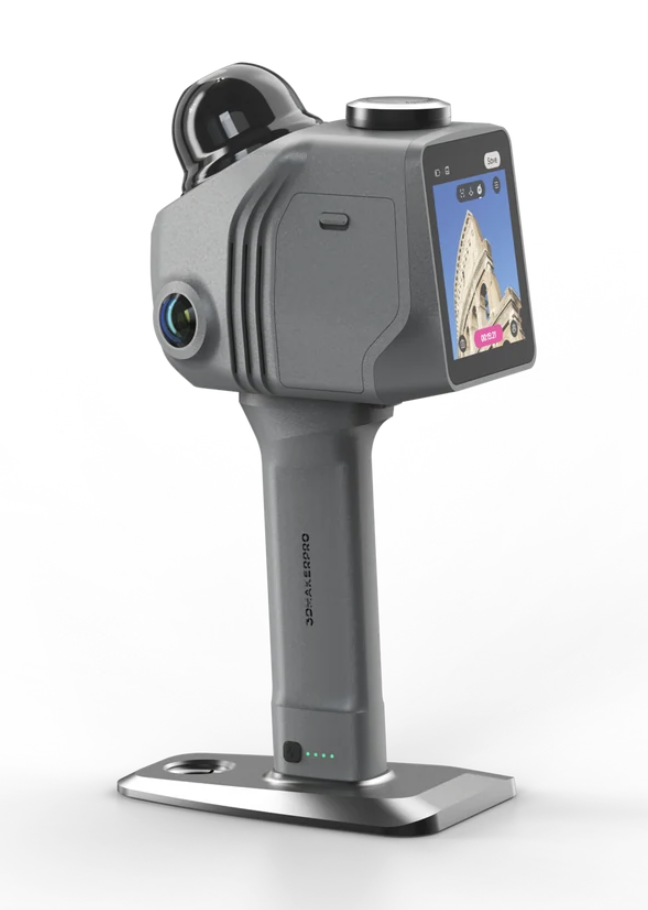
Raven is a compelling option for large-scale spatial scanning, but not for precision replacement-part reproduction.
Its manufacturer-rated accuracy is 2 cm at 10 meters, with a scanning radius reaching approximately 40–50 meters under specified reflectivity conditions.
That makes it interesting for workshops, buildings, renovations, outdoor structures, and digital environments.
For tiny mechanical parts requiring fractions of a millimeter of clearance, calipers, CAD, and close-range scanning remain better choices.
Here’s the Experiment I’d Love to Try With Raven
Picture a busy 3D printing workshop.
There are printers against one wall, filament storage against another, workbenches in the middle, and equipment that has slowly accumulated over the years.
Everything works—until you decide to reorganize.
Suddenly, the questions begin.
- Will the larger printer fit beside the workbench?
- Can the filament storage move without blocking access?
- Where could another enclosure go?
- Is there enough room to move equipment safely?
- Could the entire layout be modeled before anything gets moved?
Traditionally, you’d spend time with a tape measure, graph paper, and CAD software.
But imagine walking through the workshop with Raven and capturing a digital representation of the existing layout.
You could potentially use that scan as a reference while planning equipment placement, exploring different arrangements, or documenting the space before renovations.
That’s where spatial scanning starts to become genuinely useful.
It’s not about creating an impressive-looking 3D model simply because you can.
It’s about making better decisions before spending time and money moving equipment.
A spatial scan can help you visualize the workshop, but critical dimensions still need independent measurement. Raven’s published accuracy is not a substitute for checking tight clearances, mounting locations, or safety requirements.
What Exactly Is the 3DMakerpro Raven?
Raven is a portable LiDAR scanner that collects spatial information while you move through an environment.
LiDAR stands for Light Detection and Ranging.
Rather than photographing an object from several angles and hoping software reconstructs it accurately, LiDAR uses laser-based distance measurements to create a collection of three-dimensional points.
That collection is called a point cloud.
Think of millions of tiny dots describing the shape of the surrounding environment.
With additional processing, those dots can help create 3D meshes, digital environments, and visual reconstructions.
Raven also uses camera imagery to add visual information to captured scenes.
Here’s the interesting part: the technology can help digitize spaces that would be impractical to capture using a small tabletop scanner.
Five Projects Where Raven Could Be Surprisingly Useful
1. Redesigning a Workshop Without Moving Everything Twice
Capture the current room, identify large equipment locations, and build a reference for rearranging the workspace.
For someone managing several 3D printers, CNC machines, or fabrication stations, that could make early planning more efficient.
2. Documenting an Old Building Before Renovation
Older buildings rarely match perfectly square drawings.
Walls may be uneven. Doorways may be oddly positioned. Existing equipment can complicate the layout.
A spatial scan could provide a useful visual record of the building before renovation begins.
Critical construction measurements would still require verification.
3. Creating a Digital Twin of a Real Space
Imagine showing someone a digital representation of your workshop without requiring them to visit in person.
Digital twins can be useful for visual presentations, documentation, and certain planning workflows.
Raven’s color-capture and reconstruction capabilities make this one of its more interesting applications.
4. Capturing Outdoor Structures
Large outdoor objects are difficult to place on a turntable.
Raven’s longer-range scanning capabilities are intended for structures, landscapes, and other larger environments.
Surface reflectivity, movement, weather, and visibility can influence the results.
5. Building Real-World Environments for Digital Projects
Game designers, visualization artists, and creators may find value in capturing real spaces as references for digital environments.
But remember: a realistic visual scene isn’t automatically a precision engineering model.
The Broken Clip Challenge: Where Raven Meets Its Limits
Now let’s bring this back to the kind of work I deal with at 3D Printing by Kevin.
Suppose someone brings me a discontinued plastic clip from an older piece of equipment.
The clip is small. One retaining tab has broken off. A replacement needs to fit the original mounting location.
Would I reach for Raven?
No. And the reason is accuracy.
3DMakerpro publishes an accuracy specification of 2 cm at 10 meters for Raven.
That’s 20 millimeters.
A small snap-fit component may need dimensional adjustments measured in tenths of a millimeter.
For example, a clearance adjustment of 0.2 mm is 100 times smaller than that published 20 mm accuracy figure.
This isn’t a direct measurement of Raven’s error on a tiny object, and it doesn’t mean every scanned point will be off by 20 mm. It shows that the manufacturer’s spatial accuracy rating does not establish suitability for fine mechanical work.
A visually convincing scan doesn’t guarantee a part will fit.
For replacement components, I’d start with the original part, digital calipers, the mating surfaces, and a CAD model.
Then I’d print a small test section before committing to the full part.
That’s often the difference between a replacement that works and one that merely looks correct.
For more on that process, read my guide to measuring a broken part so the replacement actually fits.
Would You Scan It? The Raven Decision Table
Here’s a practical way to decide whether Raven belongs in your workflow.
| Your Project | My Starting Choice | Why |
|---|---|---|
| Entire workshop | Raven | Large-scale spatial capture |
| Building interior | Raven | Environmental documentation |
| Outdoor structure | Raven | Longer-range scanning |
| Small broken gear | Calipers and CAD | Precise mechanical dimensions |
| Detailed figurine | Close-range 3D scanner | Fine surface detail |
| Machine mounting bracket | Direct measurements and CAD | Hole positions and tolerances |
| Virtual property walkthrough | Raven | Spatial and visual reconstruction |
The takeaway is simple: don’t choose a scanner based on how much it can capture. Choose it based on what you need to do with the captured information.
What Makes Raven’s Specifications Interesting?
Some of Raven’s numbers are impressive, but their real value becomes clearer when translated into practical applications.
| Feature | Published Specification | Why It Matters |
|---|---|---|
| Scanning radius | 40–50 m | Designed for larger environments |
| Accuracy | 2 cm at 10 m | Spatial documentation, not precision part reproduction |
| Field of view | 360° × 40° | Wide surrounding coverage |
| Point collection | 150,000 points/second | Rapid collection of spatial data |
| Weight | 1.1 kg | Portable handheld scanning |
| Battery | Up to 2 hours | Field operation with swappable battery grip |
| Camera | 12MP on Standard; dual 12MP on Max | Visual reconstruction options |
Specifications are manufacturer-published values, not results from my own testing. Actual performance depends on the environment and scanning conditions.
What stands out to me isn’t one isolated specification.
It’s the combination of portability, wide-area scanning, and visual reconstruction.
That combination makes Raven potentially useful for people who need to capture entire spaces rather than individual objects.
The Hidden Catch: Scanning Is Only Half the Job
Here’s something worth understanding before buying any 3D scanner.
Capturing geometry and creating a usable engineering model are two different jobs.
Raven uses Ray Studio software to process scan data.
Depending on your workflow, the output may include point clouds, meshes, or visual reconstruction data.
But a point cloud isn’t a finished CAD model.
And an OBJ mesh isn’t automatically a watertight STL ready for your slicer.
You may still need to:
- Clean up unwanted scan data.
- Remove noise and artifacts.
- Separate the geometry you actually need.
- Reconstruct or remodel surfaces.
- Verify dimensions independently.
- Prepare the model for its final use.
If you’re creating a digital tour, your workflow will be different from someone designing a replacement component.
That’s why I always recommend thinking about the final deliverable before purchasing scanning equipment.
Ask yourself: Do I need a visual model, a point cloud, an editable CAD design, or a printable mechanical part?
Those are four different outcomes—and they don’t necessarily require the same scanner.
Standard, Max, or Max RTK: Which Raven Makes Sense?
3DMakerpro offers three Raven configurations.
| Version | Main Difference | Best Starting Audience |
|---|---|---|
| Raven Standard | Single 12MP camera | General spatial scanning |
| Raven Max | Dual 12MP cameras | Users prioritizing richer visual capture |
| Raven Max RTK | Dual cameras with RTK support | Positioning-oriented mapping workflows |
RTK stands for Real-Time Kinematic positioning.
It’s useful in certain geospatial workflows, but it shouldn’t be confused with making Raven a submillimeter mechanical-part scanner.
For a workshop documentation project, I’d investigate the Standard configuration first.
For more demanding visual reconstruction or positioning requirements, I’d compare the Max and Max RTK capabilities carefully.
Also check computer requirements before purchasing. Processing large spatial datasets can require substantial memory and GPU resources.
Is Raven Worth Buying? My Three-Question Test
Before looking at the price, I’d ask three questions.
Question 1: Is the Project Larger Than a Tabletop Object?
If you’re scanning rooms, buildings, or outdoor environments, Raven belongs on your shortlist.
If you’re scanning a small gear, bracket, or figurine, investigate close-range scanners instead.
Question 2: Is Visual and Spatial Documentation More Important Than Tiny Tolerances?
If the answer is yes, Raven may fit your workflow.
If a part needs to fit within fractions of a millimeter, direct measurements and precision modeling are still essential.
Question 3: Will You Actually Use the Scan Data?
This might be the most important question of all.
Don’t buy a scanner because the demonstration looks amazing.
Buy it because the resulting data helps you solve a recurring problem, save time, document projects, or deliver something useful.
Explore the 3DMakerpro Raven
Ready to Turn Real Spaces Into Digital Models?
If your work involves workshop planning, building documentation, large-scale scanning, or visual digital environments, Raven deserves a closer look.
Compare the available configurations, software requirements, accessories, and current pricing directly with 3DMakerpro.
Check Raven Pricing and OptionsAffiliate link. I may earn a commission from qualifying purchases. Availability and prices can change.
Knowledge Check: Are You Buying the Right Scanner?
Let’s see whether you can match the technology to the job. Four quick questions—no technical degree required.
Frequently Asked Questions
Can Raven replace a tape measure?
It can help document large environments and reduce some manual mapping work. However, critical dimensions, installation clearances, and precision measurements should still be checked independently.
Can I use Raven for 3D printing?
Potentially, especially for large-scale references or projects involving physical environments. However, its published accuracy makes it unsuitable as the primary measurement tool for most small precision replacement parts.
Does Raven export STL files?
Its published export options include formats such as OBJ, PLY, LAS, PCD, E57, and XYZ. Compatible third-party software may convert suitable mesh data to STL, but cleanup and validation can still be necessary.
Can Raven scan outside?
Yes. Outdoor scanning is one of its intended applications. Results can vary with surface reflectivity, environmental conditions, and scanning technique.
Is Raven suitable for scanning small mechanical parts?
Generally, no. For small components with tight tolerances, direct measurements, CAD, and appropriately selected close-range scanning tools are better starting points.
Is the Raven a hands-free scanning system?
Raven is primarily a portable handheld scanner. 3DMakerpro also lists optional mounting accessories for certain mobile scanning workflows. Check compatibility and safe-use requirements before purchasing accessories.
My Verdict: The Most Important Measurement Isn’t on the Spec Sheet
The 3DMakerpro Raven is interesting because it moves 3D scanning beyond the tabletop.
Instead of capturing a small object, you can explore capturing the environment around that object.
That opens opportunities for workshop planning, building documentation, visualization, and other spatial projects.
But there’s a lesson here that applies to every scanner, printer, and piece of engineering equipment:
The most impressive tool isn’t always the right tool.
If I needed to document an entire workshop, Raven would be worth investigating.
If I needed to reproduce a discontinued plastic clip, I’d still reach for calipers, CAD, and a carefully planned test print.
Both approaches can be valuable. They simply solve different problems.
And choosing the right approach before spending money is what practical 3D printing is all about.
What Would You Scan First?
Here’s a question I’d genuinely like readers to answer.
If you had a Raven scanner for one weekend, what would you capture?
Your workshop? An old building? An outdoor structure? A digital model of your property?
Or would you rather invest in a close-range scanner for small replacement parts?
Share your project in the comments. Include the approximate size of what you’d scan and whether your goal is visualization, measurement, or 3D printing.
Those details make for a much more useful discussion than simply comparing specifications.
Have a Broken Plastic Part That Needs Replacing?
You may not need a LiDAR scanner at all.
At 3D Printing by Kevin, I focus on practical replacement parts, discontinued components, prototypes, and small-batch 3D printing projects.
If you have a damaged part, send clear photographs, approximate dimensions, and a description of how it works. I’ll help assess whether reproducing it is practical.
Request a Custom 3D Printing QuoteWhen replacement parts disappear, we make the next one.
Editorial transparency: This article is based on published manufacturer specifications and practical engineering considerations. I have not personally tested Raven. Verify current specifications, availability, software requirements, and purchase terms before ordering.
