
Practical 3D printing · Equipment buying guide
The part is finished. The job is not.
You still have to pry support out of a recess, add an orientation mark, or assemble a soft pad onto a rigid holder. Meanwhile, the printer has left a pile of material that never became part of the product.
That is where the Creality K3 multi-material 3D printer gets interesting. Four nozzle channels could make certain useful parts less troublesome to produce. The question is whether they solve a problem you actually have.
For replacement parts, prototypes, and workshop fixtures, I would judge the K3 by three jobs—not by a rainbow demonstration alone.
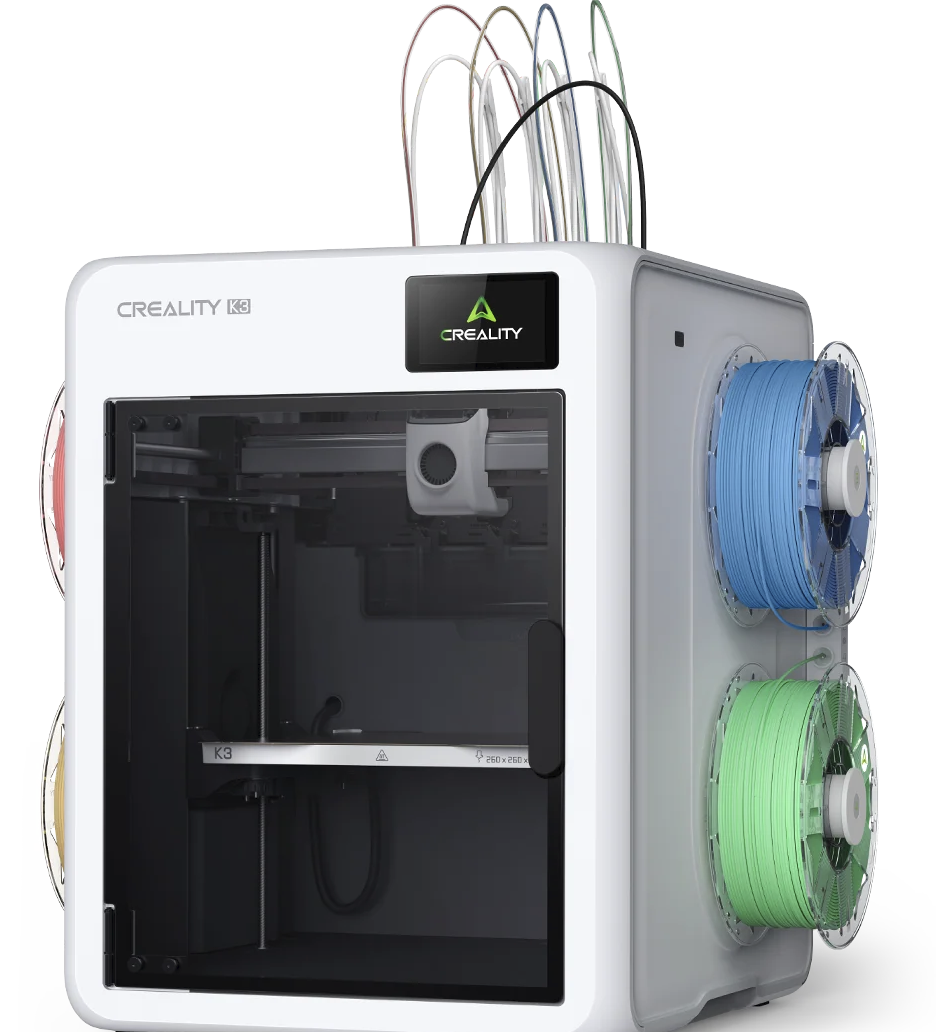
About this guide: Researched from Creality’s published information, checked November 5, 2026. This is not a hands-on review. The project scenarios below illustrate potential uses; they are not claimed K3 test results or completed customer jobs.
The K3 deserves a closer look when frequent color changes, support cleanup, or a specific multi-material design consume your time. For mostly single-color brackets and covers, prioritize dependable fit and repeatability. More nozzles do not fix an inaccurate model.
Job one: a fixture that tells you how to use it
Picture two nearly identical positioning jigs on a bench. One belongs to the left-hand assembly. The other belongs to the right. Pick the wrong one and the mistake may not become obvious until later.
Contrasting arrows, size numbers, or a clearly marked contact face can make a functional print easier to use. Color earns its place by communicating something.
That is a practical reason to investigate multicolor printing. But first, look at how the marking is built into the model. A raised label near the top of a print may be manageable with a simple layer change. Color that repeats throughout many layers creates a different switching workload.
The useful test: print a small section containing the actual text or arrow. Can someone read it without picking up the fixture? Does the marking interfere with the working surface? Is it still clear after normal handling?
A multicolor part should be easier to use, not merely more colorful.
Job two: a supported surface you do not want to fight
A bracket can look excellent from above and still have a rough, difficult-to-clean underside. If that underside sits against another component, cleanup becomes part of the fit problem.
Creality promotes using PLA and PETG as model/support partners. The attraction is a support interface that separates more readily. That is a workflow to test with a suitable profile—not a promise that any two spools will produce a clean surface.
Start with a small section of your difficult geometry. Keep the orientation and contact area representative. Compare the time needed to remove support, the surface left behind, and whether the part still seats correctly.
A print that finishes earlier but takes much longer to clean up may not save you time. Count preparation, printing, finishing, assembly, and rework.
Also try the obvious design question: could changing the orientation, splitting the part, or assembling two simpler pieces remove the support problem? Sometimes the best upgrade is in the model.
Job three: a rigid holder with a flexible contact surface
Imagine a holder that needs a firm body but a softer contact area. A flexible insert might cushion an object, improve grip, or make a prototype feel closer to its intended design.
That creates an appealing multi-material project. It also creates a connection that must work.
Two materials sharing a print job does not prove that they bond reliably. A separate pad, captured insert, or mechanical interlock may be worth comparing with direct bonding.
The useful test: make a small joint sample first. Check retention, repeated movement, and the way it will be loaded. Do that before spending a long print on the complete holder.
For functional work, the interface between materials deserves as much attention as the interface between the part and the object it holds.
What the K3 changes—and the timing detail worth noticing
Creality describes KliTek as four independent filament channels with interchangeable nozzle assemblies. In a shared-nozzle multicolor workflow, repeated unloading, loading, and purging can add considerable overhead. The K3 aims to reduce that overhead by keeping materials in separate paths.
Here is the distinction: Creality lists a 4.8-second nozzle change and a 15-second complete color/material change. Those are different operations. Treating every material transition as only 4.8 seconds would give an incomplete picture of job time. See the official K3 FAQ.
For scale, an illustrative 10-second saving repeated 600 times adds up to 100 minutes. That is arithmetic, not a K3 benchmark. It explains why your number of transitions matters more than the mere presence of four colors.
Less purging is useful. “Zero waste” needs context.
Creality advertises laboratory results of up to 80% less overall print time and up to 85% less filament use compared with single-channel, single-nozzle systems. Its examples still include prime towers and, where needed, supports. The four-or-fewer-color condition also matters. Review the manufacturer’s comparison conditions before applying those percentages to your work.
For your own comparison, weigh everything consumed by the job. A smaller purge pile is welcome, but the part, support, priming structures, and unsuccessful attempts all belong in the calculation.
The specifications that deserve a place in your decision
| Published specification | Your practical check |
|---|---|
| 260 × 260 × 260 mm build volume | Allow space for the model, supports, and any required priming structure. |
| 500 mm/s listed printing speed | Compare complete sliced jobs at an acceptable quality target. |
| 300°C nozzle; 100°C bed | Check the full material profile and hardware requirements. |
| 420 × 482 × 536 mm printer dimensions | Allow additional room for spool access, tubes, and servicing. |
| Creality Print 7.0 or newer listed | Inspect the preview and supported workflow before committing a long job. |
Source: Creality’s K3 store listing. Maximum specifications are not finished-part performance guarantees.
Before buying for TPU or mixed nozzle sizes, check the package
The FAQ lists standard 0.4 mm nozzles and says mixed diameters need a separate kit. It also lists 95A TPU support out of the box, with an optional kit for softer grades. Other official product wording broadly associates TPU printing with extra accessories.
If flexible material is your reason for buying, ask Creality to confirm your exact filament, profile, and required hardware. Do not let a feature headline stand in for a complete shopping list.
Creality’s November 3 launch announcement also identifies optional accessories for softer flexible materials, soluble supports, and expanded engineering-material use.
Would I put it on the shortlist for your kind of work?
| Most of your work looks like this | My buying-guide assessment |
|---|---|
| Single-color replacement clips, covers, and brackets | Keep fit and reliability first. Four channels may be a secondary benefit. |
| Repeated multicolor jobs with many transitions | A strong reason to investigate switching overhead using your own files. |
| Functional parts with difficult supported surfaces | Evaluate a representative support-interface sample. |
| Rigid/flexible prototypes | Confirm the configuration and test the connection before a full build. |
| One broken part you need replaced | Compare commissioning that part with buying and learning a complete setup. |
Your ten-minute K3 decision planner
- Name three real jobs. Choose files you already print or projects you genuinely need.
- Identify the frustration. Is it switching time, support removal, assembly, or dimensional fit?
- Check a simpler route. Consider a layer change, separate insert, or design adjustment.
- Price the complete setup. Include required accessories, materials, and time to establish profiles.
- Define what success means. Record the time, material, cleanup, and fit result that would justify the purchase.
If your strongest reason is “I might use it someday,” keep collecting evidence. If you can name a repeated job that is expensive to finish, you have a much more useful starting point.
Price and shipping: check the order, not just the headline
On November 5, 2026, the linked US store page showed $849, a preorder label, and an early-December shipping estimate. Creality’s November 3 announcement said initial preorder shipments began November 2. That does not establish the dispatch date for a new order; confirm your selected package and destination before paying.
Check K3 pricing, accessories, and delivery
Quick check: are you comparing the right things?
Pick an answer, then open the explanation.
1. Is the advertised nozzle-swap time the same as a complete material change?
No. Creality lists separate figures. Use the complete job estimate when comparing a real print.
2. Does less purge material mean a job produces no waste?
No. Include support, priming structures, and failed attempts in your total.
3. Two materials can be printed together. Is their connection automatically reliable?
No. Test the joint and consider a mechanical connection or separate insert.
4. For a replacement bracket, what comes first: extra colors or the critical fit?
The critical fit. A correctly sized, repeatable part is the starting requirement.
Questions practical makers ask
Will four nozzles make a replacement part stronger?
Not by themselves. Material, geometry, orientation, and printing conditions still matter. More channels do not establish a load rating.
Should I replace a printer that already makes good parts?
Only after identifying a job the new setup would handle meaningfully better. Compare your complete workflow, including cleanup and repeatability.
Can the K3 fix a part that does not fit?
Start by checking the model and measurements. Our part-measurement guide explains which features control fit. A different printer cannot correct a hole placed in the wrong location in CAD.
What should I test first?
A small, single-material part with a known fit requirement. Establish that baseline, then test alignment between nozzle channels and one advanced workflow at a time.
The useful upgrade is the job you finish more easily
The K3 gives practical makers something worth investigating: less overhead between materials and more options for how a part is built. Its value becomes clear when those options solve a recurring problem on your bench.
A readable jig. A cleaner mating surface. A useful flexible insert. Those are better buying goals than simply owning more nozzles.
If a broken component or unfinished prototype brought you here, start with the project. Send photos, dimensions, quantity, and what the part must do.
Which job would you try first: a clearly labeled fixture, cleaner support interfaces, or a rigid-and-flexible prototype? Tell me what you want to make in the comments.
