
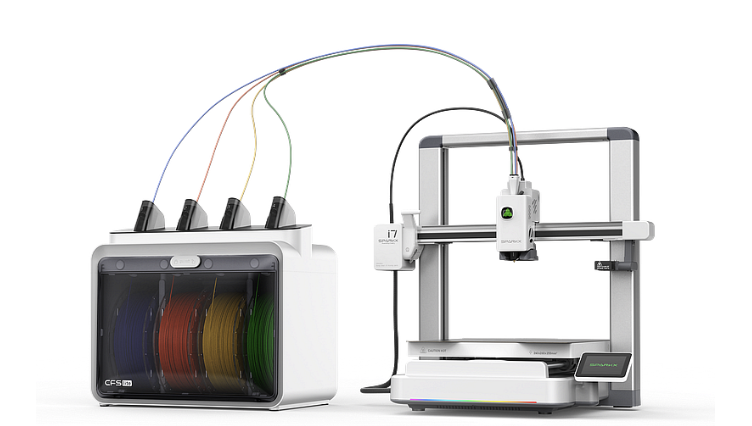
SPARKX i7 Revealed: The New Multi-Color AI Powerhouse from Creality
The 3D printing world just got a major speed boost. If you have been waiting for a machine that blends the “it just works” convenience of a home appliance with the raw power of a professional maker tool, the wait is over. Creality has officially launched the SPARKX i7, and it is aiming squarely at the top spot for desktop creativity.
Designed to take the headache out of high-speed printing, the SPARKX i7 isn’t just another incremental upgrade. It is a complete reimagining of the entry-level experience, built for those who want to spend more time creating and less time troubleshooting.
Check out the SPARKX i7 Launch Deals Here
Why the SPARKX i7 is a Game Changer
While many printers claim to be beginner-friendly, the SPARKX i7 backs it up with a “5-minute from box to print” promise. It bridges the gap between 3D printing for absolute beginners and professional-grade performance.
1. Multi-Color Magic with 50% Less Waste
The headline feature is undoubtedly the CFS Lite multi-color system. We have all seen the “poop” piles generated by other multi-color printers. The i7 uses a redesigned mechanism that reduces filament waste by up to 50%. Whether you are printing gaming accessories or intricate home decor, you can now do it in four colors without feeling guilty about the scrap bin.
2. AI-Powered Precision
Equipped with a 720p AI camera, the SPARKX i7 acts as a second set of eyes. It automatically detects “spaghetti” failures, air printing, and even filament tangles. If you have ever had to fix common 3D printing problems quickly, you know that catching a failure in the first ten minutes saves hours of cleanup later.
3. Speed Without the Shake
The i7 hits top speeds of 500 mm/s with an acceleration of 10,000 mm/s². Thanks to built-in vibration compensation and “Input Shaping,” those high speeds don’t result in ghosting or ringing. Even so, there are times when slowing your 3D printer down can still yield superior detail for organic models.
Comparison: SPARKX i7 vs. The Competition
| Feature | SPARKX i7 | Standard Entry-Level |
| Setup Time | < 5 Minutes | 30 – 60 Minutes |
| Max Speed | 500 mm/s | 180 – 250 mm/s |
| Multi-Color | Supported (CFS Lite) | Rare / Third Party |
| Maintenance | Quick-Swap Toolless | Manual Tool Required |
| Calibration | Full Auto Z-Offset | Manual / Semi-Auto |
Maker’s Note: If you prefer the classic tinkering experience, the Creality Ender series remains a fantastic choice, but for those who want a turnkey solution, the i7 is the clear winner.
Smart Design for Modern Makers
One of the most impressive hardware updates is the Quick-Swap Hotend. You can swap nozzles in about three seconds without touching a single wrench. This makes it incredibly easy to jump from detailed miniatures to large, structural parts.
If you are still acquiring the skills to design 3D objects, the SPARKX i7 integrates with Creality’s “CubeMe” AI, which can actually turn 2D portraits into printable 3D models with a single tap.
To get the most out of this precision, pair it with high-grade filament from COEX LLC. Their consistent diameter is perfect for the i7’s high-speed extruder.
Exclusive Deal: Use code 3DPRINTINGBYKEVIN at COEX for 15% off your entire order.
Is it Worth the Upgrade?
If you are currently struggling with bed leveling or first-layer issues, you might think you need the calibration trick that makes any printer perform better. While that works for older machines, the SPARKX i7 handles this automatically. It even includes a dual-sided textured PEI plate, which is the easiest way to stop 3D print warping for materials like PLA and PETG.
For those who enjoy scanning real-world objects to print, the i7 plays perfectly with the 3DMakerpro Global line of scanners, allowing you to go from physical object to digital model to multi-color print in record time.
Frequently Asked Questions
Can the SPARKX i7 print materials like ABS or Nylon?
The i7 is optimized for PLA, PETG, and TPU. While its nozzle can reach 300°C, its open-frame design means you would need an enclosure to print high-temperature materials like ABS effectively.
Does the CFS Lite support other 3D printers?
Currently, the CFS Lite is specifically designed for the SPARKX i7 ecosystem, though Creality has hinted at broader compatibility in the future.
How loud is the SPARKX i7?
It features a “Night Mode” that keeps operation below 48 dB, making it quiet enough for a home office or bedroom.
Final Thoughts: A New Era of Accessibility
The SPARKX i7 represents a shift in 3D printing. It moves away from the “hobbyist kit” feel and toward a polished, reliable consumer product. Whether you are building a 15-tool essential kit or just want to hit “Print” and walk away, the i7 is designed to keep you in the creative flow.
Ready to start your multi-color journey?
Secure your SPARKX i7 Launch Bundle here
Affiliate Disclosure: This post contains affiliate links. If you purchase through links to Creality, 3DMakerpro, or the SPARKX launch, I may receive a small commission at no extra cost to you. Don’t forget to use code 3DPRINTINGBYKEVIN at COEX for 15% off.
