
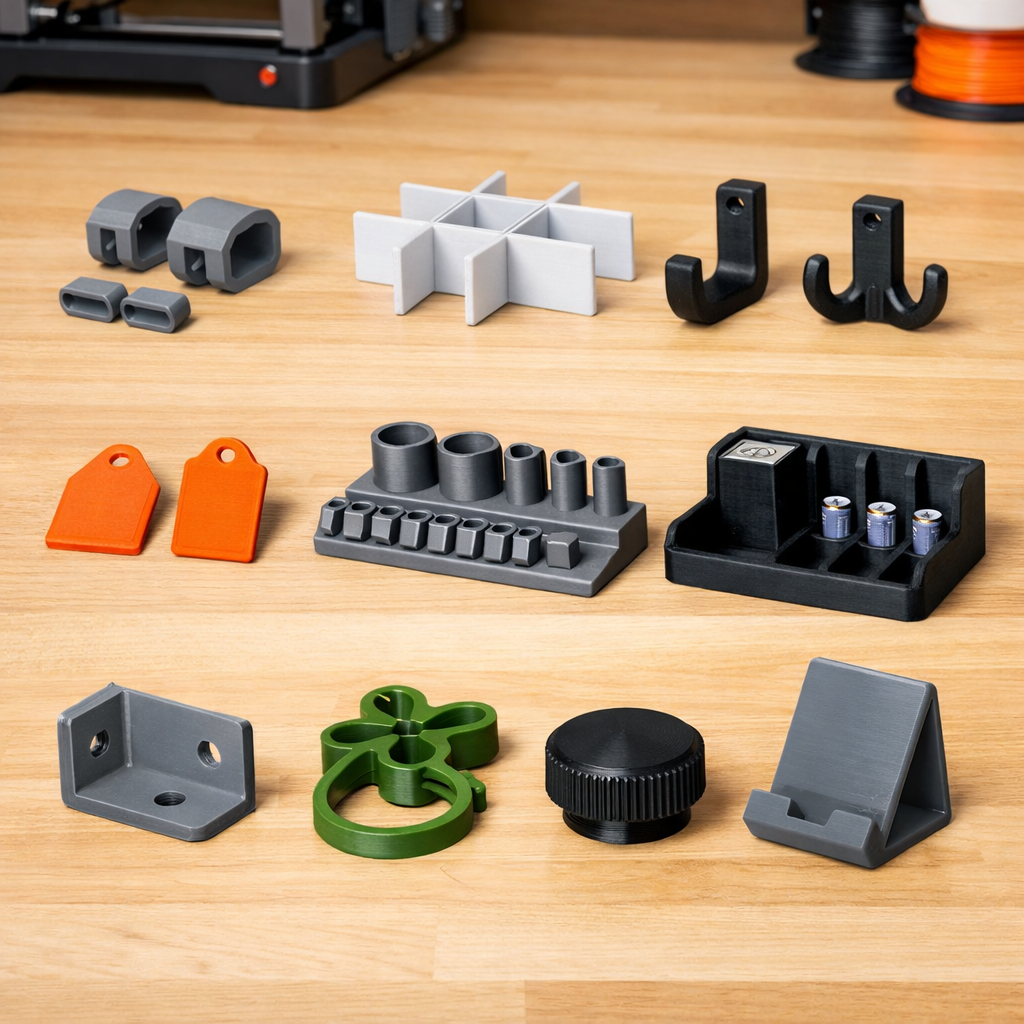
You do not need a faster hotend, a fancy enclosure, a new build plate, or a drawer full of exotic filament to make useful 3D prints. In fact, some of the best prints are simple objects that solve annoying little problems around your desk, garage, kitchen, workshop, car, or hobby space.
If your 3D printer can handle normal PLA or PETG, you already have enough machine to make practical parts. The trick is choosing prints that match the printer you own instead of chasing projects that require perfect tuning, expensive upgrades, or engineering-grade materials.
What Useful Things Can You 3D Print Without Upgrading Your Printer?
You can 3D print useful items like cable clips, drawer dividers, wall hooks, battery holders, desk organizers, tool holders, label tags, replacement knobs, plant clips, and simple brackets without upgrading your printer. Most of these prints work well in PLA for indoor use, while PETG is a better choice for parts that need more flex, heat resistance, or durability.
3D Printing Reality Check: Are You Choosing the Right Project?
Before you start a print that eats half a spool, take a quick check. Useful printing is not about making the biggest object. It is about solving the right problem with the right material.
1. Will the part live indoors or outdoors?
Indoor parts are often fine in PLA. Outdoor or warm-area parts usually deserve PETG or another more suitable material.
2. Does the part hold weight?
A small cable clip is forgiving. A shelf bracket, car part, or safety-related part needs more caution.
3. Does the part need to flex?
Thin PLA snap tabs can break. PETG often handles flex better, especially for clips and light-duty brackets.
4. Is the part near heat?
Avoid PLA for hot cars, appliances, vents, or sunny windowsills. Heat can soften or deform it.
5. Can you print a small test first?
A 20-minute test print can save hours of wasted filament and frustration.
Reality check result
If the part is small, indoor, low-stress, and easy to reprint, it is probably a great project for this week.
A Quick Safety Note Before You Print
Even simple desktop 3D printing deserves common sense. Print in a well-ventilated area, follow your printer and filament manufacturer’s guidance, and avoid treating hobby-grade printed parts as safety-critical replacements. NIOSH notes that desktop 3D printers can emit ultrafine particles and chemicals, and the EPA’s indoor air quality guidance continues to emphasize source control and ventilation as important ways to reduce indoor pollutant exposure.
For more background, see NIOSH’s page on 3D printing and additive manufacturing, NIOSH’s safe 3D printing guidance, and the EPA’s information on improving indoor air quality.
Why “No Upgrades Needed” Is the Best Starting Point
There is a strange trap in 3D printing. A person buys a printer to make things, then spends the first month buying upgrades before learning what the printer can already do.
That is backward.
A well-leveled, reasonably tuned desktop printer can produce a surprising number of useful parts with stock hardware. Better yet, practical prints teach you more than decorative test models because they reveal how parts behave in real life. A cable clip teaches fit. A hook teaches layer direction. A drawer divider teaches measurement. A bracket teaches why print orientation matters.
If you are still building confidence, start with my guide to 3D printing for absolute beginners. Then, when your printer needs a cleaner first layer or more consistent results, review the calibration trick that makes any 3D printer perform better.
| Print Idea | Why It Is Useful | Best Beginner Material | Difficulty | Watch Out For |
|---|---|---|---|---|
| Cable clips | Clean up cords around desks and printers | PLA or PETG | Easy | Too-tight clips can snap |
| Drawer dividers | Organize tools, screws, craft parts, and office supplies | PLA | Easy | Measure drawer depth carefully |
| Wall hooks | Hold light items like keys, headphones, cords, or bags | PETG preferred | Easy to medium | Do not overload printed hooks |
| Battery holders | Store AA, AAA, 9V, or tool batteries neatly | PLA | Easy | Leave enough tolerance |
| Tool holders | Keep calipers, scrapers, glue sticks, and nozzles handy | PLA | Easy | Mount securely if wall-based |
| Replacement knobs | Fix missing drawer pulls, jig knobs, and small handles | PETG or PLA | Medium | Thread fit may need testing |
| Label tags | Mark bins, cables, garden rows, and storage boxes | PLA indoors, PETG outdoors | Easy | Small text needs clean settings |
| Phone stand | Useful at a desk, nightstand, kitchen, or workbench | PLA | Easy | Check viewing angle first |
| Plant clips | Support seedlings, tomatoes, vines, and indoor plants | PETG preferred | Easy | Do not clamp stems too tightly |
| Simple brackets | Support light-duty organizers, guides, spacers, and jigs | PETG preferred | Medium | Avoid safety-critical loads |
10 Useful Things You Can Print This Week
1Cable Clips and Cord Guides
Cable clips are one of the best useful 3D prints because they solve a problem almost everyone has. Printer cables, USB cords, charging cables, lamp cords, headphone wires, and power strips all seem to wander the moment you stop paying attention.
A few printed clips can clean up a desk, a printer stand, a workbench, or an entertainment center in one afternoon. Small clips also print quickly, which makes them perfect for testing tolerances.
For the best outcome, print one test clip before filling the build plate. Cables vary more than people think. A clip that fits one USB cable may be too tight for a thicker power cord.
2Drawer Dividers That Actually Fit Your Drawer
Store-bought organizers are useful until they are half an inch too wide, too shallow, too tall, or divided in all the wrong places. That is where 3D printing shines.
You can print drawer dividers for nozzles, screws, batteries, craft supplies, fishing tackle, sockets, pens, memory cards, sewing tools, or small office items. Better yet, you can make the compartments fit your drawer instead of forcing your drawer to fit a generic organizer.
Measure twice before slicing. Leave a little clearance on each side because drawers are rarely perfectly square. If you want to learn the full workflow from idea to finished part, read how to 3D print like a pro from model to masterpiece.
3Light-Duty Wall Hooks
A printed wall hook can hold keys, headphones, lightweight tools, charging cables, dog leashes, measuring tapes, or a small shop apron. The key phrase is light-duty. A 3D printed hook can be very useful, but it should not be treated like a metal hook from a hardware store.
For hooks, print orientation matters. If the layers run in the wrong direction, the hook may split under load. Whenever possible, choose a model designed for strength or orient the part so the load does not pull directly between layer lines.
A good rule is simple: if failure would damage something expensive or hurt someone, do not rely on a hobby-grade printed hook.
4Battery Holders
Loose batteries are messy. They roll around in drawers, hide under tools, and turn simple tasks into little treasure hunts. A printed battery holder brings order back quickly.
You can make holders for AA, AAA, 9V, coin cells, camera batteries, or even cordless tool batteries. For small household batteries, PLA usually works fine. For larger battery mounts, use more caution and avoid designs that stress the plastic too heavily.
If the battery must slide into a tight slot, print a small tolerance test first. A few tenths of a millimeter can make the difference between a smooth fit and a frustrating one.
53D Printer Tool Holders
Your printer probably came with small tools. Then you added a scraper, flush cutters, glue stick, spare nozzles, needle, tweezers, calipers, hex keys, filament clips, and maybe a deburring tool. Suddenly, the tools used to maintain your printer need their own organizer.
A printed tool holder keeps the most-used items near the printer, not buried in a drawer. This is one of those prints that quietly improves your entire workflow.
If you are building a better starter setup, my guide to the $15 tool every 3D printer owner should have is a helpful companion to this project.
6Replacement Knobs and Small Handles
A missing knob can make a drawer, jig, cabinet, tool, or small machine feel broken even when the rest of it works fine. 3D printing is excellent for these small replacement parts because the shape can be customized to fit your hand, your screw, and your use case.
This is where printing becomes more than a hobby. You are not just making another plastic object. You are extending the life of something that might otherwise be annoying, awkward, or thrown away.
Threaded parts may take a test print or two. If you need help turning a broken or missing part into a printable replacement, you can submit the details through the 3D Printing by Kevin quote and project intake page.
7Label Tags for Bins, Cords, Plants, and Storage Boxes
Labels are not exciting until you need to find something quickly. Printed tags can organize filament bins, tool drawers, garden rows, storage totes, parts boxes, cords, shelves, and hobby supplies.
For indoor tags, PLA is usually fine. For outdoor garden markers, PETG is a better starting point because it handles moisture and warmth better than PLA. Color contrast matters too. Raised lettering works best when the text is easy to see.
If you are designing tags yourself, keep the text bold. Thin text may look good on screen but disappear after slicing.
8A Phone Stand You Will Actually Use
A phone stand sounds basic, but it is one of the most useful beginner 3D printing projects. It can sit on your desk, kitchen counter, nightstand, workbench, or printer table. You can use it for recipes, video calls, print monitoring, reference photos, or hands-free reading.
The best phone stand is not always the fanciest one. A simple stand with a stable base, a charging cable gap, and the right viewing angle is often better than a complicated model that tips over.
Before printing, check whether the model fits your phone with its case on. Many failed phone stands are not design failures. They are measurement failures.
9Plant Clips and Garden Helpers
Plant clips are small, useful, and surprisingly satisfying. They can support seedlings, tomato plants, indoor vines, small garden stakes, or lightweight trellis setups. They also teach an important 3D printing lesson: flexible shapes need the right material and the right thickness.
PETG is often better than PLA for this type of print because clips may need to flex. PLA can work for very gentle indoor clips, but it may crack if the design is too thin or the clip opens too far.
Do not clamp plant stems tightly. The goal is support, not pressure.
10Simple Light-Duty Brackets, Spacers, and Mounts
This is where 3D printing starts to feel powerful. A simple bracket can hold a sensor, guide a cable, support a light organizer, space two parts apart, align a jig, or mount a small accessory exactly where you need it.
Still, brackets require judgment. A printed bracket for a small LED strip is very different from a printed bracket holding heavy weight. For light-duty utility, they are excellent. For safety-critical use, they require better material selection, stronger design, and sometimes a different manufacturing method altogether.
If a part needs to fit a real-world object, the design stage matters. To build that skill, read acquiring the skills to design 3D objects using software.
Best Filament for These Prints
For most of the useful things on this list, PLA and PETG are enough. PLA is beginner-friendly, prints cleanly, and works well for many indoor parts. PETG is usually better when a part needs more toughness, light flex, or better heat resistance.
Use PLA when…
The part stays indoors, does not hold much weight, does not flex much, and will not sit in a hot car, sunny window, or warm mechanical area.
Use PETG when…
The part needs more durability, slight flexibility, better heat resistance, or outdoor usefulness.
If you are choosing filament for everyday printing, stick with reliable brands and basic colors first. Fancy silk, glow, carbon-filled, or abrasive filaments can be fun, but they are not needed for these projects.
Affiliate note: Some material or tool links on 3DPrintingByKevin.com may be affiliate links. That means I may earn a commission if you buy through them, at no extra cost to you. I only recommend practical options that fit the project and avoid pushing upgrades when a simpler choice makes more sense.
Settings That Usually Work for Practical Prints
You do not need exotic slicer settings for most of these projects. Start simple, then adjust only when the part has a clear reason to need something different.
| Setting | Good Starting Point | Why It Helps |
|---|---|---|
| Layer height | 0.20 mm | Balanced speed, strength, and detail |
| Walls/perimeters | 3 walls | Improves durability on clips, hooks, and holders |
| Infill | 15% to 30% | Enough for most light-duty practical prints |
| Top/bottom layers | 4 to 5 | Helps parts feel solid instead of flimsy |
| Print speed | Moderate | Cleaner edges and better fit for useful parts |
| Supports | Avoid when possible | Simple designs print cleaner and waste less material |
If your prints look rough or parts do not fit consistently, slowing down can help more than many beginners expect. For a deeper look, read what happens when you slow your 3D printer down.
What Not to Print Yet
Useful printing is exciting, but it is easy to get overconfident. Some objects look simple but are not good beginner projects.
- Safety-critical car parts: Avoid printed parts that affect steering, braking, seat belts, engine heat areas, or structural safety.
- Heavy wall brackets: Light hooks are fine. Heavy shelves or load-bearing mounts need careful engineering.
- Food-contact parts: Layer lines can trap residue, and material safety depends on more than the filament label.
- Hot-environment PLA parts: PLA can soften in warm areas, especially cars, sunny windows, and near appliances.
- Electrical housings without planning: Heat, fire safety, fit, and material choice matter.
This does not mean you should be afraid of practical printing. It means you should match the part to the material, environment, and risk level.
Need a Useful Part Printed for You?
If you have a broken bracket, missing knob, custom holder, workshop organizer, discontinued plastic part, or a practical idea you want printed, 3D Printing by Kevin can help you turn it into a real object.
Send the idea, measurements, photos, or files you already have. Accepted project files may include STL, STEP, OBJ, or PDF references. For larger files, include a file-sharing link instead of trying to upload a compressed folder.
Quick Project Plan: What to Print First This Week
If you want the easiest path, do not start with all 10. Pick one small print from each category below.
Day 1: Cable clip
Fast print. Easy test. Immediate use.
Day 2: Drawer divider
Great for measurement practice and daily organization.
Day 3: Tool holder
Improves your printer area and reduces clutter.
Day 4: Phone stand or label tags
Simple, useful, and easy to customize.
After those prints, you will know more about your printer than you would from a dozen upgrade videos.
FAQs About Useful Things to 3D Print
What is the most useful thing to 3D print first?
A cable clip, drawer divider, or tool holder is usually the best first useful 3D print. These projects are small, practical, low-risk, and easy to reprint if you need to adjust the fit.
Can I make useful 3D prints with a beginner printer?
Yes. Many practical prints do not require an upgraded printer. A stock printer with a clean first layer, decent calibration, and basic PLA or PETG can make plenty of useful household, desk, workshop, and hobby parts.
Is PLA strong enough for useful parts?
PLA is strong enough for many indoor, low-stress parts such as organizers, labels, desk accessories, trays, and light holders. It is not the best choice for heat, outdoor exposure, repeated flexing, or safety-critical loads.
When should I use PETG instead of PLA?
Use PETG when a part needs more toughness, light flexibility, better heat resistance, or outdoor durability. PETG is often a better choice for clips, plant supports, light-duty brackets, and parts used in garages or sheds.
Do I need to upgrade my printer before making practical parts?
No. Most beginners should learn the printer first. Good calibration, proper material choice, clean slicing, and smart model selection often matter more than upgrades.
Can 3D Printing by Kevin print a custom part for me?
Yes. If you need a replacement part, custom holder, bracket, organizer, prototype, or practical printed object, you can submit the details through the project intake page and request a custom quote.
Final Takeaway
The most useful 3D prints are not always the biggest, fastest, or most impressive. They are the prints that remove little frustrations from daily life.
A cable that stays where it belongs. A drawer that finally makes sense. A tool that has a home. A missing knob that works again. A small bracket that solves a weird problem no store-bought part could solve.
That is the real power of desktop 3D printing. You can look at a problem on Monday, print a solution by Tuesday, and improve it by the weekend.

