
2026 enclosed CoreXY comparison · Specifications checked August 25, 2026
The Bambu Lab H2D and Creality K2 Pro can both print fast, manage multiple filaments, and hold an actively heated chamber. That does not make them interchangeable. The H2D asks you to pay for a true dual-nozzle platform and greater thermal headroom; the K2 Pro concentrates on a 300 mm cube, CFS color switching, Ethernet, and a lower-cost route into this class.
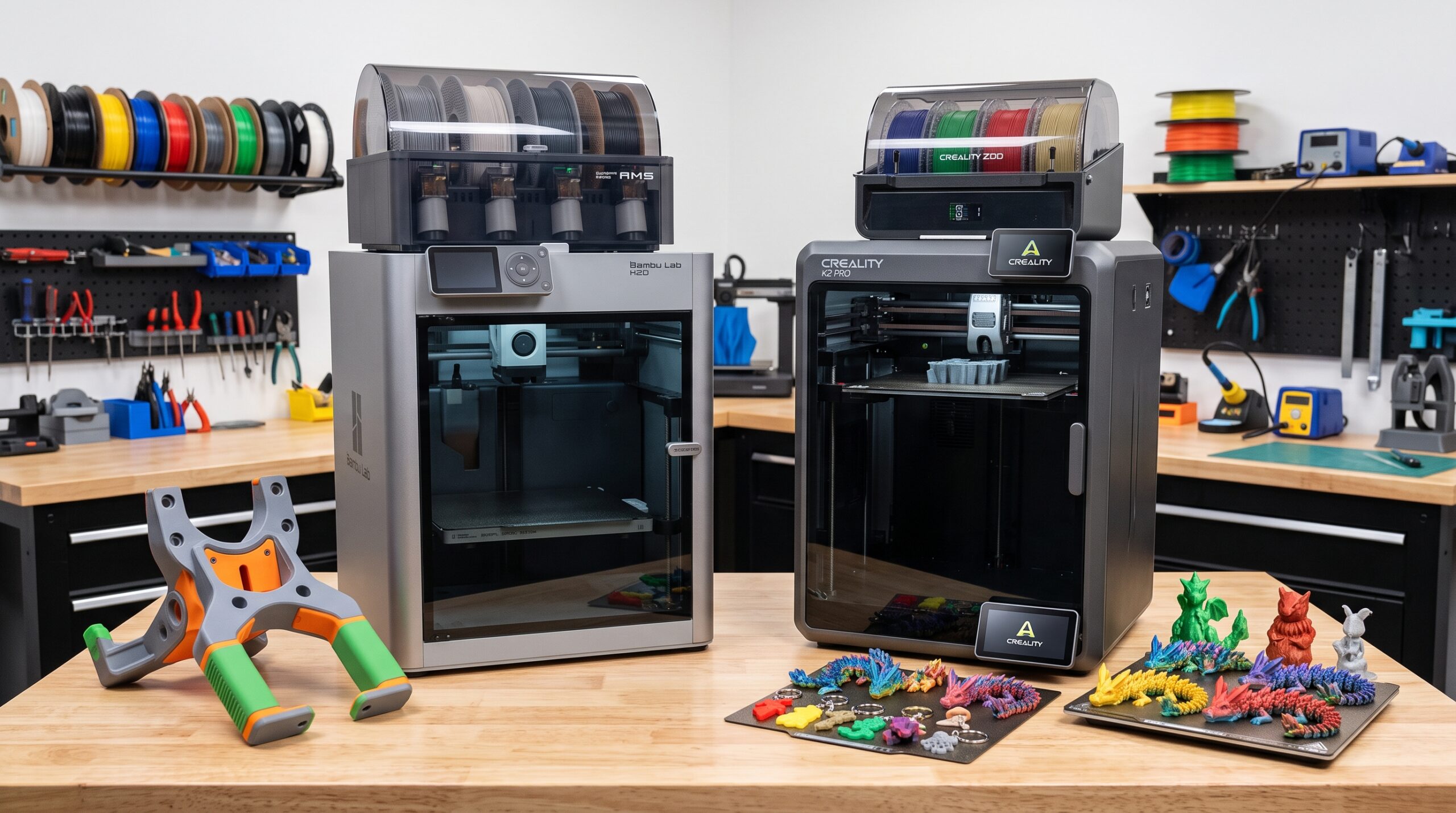
Quick Answer: H2D for Dual-Material Control, K2 Pro for Value
Choose the Bambu Lab H2D when two nozzles will solve a recurring problem: cleaner support interfaces, soluble-support work, faster two-material changes, or less purge than repeatedly swapping every material through one nozzle. It is also the stronger specification choice for 350°C hotend work, a 65°C chamber, and parts that exceed the K2 Pro’s 300 mm limit.
Choose the Creality K2 Pro when your parts fit within 300 × 300 × 300 mm and you primarily want an enclosed, high-speed printer with optional four-color CFS automation. Its single-nozzle system gives up some dual-material efficiency, but Ethernet and a more restrained system cost can matter more in a practical workshop or small farm.
Skip both upgrades for now if most of your work is single-color PLA or PETG that already fits your current printer. A flagship machine earns its space only when it removes a repeated production limit.
Affiliate disclosure: This comparison contains a sponsored link to the Creality Official Store. If you buy through it, 3D Printing by Kevin may earn a commission at no extra cost to you. I am not affiliated with Bambu Lab. This is a manufacturer-specification and workflow comparison, not a claim that I have run production jobs on both machines. Prices, bundles, firmware, accessories, and regional availability can change; verify the exact cart before ordering.
Bambu Lab H2D vs. Creality K2 Pro: Winner by Workflow
Dual-material and support work
Two nozzles let you reserve one nozzle for the model and the other for a support or second material. That can shorten changes, limit contamination, and reduce purge compared with routing every swap through one nozzle.
Cost-conscious multicolor
One CFS manages four spools, while as many as four CFS units can expand the system to 16 colors. It is the more straightforward choice when color—not true dual-nozzle material separation—is the priority.
Thermal headroom
The H2D is rated for a 350°C hotend, 120°C bed, and 65°C actively heated chamber. The K2 Pro reaches 300°C, 110°C, and 60°C. The difference matters most for demanding, validated material workflows.
Wired workshop networking
Creality lists RJ45 Ethernet alongside Wi-Fi and USB-drive transfer. That is a practical distinction for shared workspaces and farms that prefer a stable wired connection.
Maximum printable reach
The H2D exceeds the K2 Pro’s 300 mm cube, but its usable dimensions change with single- or dual-nozzle mode. Measure the actual model orientation instead of relying on the headline 350 mm number.
Finished-part speed
The H2D advertises 1,000 mm/s toolhead speed versus 600 mm/s for the K2 Pro, yet both list 20,000 mm/s² acceleration and 40 mm³/s-class hotend flow. Geometry and material can erase the headline gap.
Verified Specification Comparison
The table uses manufacturer specifications checked on August 25, 2026. Maximum speed, temperature, color count, and acceleration are ceilings—not promises that every file, material, or bundle can use them together.
| Decision point | Bambu Lab H2D | Creality K2 Pro | What it means |
|---|---|---|---|
| Print architecture | CoreXY; dual-nozzle direct-drive toolhead | CoreXY; single-nozzle dual-gear direct drive | H2D can park one nozzle while using the other. K2 Pro feeds all selected CFS filaments through one nozzle. |
| Build volume | Single nozzle: 325 × 320 × 325 mm Dual nozzle: 300 × 320 × 320 mm Total two-nozzle envelope: 350 × 320 × 320 mm |
300 × 300 × 300 mm | H2D is larger, but its 350 mm width is conditional and should not be read as a normal single-nozzle box. |
| Advertised maximum speed | 1,000 mm/s toolhead speed | 600 mm/s; Creality lists 300 mm/s as typical for the K2 line | Neither number predicts the time or surface quality of your actual part. |
| Maximum acceleration | 20,000 mm/s² | 20,000 mm/s² | The machines share the same advertised acceleration ceiling. |
| Maximum hotend flow | 40 mm³/s with standard-flow hotend under Bambu’s test conditions | 40 mm³/s under Creality’s stated ABS test conditions | Flow, cooling, layer geometry, and filament often limit real speed before motion does. |
| Nozzle / bed / chamber | 350°C / 120°C / 65°C active chamber | 300°C / 110°C / 60°C active chamber | H2D has more thermal headroom; K2 Pro still covers a broad manufacturer-listed material range. |
| Automated filament system | Optional AMS ecosystem; AMS 2 Pro and AMS HT configurations can scale beyond one four-slot unit | Optional CFS; four slots per unit and up to four CFS units for 16 colors | Compare the exact bundle and the number of feeders you will really use. |
| Calibration and monitoring | Automated calibration and multi-camera sensing; some precision and laser features depend on configuration | Auto leveling, nozzle AI camera for flow calibration, and 720p chamber camera | Automation reduces setup work, but it does not replace maintenance, dry filament, or first-layer checks. |
| Connectivity | Wi-Fi and USB-based workflow | 2.4 GHz Wi-Fi, RJ45 Ethernet, USB drive, and Creality 485 port | K2 Pro has the clearer wired-network advantage. |
| Machine size / net weight | 492 × 514 × 626 mm / 31 kg | 445 × 477 × 573 mm / 23.7 kg | H2D needs the larger, stronger bench. Feeders, open doors, cables, purge handling, and service access add to both footprints. |
| Optional non-print tools | Laser engraving/cutting, digital cutting, and plotting in properly equipped configurations | 3D printing platform | Count H2D’s hybrid tools only if you have a real use case and the required safety-equipped package. |
| Price position | Premium; total varies widely by printer, AMS, and laser configuration | Lower-cost entry into this comparison; printer-only and Combo packages differ | Compare complete, usable systems—not a bare printer against a loaded combo. |
The H2D Build-Volume Number Needs an Explanation
The H2D is often summarized as a 350 × 320 × 325 mm printer. That shorthand hides the most important buying detail: its available area changes with the nozzle strategy.
Important correction: Bambu Lab’s current technical page lists 325 × 320 × 325 mm for single-nozzle printing, 300 × 320 × 320 mm for dual-nozzle printing, and 350 × 320 × 320 mm as the total volume for two nozzles. The 350 mm width is achieved through a coordinated two-nozzle method, not by one nozzle sweeping a conventional 350 mm-wide build box.
For a 315 mm-wide one-color housing, the H2D’s single-nozzle width can be decisive because the K2 Pro stops at 300 mm. For a two-material job, however, use the H2D’s 300 mm dual-nozzle width when checking whether the model fits. If your project needs the full 350 mm reach, read Bambu’s workflow instructions and slice the actual file before buying.
The K2 Pro is easier to understand: its 300 × 300 × 300 mm volume is a regular cube. That predictability has value for quoting, fixtures, repeated batches, and customer files. The H2D wins maximum reach, while the K2 Pro wins simplicity of interpretation.
Dual Nozzles vs. CFS: This Is the Real Comparison
The most consequential difference is not top speed. It is what happens every time the print changes material.
How the H2D handles two materials
The H2D carries two nozzles in one toolhead. It can keep a model material in one nozzle and a support or accent material in the other, then mechanically switch between them. This is not an IDEX machine with two independent carriages printing simultaneously, but it avoids pushing every change through the same melt path.
- Best-case use: a model material in one nozzle and a dedicated support-interface material in the other.
- Practical benefit: fewer full unload-and-reload cycles when alternating between two assigned materials.
- Waste benefit: potentially less purge than a single-nozzle system, although priming, transition management, and a purge tower may still consume material.
- Boundary: material combinations still need compatible temperatures, adhesion behavior, and slicer settings.
How the K2 Pro handles multiple colors
The K2 Pro uses one nozzle. A CFS selects a spool, retracts the current filament, loads the next one, and purges the transition. One CFS provides four slots; Creality says four connected units can reach 16 colors.
- Best-case use: signs, labels, characters, visual models, and branded parts that benefit from automated color changes.
- Practical benefit: one-nozzle simplicity and a scalable color system without paying for a dual-nozzle flagship.
- Trade-off: every change can add time and purge waste, especially when a model swaps colors many times per layer.
- Bundle check: the K2 Pro Combo normally includes one CFS; a printer-only listing may not.
Kevin’s practical read: do not buy either machine because its ecosystem can theoretically hold a large number of colors. Slice one representative project and inspect the material estimate, change count, purge volume, and total time. Four colors used intelligently can be more productive than 16 colors that spend most of the job changing filament.
Is the H2D Actually Faster Than the K2 Pro?
On the specification sheet, yes: 1,000 mm/s is higher than 600 mm/s. On a finished part, the answer depends on whether the file provides enough long motion for that peak—and whether the hotend can melt material quickly enough to sustain it.
Both manufacturers publish a 40 mm³/s maximum-flow figure under their own test conditions. A 0.4 mm line that is 0.2 mm tall would theoretically need 40 mm³/s at 500 mm/s before line-width adjustments. Small perimeters, corners, bridges, overhangs, supports, color changes, and cooling constraints reduce the opportunity to hold anything close to a maximum travel or extrusion speed.
Benchmark that matters
Slice the same production file in both ecosystems with the same nozzle size, layer height, wall count, infill, material, and quality target. Compare total time, filament use, purge, and estimated changes.
Benchmark that misleads
Do not convert 1,000 versus 600 mm/s into a claim that the H2D finishes every job 67% faster. That conclusion ignores flow, acceleration distance, geometry, cooling, and tool changes.
For a large single-material shell, H2D’s motion ceiling may have more room to work. For a small detailed part, both machines may spend most of the job below their maximum. For a two-material print, nozzle strategy can influence total time more than peak motion speed.
Materials and Chamber Heat: Headroom vs. Actual Need
The H2D’s 350°C nozzle, 120°C bed, and 65°C chamber make it the stronger thermal platform on paper. That extra margin can help when a validated filament profile genuinely needs it, especially on larger parts that stay in the chamber for many hours.
The K2 Pro is not a PLA-only machine. Creality lists PLA, PETG, PET, ABS, ASA, PLA-CF, PA-CF, PPA-CF, and TPU95A across its product and support pages. Its hardened-steel nozzle, 110°C bed, and 60°C chamber cover a broad range, although the material manufacturer’s requirements still govern the final process.
Higher temperature alone does not guarantee a better engineering part. Moisture control, nozzle abrasion resistance, bed surface, chamber stability, part orientation, annealing requirements, and ventilation can matter just as much. If you mainly print PLA and PETG, much of H2D’s thermal premium may sit unused.
Enclosed does not mean emission-free. Built-in filters are useful, but they are not a universal substitute for source control and appropriate ventilation. The NIOSH guide to safer 3D printing recommends assessing material and process hazards and using suitable engineering controls.
Software, Automation, Footprint, and Ownership Cost
Bambu Lab’s advantage is integration. The H2D combines calibration, dual-nozzle control, monitoring, and optional AMS management inside one coordinated workflow. That can reduce setup decisions, but it also makes the value of the machine closely tied to its ecosystem.
Creality counters with Creality Print, automated leveling, nozzle-camera flow calibration, chamber monitoring, CFS support, and published root-access capability in Creality OS. The K2 Pro also provides Ethernet, which can be more meaningful than another camera feature in a farm or shared workspace.
Budget for the system around the printer
- The exact printer or combo, including whether AMS 2 Pro or CFS is in the box.
- Additional feeder units, adapters, cables, dry-storage capacity, and shelf space.
- Replacement hotends, build plates, cutters, wipers, filters, and other wear items.
- Purge filament, purge handling, support material, and the labor to recover failed long jobs.
- A bench that supports 31 kg for the H2D or 23.7 kg for the K2 Pro before accessories.
- Door, lid, cable, feeder, spool, ventilation, waste-chute, and maintenance clearance.
Do not count H2D laser capability casually
Laser engraving and cutting are legitimate H2D differentiators only in a properly equipped configuration. Bambu’s instructions require laser-safety windows, closed protective panels, and a correctly installed ventilation system. Compare the printer-only, AMS Combo, and Laser Full Combo as different purchases—not as though every H2D includes every tool.
If you do not already have repeatable laser or cutting projects, the hybrid hardware should not decide a 3D-printer purchase. Buy the workflow you will use, not the longest feature list.
The Creality button is sponsored. The Bambu Lab link is provided for comparison only and is not an affiliate link.
Which Printer Fits Each Type of Buyer?
Functional prototyper
Lean H2D if you regularly need a second nozzle for support interfaces or material separation. Lean K2 Pro if most prototypes are single-material, fit the 300 mm cube, and need a heated chamber more than dual extrusion.
Multicolor creator
Lean K2 Pro Combo when four-color CFS printing meets the job and purchase cost matters. Lean H2D when two assigned nozzle paths can reduce frequent transitions in the designs you actually sell.
Small print farm
Lean K2 Pro for wired networking and potentially lower cost per station, but validate uptime, parts supply, and operator labor before scaling. One premium H2D is not automatically more productive than multiple simpler machines—or vice versa.
Engineering-material user
Lean H2D when a qualified material needs its higher thermal limits. If your approved filament fits the K2 Pro’s 300°C nozzle and 60°C chamber, the less expensive thermal platform may be sufficient.
Large-model builder
Lean H2D for models between 300 and 325 mm that work in its single-nozzle envelope. If you regularly need a conventional 350 mm cube, compare a K2 Plus rather than stretching either machine beyond its practical geometry.
First-time flagship buyer
Lean K2 Pro when the smaller commitment covers a clear project list. Choose H2D only after naming the dual-nozzle, size, thermal, or hybrid capability that will repay the premium.
For a second large-printer perspective, see Prusa CORE One vs. Creality K2 Plus Combo. If you are deciding whether a full 350 mm cube is worth the footprint, the refreshed K2 Plus vs. Elegoo Centauri Carbon comparison approaches the same question from a different size and budget angle.
Use the P.R.I.N.T. Method Before You Buy
A comparison becomes useful when it is tied to real files. Use this five-part planner before letting a maximum specification make the decision.
- P — Problem: Name the repeated limitation. Is it weak support surfaces, 310 mm-wide parts, material warping, slow manual color changes, unreliable Wi-Fi, or simply wanting a new machine?
- R — Requirements: List the largest three model dimensions, required materials, realistic color count, nozzle size, surface-quality target, weekly hours, and acceptable operator time.
- I — Interfaces: Measure the bench and access route. Include the open door or lid, feeder placement, rear cables, purge handling, ventilation, power, network, and maintenance clearance.
- N — Next-Best Materials & Methods: Compare fully configured carts. Price the feeder system, wear parts, dry storage, support material, and safety equipment—not just the printer.
- T — Test & Tune: Slice three representative files in Bambu Studio and Creality Print using matched settings. Record time, filament, purge, changes, support strategy, and whether the part truly fits.
The complete P.R.I.N.T. It practical 3D printing guide expands this method into setup, slicing, material selection, calibration, maintenance, and repeatable project decisions.
One Project May Not Justify Either Printer
If you need one display model, replacement part, fixture, or prototype, buying a large enclosed printer can turn the part into a maintenance commitment. The printer, feeder, filament, bench space, calibration, failed trials, and post-processing all become part of the project.
For a one-off need, request the result first. Use the 3D Printing by Kevin project intake page to share the file, material goal, size, quantity, deadline, and finish requirements. If recurring demand later supports machine ownership, you will be making that decision with better production evidence.
Four-Question Knowledge Check
Open each question to check whether the comparison’s most important distinctions are clear.
1. Which machine has the stronger architecture for a model material plus a dedicated support-interface material?
2. Can one H2D nozzle print anywhere inside a conventional 350 mm-wide box?
3. Which machine has the clearer advantage for a wired print-farm connection?
4. Why does 1,000 mm/s versus 600 mm/s not prove that the H2D completes every job faster?
Frequently Asked Questions
Which is better, the Bambu Lab H2D or Creality K2 Pro?
The H2D is better when true dual-nozzle work, higher thermal limits, or its larger conditional build envelope solves a repeated need. The K2 Pro is better when a 300 mm cube, CFS multicolor, Ethernet, and lower system cost cover the workflow.
Is the Bambu Lab H2D really a 350 mm-wide printer?
Only with an important qualification. Bambu lists 325 mm width for single-nozzle printing, 300 mm for dual-nozzle printing, and 350 mm as the total two-nozzle envelope. A 350 mm model requires the appropriate two-nozzle workflow rather than ordinary single-nozzle printing.
Does the H2D’s dual nozzle eliminate purge waste?
No. It can reduce repeated single-nozzle material transitions when two materials are assigned to separate nozzles, but priming, purging, transition management, and a purge tower may still use material. The model and slicer strategy determine the real savings.
Can the Creality K2 Pro print engineering filaments?
Creality lists several engineering and fiber-filled materials, including ABS, ASA, PA-CF, and PPA-CF. Confirm the exact filament maker’s nozzle, bed, chamber, drying, ventilation, and abrasion requirements before treating a manufacturer compatibility list as a finished process.
Does the Creality K2 Pro include the CFS?
The K2 Pro Combo normally includes one four-slot CFS. A printer-only K2 Pro listing may not. Check the product name, selected option, included-items list, and cart before comparing its price with an H2D or H2D AMS Combo.
How many colors can these printers handle?
The K2 Pro can use up to four CFS units for a manufacturer-listed maximum of 16 colors. Bambu describes much larger maximum AMS configurations for the dual-hotend H2D, including a theoretical 25-color arrangement. Those ceiling configurations require many separately purchased feeder units and are not representative of a typical bundle.
Does every H2D include laser engraving and cutting?
No. Laser capability depends on the selected edition or a compatible upgrade with the required safety equipment. Verify the exact configuration, laser-safety panels, ventilation, accessories, and local operating requirements before purchasing.
Which printer is faster in real use?
The H2D has the higher advertised toolhead-speed ceiling, but there is no universal winner for every file. Slice matched projects and compare total time, flow demand, support strategy, filament changes, and quality—not just the largest number on the specification page.
Final Verdict: Buy the Architecture, Not the Headline
The Bambu Lab H2D is the capability-first choice. Its dual nozzles, 350°C hotend, 65°C chamber, and larger conditional work area justify the premium when they remove real limits from support-heavy, dual-material, high-temperature, or oversized projects.
The Creality K2 Pro is the value-and-throughput choice. Its 300 mm cube, 60°C heated chamber, 40 mm³/s-class hotend, CFS expansion, automated calibration, and Ethernet make it a serious workshop platform without requiring H2D-level spending.
My pick is not one printer for everyone. If your recurring job needs two melt paths, choose the H2D. If it needs a capable enclosed 300 mm machine with optional color automation, choose the K2 Pro. If neither removes a measurable constraint, keep the printer you have and put the budget into materials, tooling, or finished parts.
What would decide it for your workshop?
Would you use the H2D’s second nozzle for support material, or would the K2 Pro’s 300 mm cube and CFS cover your real projects? Share your largest part, usual material, and realistic color count in the comments. Those three details make the recommendation far more useful for the next reader.
