
High-speed CoreXY comparison
Quick answer: The Creality K2 Plus Combo wins for large prints and ready-to-use multicolor. Its 350 mm cube build area and included four-spool CFS give it substantially more project range out of the box. The Prusa CORE One wins for compact, professional ownership when you value a refined slicer ecosystem, offline operation, repairability, and a machine that is easier to fit into a working shop.
2026 model update: Prusa now sells the CORE One+ (Gen 2) at the original CORE One product page. The newer version keeps the same 250 × 220 × 270 mm build volume and 55°C chamber class while adding practical refinements. This comparison retains the original CORE One search title, but the new-purchase advice reflects the current CORE One+ platform.
Checked: August 25, 2026. Printer bundles, add-ons, availability, and sale prices can change.
If you are moving up from a bed-slinger, both machines look like an obvious leap: enclosed CoreXY motion, automated calibration, fast profiles, and support for more demanding materials. Yet they solve different problems.
The Prusa is the smaller, ownership-focused system. The K2 Plus Combo is the capacity-focused system. Before spending four figures, start with your largest real part, your usual materials, and whether multicolor is a regular need or an occasional extra.
Disclosure: This article contains a sponsored Creality link. If you purchase through it, I may earn a commission at no extra cost to you. The Prusa link is included as a direct manufacturer reference.
Prusa CORE One vs. Creality K2 Plus Combo at a Glance
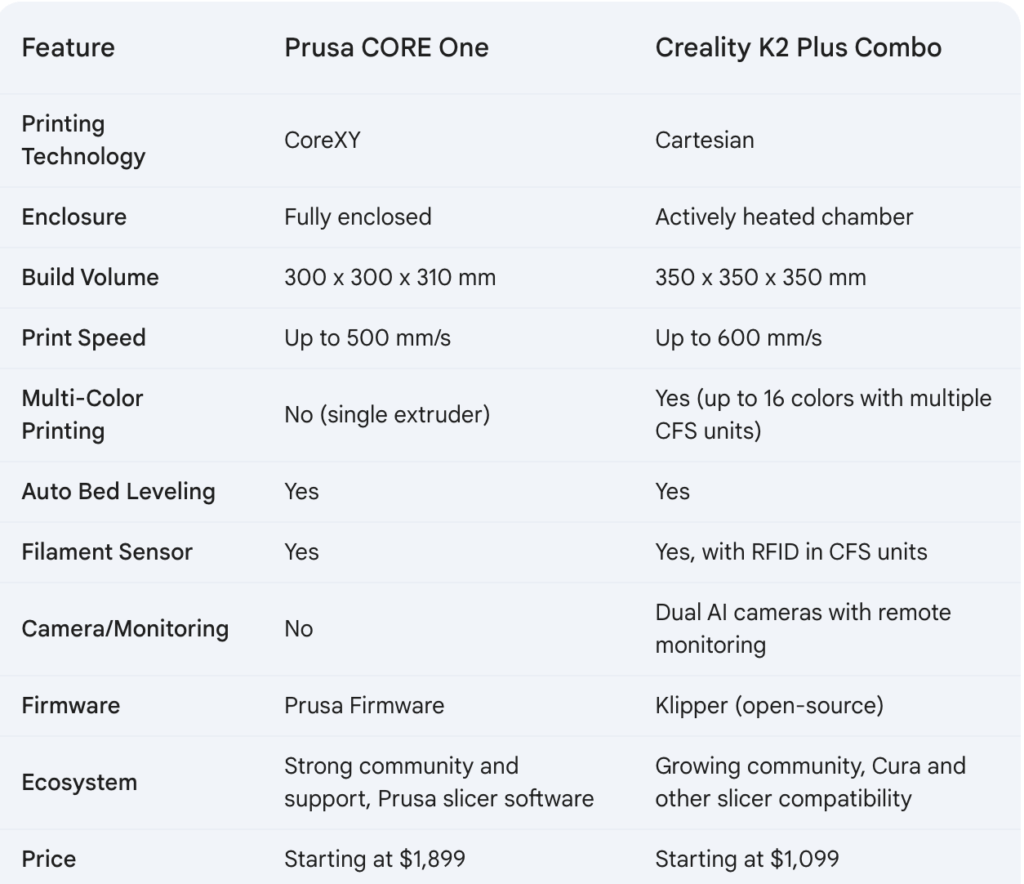
| Decision point | Prusa CORE One / CORE One+ | Creality K2 Plus Combo | Edge |
|---|---|---|---|
| Motion system | Enclosed CoreXY with Input Shaper | Enclosed CoreXY with step-servo motion | Project-dependent |
| Build volume | 250 × 220 × 270 mm | 350 × 350 × 350 mm | K2 Plus |
| Maximum nozzle temperature | 290°C on the standard hotend | 350°C | K2 Plus on paper |
| Maximum bed temperature | 120°C | 120°C | Draw |
| Maximum chamber temperature | 55°C with active temperature control | 60°C with active heating | K2 Plus on paper |
| Multicolor | Single-color by default; optional MMU3 supports five filaments, with INDX configurations supporting up to eight | One four-spool CFS included; expandable to as many as 16 colors with four CFS units | K2 Plus out of box |
| Camera | Optional internal camera | Toolhead and chamber cameras included | K2 Plus |
| Offline use and repairability | Strong emphasis on offline control, published files, replaceable parts, and upgrades | Local options are available, but the ecosystem leans more heavily into integrated smart features | Prusa |
| Physical footprint | Compact printer body; allow right-side spool and front-door access | Larger and heavier; the top-mounted CFS also adds height | Prusa |
| Best fit | Functional parts, controlled workflows, long-term serviceability | Helmets, props, big prototypes, multicolor models, and larger batches | Depends on your work |
Specifications were checked against the official Prusa CORE One+ product page and Creality’s K2 Plus support specifications.
Compare the Current Configurations
Check exactly what is included before ordering. A printer-only listing, a Combo, and a multicolor upgrade are not equivalent packages.
Build Volume Is the First Real Divider
The K2 Plus build chamber is not merely a little larger. Its nominal build volume is about 2.9 times that of the Prusa CORE One.
K2 Plus: 42.9 liters
That difference matters when a part is close to the printer’s limit. A one-piece helmet, large enclosure, tall duct, or production tray may fit the K2 Plus and require splitting on the Prusa. Every split adds alignment work, bonding, finishing, and another possible failure point.
The larger machine is not automatically the better machine, though. A 350 mm bed takes more room and tempts buyers to size the printer around projects they may never run. If most of your functional parts fit inside 250 × 220 × 270 mm, the Prusa’s compact chamber is a practical advantage rather than a limitation.
Simple sizing test: Open your three largest likely models in the slicer. Add brim, supports, purge structures, and the orientation you would actually use. If they fit the Prusa with comfortable clearance, do not pay for size alone. If they do not, the K2 Plus has already made a strong case.
Which Printer Is Actually Faster?
Creality advertises up to 600 mm/s speed and 30,000 mm/s² acceleration for the K2 Plus. Prusa emphasizes CoreXY motion, Input Shaper, a high-flow nozzle, and tuned profiles rather than presenting a directly comparable headline speed on its current product page.
That does not hand the real-world win to either machine. A top speed is a motion-system ceiling, not a promise that every wall, overhang, or detailed surface will print at that rate.
- Small detailed part: minimum layer time, cooling, and surface-quality limits may erase most of the advertised difference.
- Large solid part: hotend flow, filament, line width, and acceleration distance can matter more than maximum travel speed.
- Multicolor model: filament changes and purging can dominate total time.
- Oversized part: the K2 Plus may finish sooner simply because it avoids splitting, alignment features, and assembly.
For a deeper look at why the number on the box is only part of the story, read Are 500 mm/s 3D Printers Actually Better? You can also compare the broader workflow tradeoffs in High-Speed 3D Printing Compared.
Speed verdict: Call the machines effectively tied until you slice your own files with realistic quality settings. Give the K2 Plus the throughput edge for large one-piece work and bigger batches. Give the Prusa the workflow edge when repeatability, tuned profiles, and predictable restarts matter more than a maximum-speed claim.
Engineering Materials: Temperature Is Only Half the Decision
Both printers are better suited to ABS, ASA, nylon, and reinforced filaments than an open-frame machine. Their enclosures reduce drafts, and their actively managed chambers help limit uneven cooling.
The K2 Plus has the higher published temperature limits: a 350°C nozzle and a chamber up to 60°C. The current standard Prusa hotend reaches 290°C, while its chamber reaches 55°C. On specifications alone, Creality has more thermal headroom.
Material success still depends on the full path: a suitable nozzle, a dry spool, a correct build surface, chamber stability, tuned flow, and a part designed to control shrinkage. A wet nylon spool will not become reliable because the printer has a higher maximum temperature.
Choose Prusa for the Refined Material Workflow
- Factory-tuned profiles across a broad material library
- Automatic chamber ventilation for lower-temperature materials
- Strong documentation and a repair-oriented design
- Compact chamber that reaches a stable condition efficiently
Choose K2 Plus for Thermal Headroom
- Higher published nozzle and chamber limits
- Hardened-steel nozzle listed as standard
- More room for large ASA, PA-CF, and PPA-CF projects
- More space to arrange repeated parts for batch production
CFS caution: Do not assume every filament that the K2 Plus can print should run through the CFS. Creality advises against using CFS feeding for flexible TPU and certain carbon-fiber-reinforced materials. Check the official K2 Plus filament guidance and use the appropriate external spool path when required.
If you are deciding whether you need a heated enclosure at all, start with Enclosed vs. Open-Frame 3D Printers for Home Use.
Multicolor: Included Convenience vs. Optional Expansion
The word Combo matters. The K2 Plus Combo includes one CFS, giving you four loaded spools and automated color or filament switching. Up to four CFS units can expand the system to 16 colors, although every extra unit adds cost, tubing, spool space, and workflow complexity.
The Prusa CORE One is a single-filament printer in its base configuration. The optional MMU3 can handle five filaments, while Prusa’s newer INDX platform can support as many as eight tools depending on the configuration and availability.
This makes the K2 Plus Combo the simpler answer for someone who wants multicolor immediately. However, both CFS and MMU3-style single-nozzle color changes require time and purge management. INDX takes a different toolchanging approach designed to reduce swap time and waste, but it should be priced as a separate configuration—not treated as a free feature of the base Prusa.
Multicolor verdict: The K2 Plus Combo wins out of the box. The Prusa becomes more interesting when you intentionally choose and budget for its optional multicolor or multi-tool path.
The Ownership Experience May Matter More Than the Specification Sheet
Prusa’s strongest case is not a single temperature or speed number. It is the way the system is built around long-term ownership: offline operation, open-source firmware and published CAD resources, replaceable components, mature PrusaSlicer profiles, and defined upgrade paths.
Creality answers with more hardware in the box: a much larger build chamber, included CFS, dual cameras, extensive sensors, and aggressive automation. That can deliver impressive capability for the money, but a larger and more complex system also means more components, more filament-path variables, and more workspace to plan around.
Workspace Reality
The Prusa body is roughly 415 × 444 × 555 mm, but it needs door clearance and access to the side spool. The K2 Plus printer is roughly 495 × 515 × 640 mm and weighs about 35 kg; a top-mounted CFS increases the working height.
Cost Reality
Compare complete, landed configurations—not banner prices. Include multicolor hardware, cameras, spare nozzles, build plates, filtration, shipping, taxes, and any extra CFS or Prusa upgrade you actually plan to use.
If you want another large-versus-compact decision point, see my Creality K2 Plus vs. Elegoo Centauri Carbon comparison.
Use the P.R.I.N.T. Method Before You Buy
A comparison becomes useful when it ends with your parts—not the manufacturer’s demo model. Run this five-step check with the files you expect to print most often.
- Problem: Name the job. Is this printer for functional replacements, large props, multicolor display pieces, prototypes, or small-batch production?
- Requirements: Record your largest part dimensions, tolerance needs, layer-height target, surface expectations, and typical weekly print hours.
- Interfaces: Measure the printer location, door and spool access, CFS height, network preferences, power access, ventilation, and where filament will stay dry.
- Next-Best Materials & Methods: Decide whether PLA and PETG cover the work or whether ASA, nylon, composites, soluble supports, or multiple colors are genuine requirements.
- Test & Tune: Slice three representative files for both machines. Compare total time, material use, purge waste, support strategy, part splitting, and post-processing—not just the fastest profile.
For a reusable beginner-to-functional-part system, explore P.R.I.N.T. It: Practical 3D Printing for Beginners.
Which High-Speed 3D Printer Should You Buy?
Choose the Prusa CORE One / CORE One+ if:
- Your real parts fit comfortably inside 250 × 220 × 270 mm.
- You value repairability, documentation, offline use, and upgrade paths.
- You prefer a compact professional tool over maximum build capacity.
- You want PrusaSlicer’s mature profiles and an integrated material workflow.
- Multicolor is optional or you are willing to choose a separate Prusa upgrade.
Choose the Creality K2 Plus Combo if:
- You regularly print helmets, props, large enclosures, or tall prototypes.
- You want four-color capability in the purchased package.
- You need more room for production trays or larger part batches.
- You want dual cameras and extensive automated monitoring included.
- You are comfortable giving a large, complex machine the space it needs.
Final Verdict
The Creality K2 Plus Combo is the capability winner. It is the better choice when size and immediate multicolor printing are central to what you make.
The Prusa CORE One is the ownership winner. It is the better choice when your parts fit its bed and you prioritize a compact footprint, controlled workflow, serviceability, and long-term support.
My practical pick: Buy the K2 Plus Combo only when you can name the projects that need its 350 mm chamber or included CFS. Otherwise, the Prusa’s smaller, repairable platform may be the machine you enjoy owning longer.
Ready to Check Today’s Packages?
Verify the exact printer version, included multicolor hardware, shipping terms, and current availability before you buy.
Four-Question Buyer Knowledge Check
Open each question to check whether the comparison’s most important tradeoffs are clear.
1. You frequently print 300 mm-wide parts that you do not want to split. Which printer fits that requirement?
Answer: The Creality K2 Plus Combo. Its 350 × 350 × 350 mm build volume can accommodate a 300 mm-wide part with more room for orientation and adhesion features.
2. Why does a 600 mm/s maximum not guarantee the shortest print time?
Answer: Actual time also depends on acceleration distance, hotend flow, cooling, geometry, quality limits, layer time, supports, and any filament changes.
3. Which printer includes automated four-spool multicolor hardware in the compared package?
Answer: The Creality K2 Plus Combo includes one CFS. The base Prusa requires a separate multicolor or multi-tool upgrade.
4. What should you check before feeding TPU or carbon-fiber filament through the CFS?
Answer: Check Creality’s current filament guidance. The printer may support the material through an external spool path even when the CFS is not recommended for feeding it.
Prusa CORE One vs. Creality K2 Plus Combo FAQs
Is the original Prusa CORE One still the current model?
Prusa’s current product page now features the CORE One+ (Gen 2). It keeps the original machine’s core build-volume and chamber specifications while adding practical hardware and usability refinements. Existing CORE One owners should check Prusa’s current upgrade information rather than assuming a complete printer replacement is necessary.
Is the K2 Plus Combo faster than the Prusa CORE One?
Creality publishes the larger maximum speed and acceleration figures, but that alone does not prove it will finish every model sooner. Slice the same file at comparable quality, material, wall, support, and acceleration settings before declaring a winner.
Can the Prusa CORE One print in multiple colors?
Yes, with optional hardware. The MMU3 supports five filaments, while INDX configurations can support up to eight tools. Confirm current compatibility, package contents, and availability for the exact Prusa version you are considering.
Which printer is better for ABS, ASA, or nylon?
Both are credible enclosed options. The K2 Plus has higher published nozzle and chamber limits, while Prusa emphasizes tuned profiles, active chamber management, and a refined material workflow. Filament condition, part geometry, build surface, ventilation, and settings remain critical on either machine.
Which printer makes more sense for a small business?
Choose based on the work queue. The K2 Plus is attractive for large one-piece jobs, multicolor products, and bigger batch layouts. The Prusa is attractive when uptime, repeatable profiles, repairability, offline operation, and long-term maintenance are higher priorities.
Does the CFS dry filament while printing?
The CFS monitors humidity and helps protect stored spools, but you should not treat storage as a substitute for actively drying moisture-sensitive filament. Dry nylon and other hygroscopic materials properly before demanding prints.

Which Tradeoff Decides It for You?
Would you choose the K2 Plus for its 350 mm build volume and included CFS, or the Prusa for its compact, repairable workflow? Share the largest part and toughest material you expect to print in the comments. That detail usually makes the right choice much easier to see.