
Product Analysis • Replacement-Part Workflows
A cracked housing sits on the bench. Its mounting holes are easy to measure. The sweeping curve around them is where the afternoon starts disappearing.
That is the kind of problem that makes the Creality Sermoon P1 interesting. Bringing scanning and processing into a handheld device could make it easier to capture an awkward object where it already sits.
For a replacement-part shop, the exciting question is how much useful work that convenience removes between the original object and a replacement that fits.
Analysis disclosure: This article evaluates published product information through a practical replacement-part workflow. It does not report a hands-on Sermoon P1 test or independently measured performance.
Affiliate disclosure: This article contains an affiliate link. If you purchase through it, 3D Printing by Kevin may earn a commission at no additional cost to you.
Quick Answer: Is the Sermoon P1 worth considering?
The Sermoon P1 deserves a closer look if you repeatedly capture complex shapes and moving a computer around the job is a real obstacle. For occasional simple clips, brackets, and spacers, measurement and CAD may be the more practical investment.
The decision starts with your recurring projects: what geometry you need, how often you capture it, and how much work remains after scanning.
The most interesting upgrade is where you can work
Some objects are easy to bring to a scanning station. Others are awkward to move, attached to an assembly, or surrounded by the very geometry the replacement needs to fit.
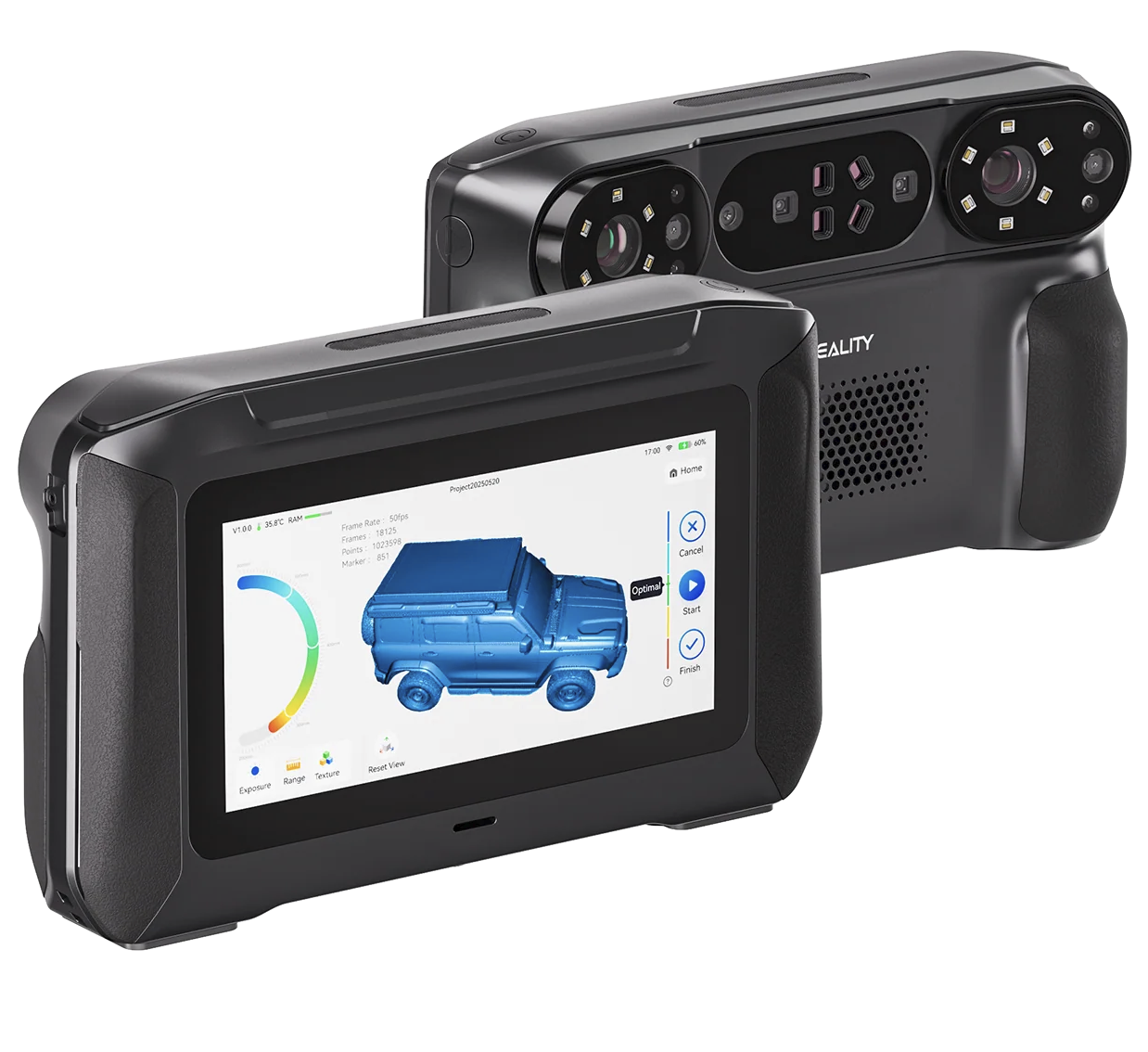
Creality lists standalone, wireless-PC, and wired-PC operation for the P1, with scanning, processing, and export available on the device. It also lists a six-inch touchscreen and blue-laser plus NIR capture options. These are manufacturer-published capabilities, rather than results measured for this article.
See Creality’s official Sermoon P1 specifications.
My assessment: the standalone workflow is its strongest editorial story. The opportunity is to reduce setup friction around the object. Whether it actually saves time depends on access, tracking, preparation, and the quality of the resulting reference.
Imagine the housing you cannot measure with one straight line
Consider a hypothetical repair project: a curved cover has lost a mounting ear, but most of the shell remains intact. A scan could provide a reference for the surviving contour.
The missing ear still needs reconstruction. Hole spacing, screw clearance, wall thickness, and the surface that mates with the machine need deliberate measurements and design decisions.
That gives the scanner a defined job: capture the complicated surface so the designer can spend more attention on the features that make the replacement work.
A scan records the object that exists. If the original is cracked, warped, worn, or incomplete, those conditions may become part of the reference. Restoring the intended shape takes judgment.
Four published features—and the questions behind them
| Published feature | Potential workshop value | What to verify |
|---|---|---|
| Standalone operation | Capture and inspect geometry near the job. | Can your typical project be processed and exported with the detail you need? |
| Wired and wireless PC modes | Flexibility when you return to a workstation. | Current system requirements and which tools work in each mode. |
| Blue-laser and NIR capture | Options for different surfaces and project types. | Results on representative objects, including preparation and tracking effort. |
| Advertised volumetric accuracy: 0.02 mm + 0.06 mm/m | A published specification to investigate for dimensional work. | Test conditions, repeatability, and measurements on your actual parts. |
The accuracy figure describes a manufacturer claim about scanning performance. It does not guarantee the fit of a printed component. Alignment, mesh processing, CAD choices, printer behavior, and material all affect the finished result.
Bring the scanner to the part. Bring engineering to the scan.
This workflow is especially useful when the outer contour is complicated but the attachment features must be precise. Keep the scan as a reference, then build clean geometry around the measurements that matter.
Deep cavities and hidden surfaces deserve particular attention. An optical scanner needs usable views of a surface; a promising capture mode does not remove every access problem.
Which route matches your next project?
| Your project | Route to consider first | Reason |
|---|---|---|
| Simple spacer or rectangular bracket | Measurement and CAD | The useful geometry is straightforward to define. |
| Curved shell with critical mounting features | Scan reference plus measured CAD | Contours and interfaces benefit from different tools. |
| Recurring complex objects away from a fixed station | Evaluate the P1’s standalone workflow | Setup convenience may have repeated value. |
| One unusual object with no future scanning work planned | Compare a scanning service with ownership | Training and equipment costs may outweigh one capture. |
For another scanner buying perspective, read our Creality Pika replacement-part guide. Compare the complete workflow each product requires before treating their specifications as interchangeable.
The $3,299 question: What recurring bottleneck will it remove?
The linked U.S. store listed the P1 at $3,299 when checked on October 11, 2026. Pricing, bundles, availability, and software inclusions can change; confirm the exact offer before ordering.
Budget for the workflow around it: markers or preparation supplies where needed, training, mesh cleanup, CAD tools, and verification. Standalone capture does not automatically cover all later design work.
For planning, divide your total setup cost by the realistic net value saved per suitable job. At an illustrative $100 of net savings per job, a $3,299 scanner alone would take about 33 jobs to recover its purchase cost. That is an example, not a performance or earnings forecast.
Count completed, usable results. Faster capture has limited value if the cleanup stage consumes the time you expected to save.
Check the current Creality Sermoon P1 offer
Use the P.R.I.N.T. Method™ before you buy
Use a notebook or project-planning sheet to complete these five prompts. They turn an exciting product into a decision you can explain.
- Problem: Name three real objects that are difficult to capture today.
- Requirements: Record object size, finish, detail needs, acceptable fit, and intended use.
- Interfaces: Identify holes, mating faces, clips, and other features that need direct verification.
- Next-Best Materials & Methods: Compare scanning, measurement, CAD, and outside services; plan a suitable printing material and process.
- Test & Tune: Define a fit sample and the checks it must pass before making the final part.
Add three more columns: expected capture time, expected cleanup/design time, and validation time. This is your buying planner—and later, a way to check whether the investment solved the problem.
For practical foundations, explore P.R.I.N.T. It Practical — 3D Printing for Beginners and apply the same problem-first approach to your next project.
The demonstration I would want before committing
Ask for a demonstration on an object like the ones you actually work with. A clean decorative model can be interesting, but your curved housing or worn component may present different challenges.
- Show the complete process, including preparation and alignment.
- Inspect difficult surfaces and identify gaps instead of relying only on a smooth preview.
- Export the result and check that your intended software can use it.
- Compare critical dimensions against independent measurements.
- Confirm current firmware, marker requirements, PC requirements, and software-license terms for the workflow you expect.
A representative sample tells you more about buying suitability than a long list of impressive maximum figures.
Four-question knowledge check
Choose your answer, then tap each question to reveal the explanation.
1. What is the P1’s most relevant potential benefit here: A) automatic repairs, B) standalone capture, or C) guaranteed printed fit?
Answer: B. Standalone capture could reduce setup friction. Reconstruction and fit validation remain separate jobs.
2. A mounting ear is missing. Should you: A) print the raw scan, B) reconstruct it from suitable references, or C) ignore the attachment?
Answer: B. A scan cannot directly record a feature that no longer exists. Use surviving geometry, measurements, and design judgment.
3. Which deserves independent measurement: A) a critical mating interface, B) only the scanner case, or C) nothing after scanning?
Answer: A. Verify the dimensions that control fit, fastening, and movement.
4. What should an ownership calculation include: A) purchase price only, B) capture speed only, or C) the complete workflow cost?
Answer: C. Include setup, training, preparation, software, cleanup, and validation.
Frequently asked questions
Can the Sermoon P1 make a replacement part by itself?
It captures and processes geometry. A functional replacement may still require CAD reconstruction, material selection, printing, and testing.
Does standalone scanning mean I can stop using CAD?
No. Capturing a surface and designing a controlled replacement serve different purposes. Missing features and critical dimensions still need attention.
Should a beginner start with this scanner?
Only with a defined need and an adequate budget for learning the full workflow. For simple parts, measurement and CAD are a practical place to begin.
Has 3D Printing by Kevin tested this P1?
This article is a published-specification product analysis. It does not present a hands-on P1 evaluation.
My assessment: A compelling workflow tool for the right projects
The Sermoon P1 is interesting because it could make complicated capture work easier to approach where the object is located. That matters most when similar projects arrive regularly.
Choose it after identifying the capture problem, seeing a representative result, and budgeting for everything needed to turn that result into a useful part.
When replacement parts disappear, we make the next one. The scanner can support that work; the measurements, design decisions, and test fit make the replacement dependable.
Have a broken part you want evaluated? Use the project-intake form with photos, dimensions, and a description of how it works.
Join the conversation: What object would you scan first—and which surface is hardest to measure? Tell us in the comments.
Fact-checked against published sources, October 11, 2026: Product capabilities were checked against Creality’s official P1 page; the price was checked against the linked U.S. product listing. Performance claims remain manufacturer claims. Project examples and buying recommendations are editorial analysis.
