
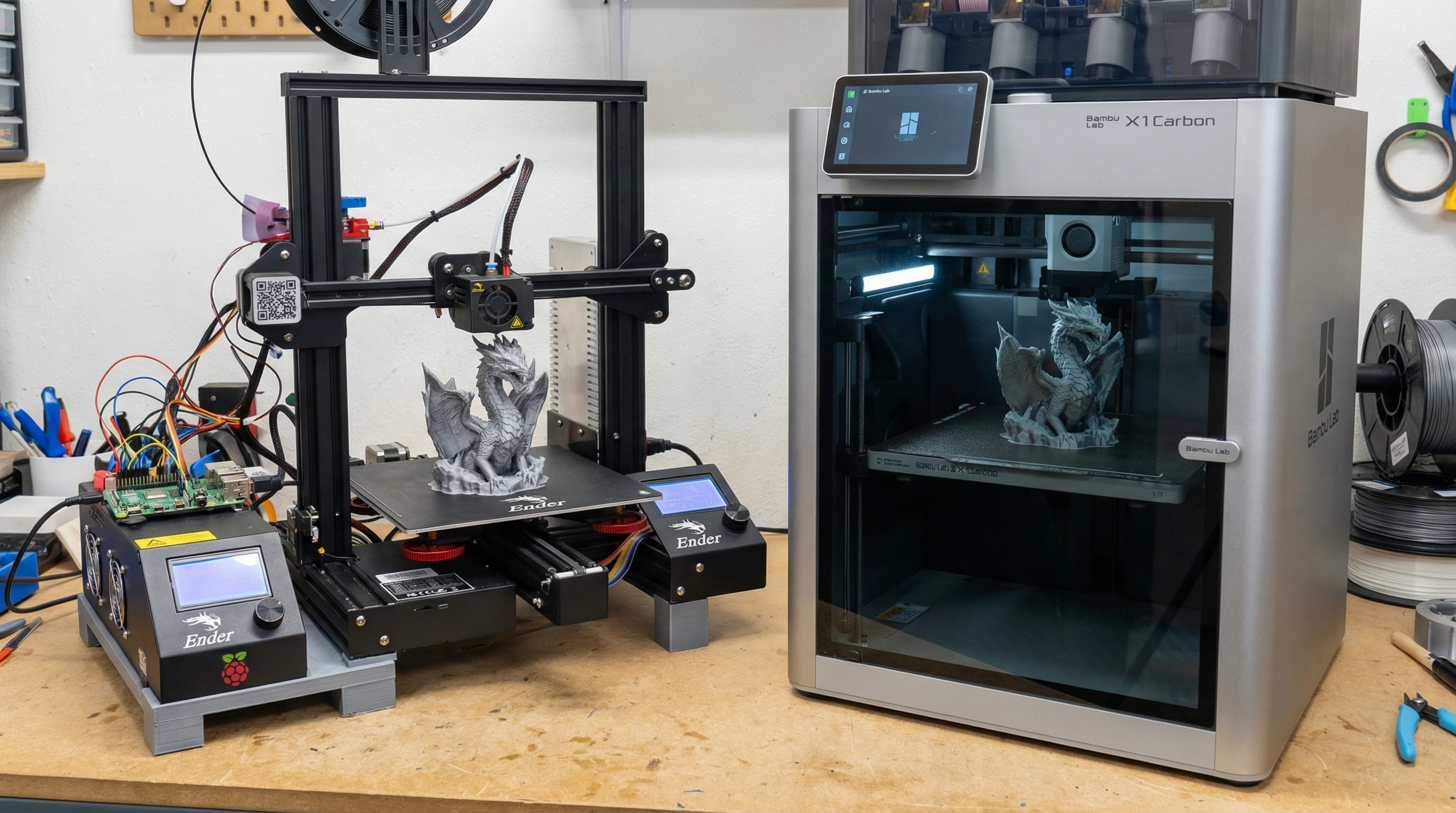
Home 3D printing • Material and workspace guide
The most useful feature on your next 3D printer may be a door. For the parts you actually make, it may also be something you can comfortably skip.
A drawer divider and an outdoor sensor cover ask different things of a printer. Before paying for an enclosure, decide what the finished part must withstand and where the machine will operate.
This comparison covers filament printers, also called FDM or FFF printers. Resin printing needs a separate handling and ventilation plan.
Quick answer: Which is better for home use?
For mostly PLA and ordinary PETG projects, a reliable open-frame printer is often enough. An enclosed printer becomes more useful when you need a warmer, draft-protected build area for ABS, ASA, or another material that specifically calls for it.
Choose the room as carefully as the printer. A closed cabinet does not establish that emissions are controlled, and an enclosed machine is not automatically quieter. Compare the actual cooling, ventilation, filtration, and maintenance arrangements.
Material guidance: PLA, PETG, ABS, and ASA from Prusa; emissions guidance from NIOSH.
What an enclosure actually changes
An open-frame printer exposes the build area to the room. You can often reach the nozzle, plate, and motion components easily, although repair access depends on the model.
An enclosed printer surrounds that area with panels and a door. The enclosure can reduce drafts and retain heat, which helps when uneven cooling would otherwise distort a part.
Check what the enclosure includes. A passive chamber mainly retains heat from the printer. An actively heated chamber adds controlled heating. An emissions-control system addresses contaminated air through a defined extraction or filtration arrangement. These features serve different purposes.
Also separate enclosure style from motion design. “CoreXY” describes how the printhead moves; it does not, by itself, promise a heated chamber, effective filtration, or easy maintenance.
Choose by the part you want to make
A quick material-and-workspace decision guide
Indoor organizers and everyday PETG parts
Start here for PLA dividers, display models, and suitable PETG holders. Prioritize a dependable printer, useful build area, and a workable room setup.
ABS, ASA, and materials needing chamber heat
Look here when the selected material and part size require a warmer build environment. Confirm the full printer specification and emissions controls.
For either layout: make space for the moving bed or doors, filament supply, maintenance, and ventilation before buying.
Enclosed vs open-frame printers at a glance
On a small screen, swipe the table sideways.
| Factor | Open-frame | Enclosed |
|---|---|---|
| PLA and PETG | Often a practical fit. | Also suitable when chamber cooling matches the material. |
| ABS and ASA | More exposed to drafts and uneven cooling. | Usually the better starting point for reliable larger parts. |
| Temperature | More dependent on room conditions. | Can retain heat; active heating is a separate feature. |
| Indoor air | Plan controls for emissions released into the room. | Check the actual air path and controls; panels alone are insufficient. |
| Noise | Depends on fans, motion, settings, and furniture. | Panels may damp some sound; added fans may offset that benefit. |
| Access | Often convenient for inspection and repairs. | Check door openings, removable panels, and service instructions. |
| Children and pets | Hot and moving parts are exposed. | Adds a barrier; verify door behavior and control access. |
| Total cost | Can leave more budget for the workspace and supplies. | Count filters, maintenance, and any required extraction equipment. |
Let the filament decide whether you need chamber heat
PLA: A hot chamber can work against you
For PLA organizers, prototypes, and display pieces, an enclosure is rarely the feature that makes the purchase worthwhile. Good part cooling and a dependable first layer matter more.
Excess heat can soften filament too early in the feed path and contribute to a clog. Prusa’s heat-creep guide identifies hot, unventilated enclosures as a potential problem, particularly with PLA.
Follow your printer’s PLA instructions. Some machines call for an open door or lid; others manage chamber temperature while closed. Opening the cabinet also changes its physical barrier and air-management behavior.
PETG: Useful parts do not automatically require an enclosure
PETG can print successfully on open machines and is commonly used for holders, covers, and mechanical parts. Prusa’s PETG guide describes its relatively low warping and good layer adhesion.
For a small workshop holder, I would compare build size, plate compatibility, maintenance, and filament handling before paying extra for chamber heat. A particular large or draft-sensitive print may change that decision.
Community perspective: this r/3Dprinting discussion includes successful open-frame PETG use and reports of drafts causing trouble. Those accounts illustrate why room conditions matter; they are not controlled tests.
ABS and ASA: A stronger reason to buy enclosed
For these materials, controlling uneven cooling becomes much more important. Prusa recommends enclosed printing for ABS and emphasizes an enclosure for larger ASA parts.
If an outdoor sensor cover needs ASA’s weather resistance, an appropriate enclosed printer makes sense. You still need suitable nozzle and bed temperatures, a matching profile, and an indoor-air plan.
For the broader workflow, read my guide to printing with ABS.
Nylon, PC, and filled filaments: Read the exact specification
“Carbon fiber” is not a complete material description. PLA-CF and PA-CF have different base polymers and may require different printing conditions.
Before buying, compare the filament maker’s requirements with the printer’s supported temperatures, chamber capability, nozzle wear resistance, and drying instructions. An enclosure is one item in that check.
A closed door is not an indoor-air plan
Filament printing can release ultrafine particles and volatile organic compounds. NIOSH’s safety guidance supports reducing exposure through material selection and engineering controls, including ventilation and filtration.
Do not use the absence of a noticeable smell as proof that emissions are controlled. A cabinet with gaps and a small filter still needs a clear explanation of how contaminated air is captured and treated.
Check the air path before the feature list
- Extraction: Where does the air go? A manufacturer-supported system that captures emissions and exhausts outdoors needs an appropriate discharge location and installation.
- Particle filtration: HEPA filtration targets particles carried through the filter.
- Gas filtration: Activated carbon or other suitable sorbent media targets certain gases. Media quantity, contact, and replacement matter.
- Evidence: Look for relevant emissions testing and filter-replacement instructions for the specific configuration.
Sources: NIOSH on local exhaust and particle control and the EPA guide to particle and gas filtration.
For a home setup, I would favor a separate, ventilated work area over a bedroom or a desk occupied throughout long prints. A garage or basement still needs assessment; the room’s label does not guarantee suitable airflow or temperature.
A portable purifier may supplement the setup. The EPA explains that filtration does not replace source control and ventilation, and no air cleaner removes every pollutant.
Noise, children, pets, and the space around the machine
Listen to the model running a representative print before treating “enclosed” as a noise specification. Cooling fans, chamber fans, rapid movement, and vibration through a desk can all affect what you hear.
For a printer near a home office, compare reviews that disclose printing mode, material, fan settings, and measurement distance. A quiet-mode claim is hard to assess without knowing the conditions.
A cabinet creates separation from hot and moving components, hazards also identified by NIOSH. Check whether opening the door actually pauses motion, and keep children and pets from operating the machine. A door, camera, or app does not replace the manufacturer’s supervision requirements.
Measure operating space, not just cabinet size. Include moving-bed travel, cable clearance, door swing, spool changes, top access, and any exhaust duct. Leave the manufacturer’s required clearances around a stable work surface.
Can you add an enclosure to an open-frame printer?
Only make that plan after checking the manufacturer’s guidance for the exact machine. Electronics, power supplies, cables, and printed components may not be designed for the temperature inside an added enclosure.
For example, Bambu Lab’s A1 FAQ says it does not recommend enclosing that model. Treat this as a reason to verify compatibility before buying a tent or cabinet.
An approved enclosure upgrade can be useful. Include its size, cooling needs, service access, and emissions controls in the total cost before comparing it with a printer designed to be enclosed.
Spend extra when it solves a project requirement
A well-chosen open printer can make useful functional parts. An enclosed printer can still produce weak or inaccurate parts when material, geometry, orientation, or settings do not fit the job.
I would shortlist machines around three things: the next few parts I expect to print, the materials those parts need, and the workspace I can provide. Compare the enclosure after those decisions.
If you already own a capable machine, use my troubleshooting guide to identify the cause of failures before assuming an enclosure will fix them.
Build your home-printer plan with P.R.I.N.T.
Copy these five prompts into a note and answer them for one real project before comparing machines.
- P — ProblemWhat will I make first? Name the part and the problem it solves.
- R — RequirementsWhat load, heat, sunlight, flexibility, appearance, and service life must it handle?
- I — InterfacesWhat must the part fit? Record key dimensions, fasteners, and clearances. Separately measure the printer’s available workspace.
- N — Next-Best Materials & MethodsChoose a suitable material, then check printer compatibility, enclosure requirements, air controls, and total setup cost.
- T — Test & TunePrint a small fit sample, inspect it, change one variable if needed, and test under the intended conditions.
Example: A drawer divider points toward simple PLA printing. A suitable PETG tool holder may also fit an open machine. A larger ASA outdoor cover gives you a more specific reason to budget for an enclosed setup.
Keep a practical reference beside your printer
My Practical Guide to 3D Printing: 2026 Expanded Edition brings together the P.R.I.N.T. Method™, material selection, setup, calibration, and troubleshooting.
If you need a finished part before deciding whether to buy equipment, send the project details for a custom printing quote.
Explore the beginner ebookFour-question knowledge check
Choose an answer, then open the explanation.
1. You mainly print PLA drawer organizers. What should drive the purchase?
- The warmest available chamber.
- Printer reliability, useful size, cooling, and workspace fit.
- The largest number of supported exotic materials.
Reveal answer 1
B. PLA usually does not need a warm enclosure. Buy around the work you expect to do.
2. Which claim about a closed printer is accurate?
- The door proves indoor-air emissions are controlled.
- No noticeable odor means no emissions.
- You still need to check the actual extraction or filtration system.
Reveal answer 2
C. Heat retention, physical separation, and emissions control are different functions.
3. What is the best reason to consider an enclosure for a larger ASA part?
- It can provide a warmer, more stable environment that reduces uneven cooling.
- It removes the need for bed preparation.
- It guarantees the finished part’s strength.
Reveal answer 3
A. The chamber helps manage cooling. Material settings, adhesion, design, and validation still matter.
4. What should you check before enclosing a printer you already own?
- Whether the enclosure looks tidy.
- Whether the manufacturer supports enclosing that exact model.
- Whether another printer uses the same filament.
Reveal answer 4
B. Confirm compatibility, temperature limits, cooling, and service access before modifying the setup.
Frequently asked questions
Is an enclosed printer better for a beginner?
It can be, if its setup process, documentation, material support, and workspace requirements fit the beginner. Enclosure style alone says little about how easy a printer is to learn.
Do I need an enclosure for PETG?
Usually no. Many PETG parts print well on open machines. Follow the specific filament and printer guidance, and investigate drafts, bed preparation, and filament condition if problems appear.
Can an enclosed printer print PLA with the door closed?
Some can manage the chamber temperature that way; others instruct you to open a door or lid. Use the guidance for your exact printer, material, plate, and room conditions.
Does a HEPA filter remove printer gases?
HEPA is particle filtration. Gas removal requires appropriate additional media, such as activated carbon, and performance varies. Check what the installed system is designed and tested to do.
Does “fully enclosed” mean the chamber is actively heated?
No. A printer can have a complete cabinet while relying on retained bed heat. Look for an explicit chamber-heating specification if your intended material requires it.
What are you planning to print, and where will the machine live? Share the material, project, and room setup in the comments. Those details make an enclosed-versus-open decision much more useful.
New to filament printing? Start with 3D Printing for Absolute Beginners.
