
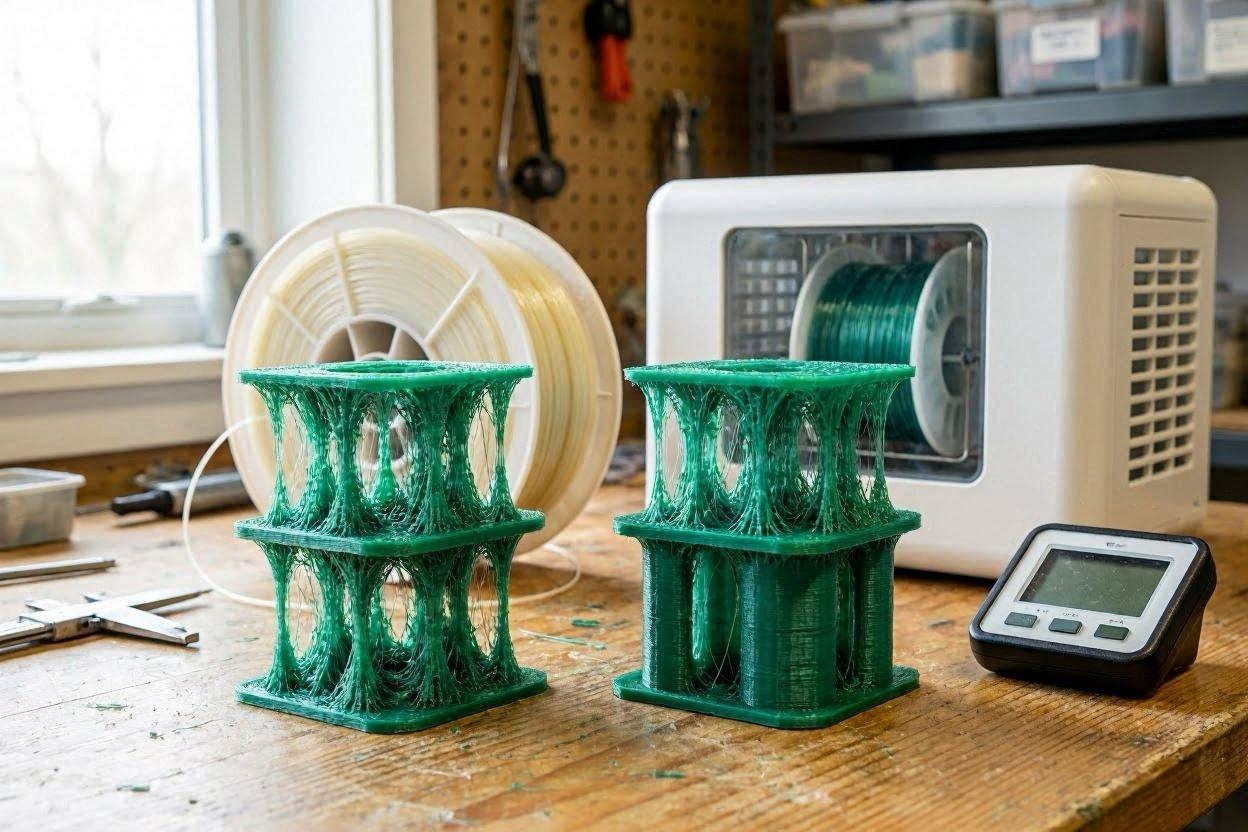
Stringing is often blamed on retraction, temperature, or the printer itself. Those can be responsible—but summer humidity can also change how filament behaves after it has been sitting open. The fastest solution comes from identifying which evidence points to moisture and which points to the machine.
How can you tell wet filament from bad printer settings?
Wet filament often produces several symptoms together: popping or hissing at the nozzle, tiny bubbles, rough or fuzzy walls, inconsistent extrusion, extra stringing, and sometimes weaker-looking layers. A settings problem is more likely when the extrusion sounds smooth, the filament prints clean surfaces, and stringing changes predictably after adjusting nozzle temperature, travel behavior, or retraction. The best confirmation is a controlled comparison using a known-dry spool or the same spool after proper drying.
Why stringing can appear even when you changed nothing
A saved slicer profile does not freeze every part of the printing process. The room can become more humid. A spool can remain mounted for several days. Desiccant can become saturated. A nozzle can collect residue. A Bowden tube or extruder can develop drag.
That means a printer can use the same file and settings yet produce a different result. Troubleshooting works best when you compare the current evidence instead of assuming the last successful profile must still be correct.
3D Printing by Kevin principle: Do not tune around an unknown material condition. Confirm the filament first, then adjust the printer with a reason.
Use the P.R.I.N.T. Method™ to stop random troubleshooting
The goal is to isolate the likely cause with the fewest possible changes.
Problem
Describe exactly what changed: strings, bubbles, blobs, weak walls, or inconsistent flow.
Requirements
Identify the filament, print temperature, quality target, and part function.
Interfaces
Inspect the spool path, extruder, tube, nozzle, hot end, and build surface.
Next-Best
Run the simplest controlled test before buying parts or rebuilding the printer.
Test & Tune
Change one variable, label the result, and compare it with the baseline.
Wet filament vs. settings: symptom comparison
| Symptom | More consistent with moisture | More consistent with settings or hardware |
|---|---|---|
| Stringing between travel moves | Appears with popping, rough walls, bubbles, or inconsistent extrusion | Changes predictably with nozzle temperature, travel, or retraction adjustments |
| Popping or hissing | A strong moisture clue when heard repeatedly during extrusion | Less typical, although debris or contamination can create unusual sounds |
| Rough or fuzzy walls | May appear across different parts and speeds with the same exposed spool | May point to unstable extrusion, worn hardware, excessive speed, or poor cooling |
| Blobs and inconsistent flow | Moisture can make extrusion appear foamy or uneven | Can also come from pressure advance, flow calibration, nozzle buildup, or temperature |
| Only one model strings | Less conclusive unless the model has long travel moves | May result from model geometry, travel path, seam placement, or slicer behavior |
| Known-dry spool prints cleanly | Strong evidence that the original spool needs drying or replacement | If both spools fail, continue checking temperature, retraction, nozzle, and mechanics |
Five clues that point toward wet filament
The spool printed well when new
The same material and profile worked until the spool remained exposed or storage conditions changed.
You hear repeated popping
Moisture turning to vapor in the hot end can interrupt smooth extrusion and leave tiny defects.
The surface looks rough
The problem extends beyond a few travel strings and appears in walls, corners, or extrusion lines.
Drying improves the same spool
A controlled before-and-after comparison is more useful than guessing from appearance alone.
A different spool prints better
A known-dry control spool helps separate material condition from the printer and slicer.
The problem worsened during humid weather
Weather is not proof by itself, but it is useful context when combined with the other clues.
Five clues that point toward settings or hardware
Every spool strings
When known-dry materials all fail similarly, inspect temperature, retraction, travel, nozzle condition, and the filament path.
The nozzle is running too hot
Excessive temperature can make material ooze more freely during travel moves.
The extruder path has resistance
A worn tube, loose gear, partial clog, tangled spool, or misaligned path can create inconsistent flow.
The problem follows one profile
A slicer preset with aggressive temperature, inadequate travel speed, or unsuitable retraction may be responsible.
The print improves after one controlled adjustment
A repeatable settings response is stronger evidence than changing several values at once.
The model creates many travel moves
Geometry and travel paths can expose stringing that barely appears on simpler parts.
The twenty-minute diagnostic plan
Do not begin by rebuilding the hot end. Use a small, repeatable test and keep the file, material, and environment as consistent as possible.
Note popping, hissing, bubbling, rough flow, or material curling unusually around the nozzle.
Save the result as the baseline. Do not change multiple settings first.
If the second spool prints cleanly, investigate the first spool before tuning the printer.
Repeat the same model and label the result before changing retraction.
Check the nozzle, extruder gears, spool movement, tubing, connectors, and filament tension.
Drying and storing filament are different jobs
A dryer removes absorbed moisture
A filament dryer uses controlled heat and airflow to improve a spool that has already absorbed moisture. The correct temperature and duration depend on the material and manufacturer.
A dry box slows moisture return
A sealed container with fresh desiccant helps preserve a dry spool. It should not be assumed to restore a spool that is already producing moisture-related symptoms.
Important: Do not use one universal drying temperature for every filament. Excessive heat can deform a spool, damage material, or create a separate safety risk. Follow the filament manufacturer’s drying guidance and the dryer manufacturer’s instructions.
For manufacturer guidance on drying and storage, see the Prusa filament-drying guide .
A practical storage routine for busy printer owners
- Return unused filament to sealed storage after printing.
- Use fresh or reconditioned desiccant appropriate for the container.
- Add a small hygrometer to storage boxes when practical.
- Keep filament away from direct sunlight and major temperature swings.
- Label dried spools with the material and drying date.
- Prioritize dry storage for PETG, TPU, nylon, PVA, and other moisture-sensitive materials.
- Inspect brittle, tangled, contaminated, or visibly damaged filament before use.
- Run a small test before committing a questionable spool to a long functional print.
Continue with these troubleshooting resources
Temperature or moisture?
Read 3D Printer Temperature Guide: How Heat Affects Your Prints before assuming every string is a retraction problem.
Printing PETG?
Continue with You’re Using PETG Wrong—The One Change You Need for material-specific troubleshooting.
Need a better tool setup?
Review Tools Every 3D Printer Owner Needs for practical drying, storage, measuring, and maintenance tools.
Newer printer owners can begin with 3D Printing for Absolute Beginners , while readers who want a repeatable planning and troubleshooting system can explore P.R.I.N.T. It: Practical 3D Printing for Beginners .
Quick knowledge check
Open each question to test the diagnostic process.
1. Which symptom most strongly supports a wet-filament diagnosis?
Repeated popping or hissing combined with bubbles, rough walls, inconsistent extrusion, and increased stringing is stronger evidence than stringing alone.
2. Why should you test a known-dry spool?
It provides a control comparison. If the known-dry spool prints cleanly with the same machine and test file, the original filament becomes the stronger suspect.
3. Why should you change only one setting at a time?
Changing one variable lets you identify which adjustment helped. Multiple simultaneous changes can hide the real cause or introduce a new problem.
4. Can desiccant dry an already-wet spool?
Desiccant is best used to maintain a dry storage environment. Filament that has already absorbed enough moisture to affect printing generally needs controlled drying appropriate for that material.
Frequently asked questions
Does stringing always mean the filament is wet?
No. Stringing can also come from excessive nozzle temperature, unsuitable retraction, slow travel, model geometry, nozzle residue, or inconsistent extrusion. Look for multiple moisture clues and run a controlled comparison.
Can PLA absorb enough moisture to print badly?
PLA is often less moisture-sensitive than materials such as nylon or PVA, but poor storage can still contribute to brittle filament, rough extrusion, stringing, or inconsistent results.
Why does PETG suddenly start stringing?
Possible causes include moisture, excessive nozzle temperature, unsuitable retraction, slow travel, nozzle buildup, or a changed filament path. PETG naturally tends to ooze more than PLA, so controlled testing matters.
Do I need a filament dryer?
A dryer becomes especially useful when you print moisture-sensitive materials, keep spools open for long periods, live in a humid climate, or regularly see symptoms that improve after controlled drying.
Can I print directly from a dry box?
Many dry boxes are designed for direct feeding. The path should remain smooth, properly aligned, and free of excess resistance. A dry box preserves material condition but does not correct unrelated extrusion or slicer problems.
Should I keep adjusting retraction until the strings disappear?
Not before checking filament condition and temperature. Extreme retraction can create clogs, inconsistent extrusion, or unnecessary wear while masking the real problem.
Still unsure whether the spool, file, or printer is causing the failure?
Send the material, printer, slicer, settings, photographs, and a description of what changed. The review can focus on the most likely cause before you replace hardware or waste another spool.
Drying requirements vary by filament formulation, spool material, dryer design, and manufacturer. Always follow the filament and equipment manufacturers’ temperature, time, ventilation, and handling instructions. Do not place filament or plastic spools in an uncontrolled heating appliance.
