
Buying your first home 3D printer should feel exciting—not overwhelming. Yet most beginners quickly discover something unexpected: the 3D printer you choose determines whether your first month is filled with amazing creations… or endless frustration.
That’s why these eight insider secrets matter. They’ll help you skip the trial-and-error stage, avoid overpriced machines, and buy a printer that gives you consistent, high-quality results right from day one. Whether you’re printing cosplay props, prototypes, models, toys, or functional parts, this guide will help you make a smart, confident choice.
1. Choose a Brand You Can Trust
Here’s the truth: a 3D printer is only as reliable as the company behind it. Trusted brands offer better parts, better support, and better long-term performance. Unknown brands often save money upfront… but cost you hours of troubleshooting later.
When comparing brands, look for:
- Strong customer reviews
- Active communities (Facebook, Reddit, Discord)
- Regular firmware updates
- Readily available spare parts
If you’re new to printing, start exploring with my helpful beginner guide: What Is a 3D Printer?
2. Look Closely at the Warranty
A solid warranty isn’t just paperwork—it’s peace of mind. Most high-quality printers include at least a one-year warranty covering motors, electronics, and manufacturing defects.
Before buying, ask:
- Is there a U.S.-based repair center?
- How fast can they ship replacement parts?
- Is customer support responsive?
A great warranty means you’ll never feel “stuck” if something goes wrong.
3. Know the Build Volume You Really Need
Build volume is one of the biggest factors people overlook—and one of the most important. It determines how large your printed objects can be.
If you only want to print small trinkets or functional parts, a compact printer is perfect. But if you dream of helmets, cosplay armor, or large models… you’ll want something with room to grow.
Before choosing your machine, consider the space you have and the projects you want to make. For deeper guidance, check out: Different Types of 3D Printers.
4. Research the Manufacturer (Not Just the Machine)
A good manufacturer doesn’t just sell you a printer—they support you throughout your entire printing journey. Brands like Creality, Bambu Lab, Prusa, and Raise3D are known for their robust communities and dependable build quality.
When you buy from a strong ecosystem, you get:
- Upgrades and mods made by thousands of users
- Proven reliability and tuning profiles
- Helpful YouTube tutorials and setup walkthroughs
This one factor alone can make or break the printing experience for beginners.
5. Decide What Type of 3D Printer Fits Your Needs
Before browsing printers, decide what you’re trying to create. Different printers excel at different things.
- FDM printers — best for functional parts, cosplay, prototypes, large objects
- Resin printers (SLA/MSLA) — best for miniatures, small detailed models, jewelry
- CoreXY printers — best for speed and precision
- Enclosed printers — essential for ABS/ASA/Nylon
If you’re unsure, see my guide: How Does a 3D Printer Work?
Quick material breakdown:
- PLA: easiest to print; ideal for beginners
- PETG: strong, flexible, great for outdoor use
- ABS/ASA: heat-resistant; needs enclosure
- Nylon: extremely strong; trickier to print
6. Focus on the Features That Actually Matter
The 3D printing market is full of buzzwords—but only a few features truly improve your printing experience.
- Auto bed leveling — no more manual knobs
- Direct drive extruder — essential for TPU and flexible filaments
- High-speed printing — modern printers can print 3–5× faster
- Filament runout sensor — prevents failed prints
- Enclosure — stabilizes temperature for advanced materials
The right features save time, reduce failures, and help you get prints that look professionally made.
7. Choose the Connectivity That Fits Your Workflow
How your printer receives files will affect how smoothly your prints begin.
- MicroSD / SD card: most stable and beginner-friendly
- USB: convenient and fast
- Wi-Fi: allows remote monitoring and wireless printing
- Ethernet: ideal for schools and shared environments
If you’re printing often, Wi-Fi and apps add convenience—but SD cards remain the reliability king for long prints.
8. Know Your Budget—and What Each Price Tier Delivers
You don’t need a $1,500 machine to get great prints—but you do need the right printer in the right tier.
- $200–$400: great for beginners; basic speed and automation
- $400–$800: best value; auto-leveling, silent motors, stronger frames
- $800–$1500: high-end home printers; CoreXY, enclosed, multi-color upgrades
- $1500+: prosumer printers for high-volume or professional use
Here are some respected brands worth exploring:
- Original Prusa
- Ultimaker
- Formlabs
- Anycubic
- Bambu Lab
- Raise3D
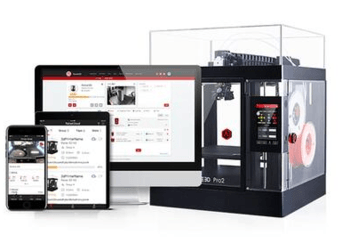
I personally use a Raise3D Pro2 for large jobs and a smaller machine for quick, precise prototypes. Both are workhorses.
Bonus: Your Filament Matters Just as Much as Your 3D Printer
Cheap filament causes clogs, jams, weak prints, and inconsistent results. High-quality filament, on the other hand, instantly improves your print quality—even on a budget machine.

Trusted brands: COEX, Hatchbox, eSun, Overture, Polymaker
Want to improve print quality fast? Read: 12 Tips to Improve 3D Print Quality.
Choosing the right 3D printer is the first step toward an incredible journey—one filled with creativity, problem-solving, and the thrill of turning digital ideas into physical reality. If you want personalized recommendations, explore my 3D printer reviews or check out my step-by-step guides for beginners.
Some links on this page may be affiliate links. If you decide to purchase through them, it helps support the site at no extra cost to you—thank you!
