
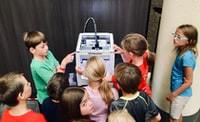
3D printing can turn an abstract STEM lesson into something students can hold in their hands. A geometry exercise becomes a physical model. A robotics idea becomes a working bracket. A failed prototype becomes a lesson in iteration instead of just a wrong answer.
But buying a 3D printer for a school is very different from buying one for a hobby workbench.
Teachers also have to consider supervision, hot components, moving parts, ventilation, student workflow, maintenance, IT requirements, print queues, and what happens when six groups want their project printed before Friday.
Disclosure: This article contains affiliate links. If you purchase through one of these links, I may earn a commission at no additional cost to you. My recommendations are based on classroom fit, usability, and practical value.
What Should Most Schools Buy?
For most K–12 programs, I would start with an enclosed FDM printer running PLA, automatic bed leveling, dependable slicer profiles, easy maintenance, and an appropriate ventilation or filtration plan.
My biggest recommendation: Don’t buy based on maximum print speed alone. Reliability, maintenance, safety, workflow, and teacher time matter far more in a classroom.
Best Classroom 3D Printers at a Glance
These machines serve slightly different kinds of programs. Think about the environment first, then choose the printer.
| Printer | Best For | Why It Fits | Watch For |
|---|---|---|---|
| FlashForge Adventurer 5M Pro | First classroom printer | Enclosed, automatic leveling, compact and filtered | Smaller education ecosystem |
| MakerBot Sketch Sprint | Managed school programs | Teacher resources, curriculum and workflow tools | Higher acquisition cost |
| Prusa CORE One+ Gen 2 | Advanced STEM labs | Repairable, documented and expandable | Advanced filtration is optional |
| Bambu Lab P1S | Robotics and high throughput | Fast, enclosed and highly automated | Internal carbon filter is not full particulate filtration |
| Creality K1C | Supervised makerspaces | Fast enclosed CoreXY platform | More prosumer than education-specific |
I have a separate deep dive into the best enclosed 3D printers for schools and STEM labs. This guide takes the wider view—printer selection, safety, workflow, curriculum, materials, and program planning.
Why Classroom 3D Printers Are Different
A hobbyist might spend Saturday afternoon diagnosing a first-layer problem. A teacher with 25 students waiting for projects usually cannot.
Classroom Safety: Think in Layers
An enclosure is valuable because it can make hot and moving components harder to reach. But simply closing a printer door does not automatically solve every indoor-air-quality concern.
NIOSH guidance for schools, libraries and makerspaces discusses potential exposure to ultrafine particles and volatile organic compounds along with hazards associated with heat, moving components and additive-manufacturing processes.
Read the NIOSH School & Makerspace Guidance →
Five Layers of a Better Classroom Setup
1. FlashForge Adventurer 5M Pro
The FlashForge Adventurer 5M Pro is one of the easiest machines to put on a classroom shortlist when you want an approachable enclosed printer without immediately moving into expensive education-system pricing.
It combines an enclosed chassis, automatic bed leveling, quick-change nozzle hardware, camera monitoring, and filtration incorporating HEPA and activated carbon.
Why It Works in a Classroom
- Compact footprint
- Automatic leveling
- Enclosed print area
- Integrated filtration
- Easy nozzle changes
- Good fit for everyday PLA projects
My take: This is the kind of printer I would consider when a teacher wants to begin printing without first becoming the school’s full-time printer technician.
2. MakerBot Sketch Sprint
Some schools don’t want to build an education program around a consumer printer. They want hardware, curriculum, training and classroom workflow to function as one system.
That’s where the MakerBot Sketch Sprint has an advantage.
MakerBot positions the Sketch platform specifically around education, including lesson resources, teacher and student certification options, and tools designed around classroom printing.
Why It Stands Out
- Education-specific ecosystem
- Teacher training options
- Student learning resources
- Managed workflow
- Lesson-plan integration
The tradeoff: Schools pay more than they would for a basic hobby machine. Part of that cost is the education infrastructure surrounding the printer.
3. Prusa CORE One+ Gen 2
A serious STEM program should think beyond the first semester.
Can the printer be maintained? Can components be replaced? Is documentation available? Can students eventually understand what is happening instead of treating the machine like a mysterious black box?
The Prusa CORE One+ Gen 2 is especially interesting from that perspective.
Its enclosed CoreXY platform, automatic calibration, documentation and emphasis on serviceability can make it a printer that grows with the program.
Why I Like It for Advanced Programs
- Fully enclosed design
- Automatic calibration
- Strong documentation
- Replacement-parts ecosystem
- Useful for increasingly advanced materials
- Optional advanced filtration
4. Bambu Lab P1S
The Bambu Lab P1S becomes especially attractive when student projects are stacking up faster than the printer can finish them.
It is enclosed, highly automated and fast. The optional AMS also introduces multicolor and multi-filament possibilities.
Where It Makes Sense
- Robotics projects
- Engineering challenges
- Rapid prototype iteration
- Busy project-based classrooms
- Programs where printer throughput becomes a bottleneck
5. Creality K1C
The Creality K1C offers an enclosed CoreXY platform without moving immediately into dedicated education-system pricing.
It can be a particularly useful option when a STEM instructor or makerspace coordinator already understands 3D printer maintenance and does not need an education ecosystem built around the hardware.
Why Consider It
- Enclosed design
- Fast CoreXY architecture
- Automatic calibration
- Activated-carbon filtration
- Capable of both simple and more advanced work
My distinction: I see the K1C more as a supervised lab machine than a printer I would simply place in an elementary classroom for unrestricted student operation.
What Filament Should Schools Use?
Start with PLA.
Students can learn CAD, geometry, iteration, tolerances, prototyping and engineering without immediately introducing difficult materials.
| Material | Classroom Fit | Best Use |
|---|---|---|
| PLA | ★★★★★ Best starting point | Models, prototypes, manipulatives and basic engineering |
| PETG | ★★★★☆ Good for older students | More durable functional parts |
| TPU | ★★★☆☆ Advanced projects | Flexible components and mechanisms |
| ABS / ASA | ★★☆☆☆ Controlled lab use | Heat-resistant or outdoor applications |
| Resin | ★☆☆☆☆ Specialized environments | Very high-detail advanced work |
Should Schools Use Resin Printers?
Usually not as the first classroom printer.
Resin printing creates an entirely different workflow involving uncured photopolymer, contaminated tools, washing, post-curing and waste handling.
That may be appropriate in a properly equipped university, engineering, biomedical or advanced art lab. For most K–12 programs, FDM provides a much simpler starting point.
How Many Printers Does a Classroom Need?
Classroom 3D Printer Planner
Before asking for quotes or spending grant money, answer these eight questions.
- Who will use it? Elementary, middle school, high school, college or robotics?
- What will students print? Models, CAD projects, robotics components or functional prototypes?
- Where will it operate? Classroom, lab, library or makerspace?
- Who maintains it? Teacher, STEM coordinator, IT department or technician?
- How much printing do you expect? Several models each month or daily production?
- Which materials are truly necessary? PLA may cover almost everything.
- What does IT allow? Cloud, Wi-Fi, USB, local networking or offline operation?
- What happens when something fails? Decide who owns troubleshooting before it happens.
Use the P.R.I.N.T. Method™ Before You Buy
The same framework I use when approaching practical 3D-printing projects works extremely well for classroom equipment decisions.
What learning goal is the printer supposed to solve?
Define grade level, budget, safety, room and workload.
Consider CAD, slicers, student accounts, networks and print approval.
Choose the simplest equipment and material that meet the objective.
Pilot the workflow before expanding into a printer fleet.
Teachers learning 3D printing themselves can also use my P.R.I.N.T. It: Practical 3D Printing for Beginners as a practical starting reference.
What Can Students Actually Learn?
The printer should never become the entire lesson. The real value comes when students use the machine to test an idea.
CAD Software for Classroom 3D Printing
For younger students, Tinkercad remains one of the easiest entry points because students can build geometry visually without first mastering professional CAD commands.
As students advance, programs can move into tools such as Fusion, Onshape, SolidWorks or another engineering CAD platform that fits the curriculum.
The Printer Price Is Not the Whole Budget
A school should look at total cost of ownership, not simply the price displayed on the printer page.
Start Small Before Equipping the Whole Lab
My preferred rollout:
Buy one or two printers → establish the student submission process → learn the slicer → track print failures → measure real demand → scale from evidence.
That is much safer than discovering after purchasing ten machines that the software conflicts with district IT policy, the ventilation plan needs work, or nobody has been assigned to maintain the fleet.
Is Your Classroom Ready?
Tap each question to reveal the answer.
1. Is an enclosed printer automatically safe anywhere in a classroom?
No. An enclosure helps with guarding and containment, but ventilation, filtration, material selection, placement and supervision still matter.
2. What material should most beginner school programs start with?
PLA. It is easy to print and suitable for the majority of introductory classroom projects.
3. What matters more than maximum advertised speed?
Reliable throughput. A printer that consistently finishes student jobs is more useful than one that is theoretically faster but frequently needs troubleshooting.
4. Should a school immediately buy an entire fleet?
Usually not. Pilot one or two printers first and verify curriculum, safety, IT, maintenance and workload before scaling.
Building a STEM Lab?
Tell me the grade levels, budget, available space, expected projects and approximate number of students.
I can help you think through the printer, material and workflow requirements before you invest in equipment.
Start a Classroom Equipment Discussion →Frequently Asked Questions
What is the best 3D printer for a school classroom?
For many first-time programs, an enclosed FDM printer with automatic calibration and a straightforward PLA workflow is the most practical starting point. The FlashForge Adventurer 5M Pro is a strong value choice, while the MakerBot Sketch platform provides a more complete education ecosystem.
Are 3D printers safe for elementary school?
They can be incorporated into elementary programs with appropriate equipment, placement, supervision and written safety procedures. Younger students should not have unrestricted access to hot or moving printer components.
Does a classroom printer need an enclosure?
I strongly prefer enclosed machines for many K–12 environments because they make hot and moving components easier to guard. An enclosure does not eliminate the need to evaluate ventilation and emissions.
What is the best filament for classroom use?
PLA is the simplest starting material for most schools because it prints easily and works well for models, prototypes, manipulatives and engineering projects.
How many printers should a STEM lab have?
One can support demonstrations and small programs. Two provide better redundancy and throughput. Larger fleets should be based on measured student demand and a proven workflow.
Should schools use resin printers?
Usually not as the first machine. Resin printing involves additional chemical handling, washing, curing and waste-management requirements that make it better suited to controlled advanced labs.
What is the easiest CAD software for students?
Tinkercad is an excellent starting point for many K–12 students. More advanced students can later transition into parametric engineering CAD platforms.
What Is Your School Trying to Build?
Are you setting up a new STEM lab, replacing an unreliable printer, starting a robotics team, or trying to figure out how many machines you actually need?
Tell me about your program in the comments. Include the grade level and approximate budget. Your question may help another teacher or STEM coordinator facing the same decision.
