
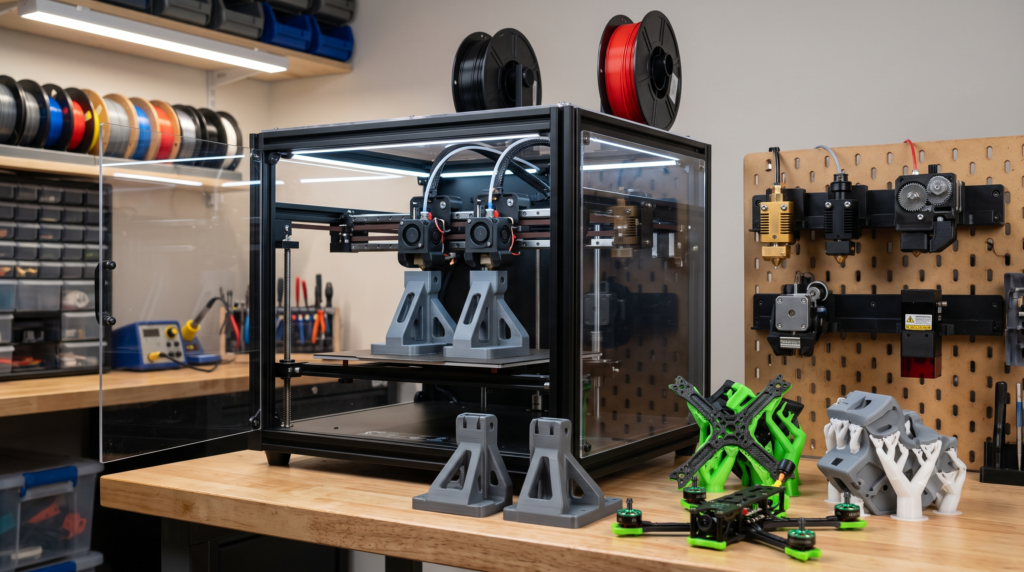
The Sovol M1D combines independent dual extrusion with an automatic tool-changing system. That creates possibilities beyond colorful display models: separate support materials, different nozzle sizes, repeated parts, mirrored components, and material combinations that are difficult to manage through one nozzle.
Does the Sovol M1D make sense for functional 3D printing?
It may make sense for users who regularly need separate support material, multiple nozzle sizes, duplicate parts, mirrored components, or frequent material changes. It is probably unnecessary for someone who mainly prints one material through one nozzle. The M1D’s strongest practical value is not seven-color decoration—it is reducing changeover time and expanding how several materials or tools can be used within one production workflow.
A toolchanger solves a different problem from an automatic filament feeder
Many multicolor systems repeatedly pull one filament out of a shared nozzle and push another filament into it. The nozzle must then purge enough material to remove the previous color or polymer.
A toolchanger parks one print head and retrieves another. Each head can remain loaded with its own filament and nozzle. That can reduce material mixing and repeated purging, although priming, wiping, calibration, and transition management may still create some waste.
3D Printing by Kevin principle: The better machine is not the one with the most toolheads. It is the one whose workflow removes a problem you encounter often.
Evaluate the M1D with the P.R.I.N.T. Method™
A new machine should earn its place through useful work—not through a feature count alone.
Problem
Identify the material change, production delay, or support problem you need to solve.
Requirements
Define build size, materials, quantity, accuracy, speed, support, and uptime needs.
Interfaces
Consider slicer support, tool alignment, nozzle offsets, material storage, and spare parts.
Next-Best
Compare a toolchanger with IDEX, automatic filament switching, or two simpler printers.
Test & Tune
Verify alignment, transitions, repeatability, support removal, and finished-part quality.
Toolchanger vs. single-nozzle multicolor vs. standard IDEX
| System | Strongest use | Main advantage | Main tradeoff |
|---|---|---|---|
| Single-nozzle filament switching | Accessible multicolor printing from several loaded spools | Fewer complete hotends and a compact mechanism | Color changes can increase purge waste and print time |
| Traditional IDEX | Two materials, duplicate parts, mirrored parts, or separate supports | Two independently controlled extruders | Usually limited to two active nozzle setups |
| Multi-head toolchanger | Several materials, nozzle sizes, colors, or support strategies | Loaded tools can be exchanged without fully unloading every filament | More mechanisms, calibration points, cost, and maintenance |
| Two independent printers | Parallel single-material production | One printer can continue if the other needs service | Cannot combine both materials automatically within one part |
Where seven available toolheads could become practical
Soluble or breakaway supports
A dedicated support nozzle may improve difficult overhangs, enclosed channels, and complex contact surfaces.
Different nozzle diameters
A larger nozzle could build strong internal regions while a smaller nozzle handles detailed surfaces or labels.
Duplicate functional parts
Independent extruders may produce two matching components simultaneously when the geometry and setup permit it.
Mirrored assemblies
Left- and right-hand parts may be produced in parallel for brackets, fixtures, guards, and paired components.
Rigid and flexible materials
Separate tools may make it easier to combine a firm housing with a flexible grip, seal, foot, or contact surface.
Small-batch identification
Permanent color coding, labels, symbols, or revision marks can be integrated without stickers or separate assembly.
What the toolchanger does not solve automatically
Material compatibility
Two filaments can print successfully yet bond poorly because their temperatures, shrinkage, or chemistry do not cooperate.
Tool alignment
Each nozzle must return to the correct position or the finished part may show steps, gaps, rough seams, or shifted features.
Workflow complexity
More tools introduce additional nozzles, heaters, sensors, offsets, filament paths, and maintenance decisions.
Expectation check: “Less purge waste” does not mean “no waste.” Priming, wiping, support structures, failed calibration, test parts, and unsuccessful material combinations still consume filament.
Why this architecture may matter for replacement parts
Replacement-part work rarely needs seven decorative colors. It may, however, benefit from several purposeful tools.
- A large nozzle for a strong structural body
- A fine nozzle for small clips or identification marks
- A support nozzle for hard-to-reach internal geometry
- A flexible material for a bumper, seal, grip, or foot
- A contrasting material for assembly marks or alignment indicators
- A duplicate setup for producing matching parts
- A mirrored mode for left- and right-hand components
- A dedicated abrasive-material nozzle that protects standard tools
The value comes from assigning each tool a job. A complicated machine should produce a simpler, more dependable result—not complexity for its own sake.
The two-minute M1D decision
Choose the situation closest to your current printing workflow.
The tool-changing architecture deserves serious evaluation.
Copy mode may matter more than the seven-head headline.
A simpler, established printer may deliver better value and easier maintenance.
Questions to answer before backing or ordering
- Which toolheads and accessories are included in the selected package?
- Which features are available at delivery rather than promised later?
- How are nozzle offsets calibrated and verified?
- Which slicer functions support every printing mode?
- What purge, wipe, prime, and parking structures are required?
- Which replacement hotends and wear parts will be stocked?
- What warranty and support apply to the actual purchase channel?
- What happens if the delivery schedule changes?
New hardware can be exciting, but campaign specifications, software features, delivery dates, and final production details can change. Judge the purchase using the terms available when you order.
Continue with these practical resources
New to multicolor printing?
Read Multicolor 3D Printing Cracked for practical guidance on tool changes, purge strategy, first layers, and color planning.
Comparing multi-material workflows?
Continue with Multi-Material 3D Printing to understand materials, supports, and workflow tradeoffs.
Want a repeatable project system?
Explore P.R.I.N.T. It: Practical 3D Printing for Beginners for planning, materials, testing, maintenance, and troubleshooting.
Readers preparing a functional project can also use the Custom 3D Printing Project Intake to submit files, dimensions, photographs, material needs, and quantity information.
Quick knowledge check
Open each question to test the toolchanger decision.
1. How does a toolchanger differ from a single-nozzle multicolor system?
A toolchanger exchanges complete print heads that can remain loaded with separate materials. A single-nozzle system repeatedly feeds different filaments through one shared melt path.
2. Why can separate tools reduce purge waste?
The new material does not always have to push the previous material through the same nozzle. Some priming and wiping may still be necessary.
3. What may be more useful than seven colors for functional work?
Separate nozzle sizes, support materials, rigid and flexible combinations, copy printing, and mirrored production may provide greater practical value.
4. Who probably does not need a multi-head toolchanger?
A user who mainly prints one material through one nozzle and does not need duplicate production or complex supports may get better value from a simpler printer.
Frequently asked questions
What is the Sovol M1D?
The M1D is a Sovol IDEX printer platform that combines two independently controlled extruders with an automatic interchangeable-toolhead system.
Does the M1D really use seven toolheads?
Sovol describes the platform as supporting one fixed extruder and multiple interchangeable heads. Confirm exactly how many heads are included with the package you are considering.
Can it print two parts at once?
Sovol lists copy and mirror printing among the M1D’s operating modes. Usable part size and spacing may differ from full-bed single-part printing.
Will a toolchanger eliminate purge towers?
It may greatly reduce traditional filament-change purging, but priming, wiping, support structures, and transition management may still be required.
Can different plastics be combined in one part?
Sometimes. The materials must have compatible printing temperatures, shrinkage behavior, adhesion, and intended use. Separate nozzles do not guarantee that two polymers will bond reliably.
Is an early-production printer suitable for business work?
It may become suitable, but production users should evaluate delivered hardware, support, spare parts, software maturity, repeatability, and downtime risk before depending on it for customer deadlines.
Do not buy seven toolheads until you can name the job for each one.
The M1D’s architecture is genuinely interesting, especially for supports, mixed materials, nozzle specialization, copy printing, and mirrored parts. The best purchase decision still begins with the work—not the feature list.
Product specifications, included toolheads, campaign pricing, availability, delivery dates, software features, warranties, and support terms may change before final production and shipment. Confirm current details directly with Sovol and the applicable sales platform before ordering. Crowdfunded or preorder hardware may involve delays, specification changes, and other risks not associated with established in-stock products.
