
Last reviewed: August 25, 2026
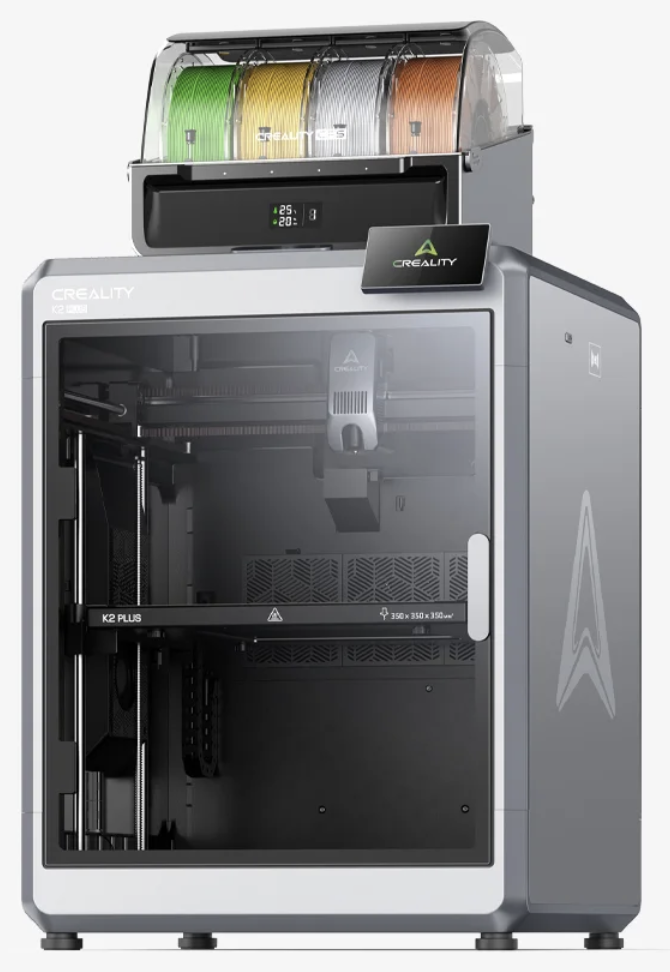
The Creality K2 Series earned Red Dot Product Design recognition in 2025, but the award alone does not tell you which K2 printer belongs in your workshop. The compact K2, balanced K2 Pro, and large-format K2 Plus share the same high-speed, multicolor idea while serving noticeably different users.
The real story is not that Creality placed a red badge on three similar machines. It is that the company scaled one design language from an approachable 260 mm printer to a 350 mm flagship without abandoning the enclosed CoreXY frame, CFS compatibility, or automation that defines the lineup.
Quick answer: The K2 Series deserves attention because it combines rigid enclosed frames, fast CoreXY motion, automated calibration, and expandable CFS multicolor printing. Choose the K2 for ordinary PLA and PETG projects in a smaller workspace, the K2 Pro for the best balance of build space and active chamber heating, or the K2 Plus for 350 mm parts, higher-temperature capability, and maximum capacity.
Important: Red Dot recognizes product design; it is not a blanket guarantee of print quality, reliability, or value. Those still depend on the model, material, setup, firmware, and your actual projects.
Disclosure: This article includes a sponsored Creality store link. If you purchase through it, I may earn a commission at no added cost to you. Specifications and bundles can change, so confirm the current listing before buying. This is an engineering-led analysis of published specifications and award documentation, not a hands-on K2 Series review.
What Did the Creality K2 Series Win?
The official Red Dot database lists the K2 and K2 Pro as 2025 Product Design honorees. It also gives the K2 Plus Combo its own 2025 Product Design entry.
The jury highlighted the K2 and K2 Pro for combining AI-assisted features, printing accuracy, minimalist styling, and premium materials. For the K2 Plus Combo, it specifically praised the restrained industrial appearance and the way the design communicates professional intent.
That distinction matters. Red Dot is evaluating how the product is conceived, built, used, and presented. It is not conducting the same kind of months-long ownership test that would measure nozzle wear, firmware behavior, service response, or failure rates.
Kevin’s practical read: Treat the award as evidence that the K2 platform has a coherent, thoughtfully integrated design—not as permission to skip the usual printer-buying homework.
Creality K2 vs. K2 Pro vs. K2 Plus at a Glance
All three machines are enclosed CoreXY printers with CFS compatibility and an advertised maximum print speed of 600 mm/s. The differences become meaningful when you compare size, heat, automation, and workshop demands.
| Feature | K2 | K2 Pro | K2 Plus |
|---|---|---|---|
| Build volume | 260 × 260 × 260 mm | 300 × 300 × 300 mm | 350 × 350 × 350 mm |
| Maximum speed | 600 mm/s | 600 mm/s | 600 mm/s |
| Maximum acceleration | 20,000 mm/s² | 20,000 mm/s² | 30,000 mm/s² |
| Maximum nozzle temperature | 300°C | 300°C | 350°C |
| Maximum bed temperature | 100°C | 110°C | 120°C |
| Active chamber heating | No | Up to 60°C | Up to 60°C |
| Nozzle AI camera | No | Yes | Yes |
| Best fit | Everyday multicolor work | Balanced advanced use | Large parts and batch work |
Specifications reflect Creality’s published K2 Series comparison as reviewed on August 25, 2026. Maximum figures are capability limits, not promises for every model, material, or slicer profile.
Which K2 Model Makes the Most Sense?
Choose the K2 for a Smaller, More Focused Workshop
The base K2 has a 260 × 260 × 260 mm build volume—larger than the familiar 256 mm class, but easier to place than the Pro or Plus. It keeps the enclosed CoreXY format, CFS compatibility, a chamber camera, automatic leveling, and the same 600 mm/s headline speed as the larger machines.
Its main limitation is thermal. The enclosure helps control drafts, but the K2 does not have the actively heated chamber found on the Pro and Plus. It is the logical choice when your work centers on PLA, PETG, display pieces, organizers, models, signs, and ordinary functional parts rather than large engineering-material jobs.
Choose the K2 Pro for the Strongest Middle Ground
The K2 Pro moves to a 300 mm cube, adds active chamber heating up to 60°C, and includes the nozzle AI camera used for automatic flow-rate calibration. It also adds a built-in RFID reader, Ethernet, and 32 GB of storage.
For many serious makers, this is the practical sweet spot. A 300 mm build volume is large enough for meaningful prototypes and medium-sized production work, while the printer remains easier to accommodate than the 35 kg K2 Plus.
If the K2 Pro is on your shortlist, compare it with other high-end ecosystems in Bambu Lab H2D vs. Creality K2 Pro.
Choose the K2 Plus When Capacity Changes the Job
The K2 Plus is not simply a stretched K2. Its 350 × 350 × 350 mm build volume, 350°C nozzle, 120°C bed, actively heated chamber, higher maximum acceleration, dual auxiliary cooling fans, and automatic belt tensioning move it into a more demanding class.
That extra room can keep a cosplay shell in one piece, fit a large enclosure without aggressive splitting, or hold more parts in a batch. It also increases the consequences of a failed print. Large beds take more energy to heat, full plates need dependable adhesion, and a physically bigger machine requires a genuinely sturdy home.
For more purchase context, see Creality K2 Plus vs. Elegoo Centauri Carbon and Prusa CORE One vs. Creality K2 Plus Combo.
The 600 mm/s Number Needs Context
Speed is one of the K2 Series’ strongest marketing hooks, but maximum travel or short-segment capability is not the same as maintaining 600 mm/s through every wall, corner, bridge, and top surface.
Creality identifies 300 mm/s as the typical printing speed for all three K2 models and recommends its high-speed filament for faster profiles. Actual throughput still depends on part geometry, acceleration, volumetric flow, layer height, material, cooling, and the quality target you select.
That is not a weakness unique to Creality. It is how fast FDM printing works. A small detailed figure may never provide enough straight-line distance to reach the advertised maximum, while a large prototype with broad infill runs can benefit much more.
Better buying question: Will the K2 shorten the prints you actually make while preserving the surface finish and strength you need?
A repeatable 300 mm/s profile that produces usable parts is more valuable than a 600 mm/s demo that forces you to reprint the job.
CFS Multicolor Printing: Impressive, but Not Free
Every K2 model can connect to the Creality Filament System. One CFS holds four spools, while four linked units can make as many as 16 colors available to a job. RFID-equipped Creality filament can also automate material identification.
This opens useful workflows for color-coded prototypes, labels, educational models, branded parts, signs, figurines, and support-interface materials. It does not turn a single-nozzle printer into four independent toolheads. Each change requires unloading, loading, and purging, so multicolor jobs usually take longer and consume more material than single-color versions.
- One Combo is not a 16-color bundle: A standard Combo includes one CFS. Reaching 16 colors requires four CFS units.
- Color changes create waste: Purge volumes, transition towers, and model design affect how much.
- Spool fit still matters: Damaged cardboard spools and unusual dimensions can create feeding problems.
- TPU does not belong in the CFS: Creality directs users to feed supported flexible filament from the external spool holder because soft filament can buckle in the CFS path.
The CFS is most convincing when color or automatic spool switching solves a real production problem. If almost everything you print is a single-color bracket, the non-Combo printer may leave more money for filament, nozzles, build plates, and ventilation.
Automation Helps—It Does Not Replace Process Control
Automatic leveling, input shaping, camera monitoring, filament detection, and flow calibration can remove repetitive setup steps. The Pro and Plus models go further with a nozzle AI camera, while all three provide a chamber camera for monitoring.
These systems improve the odds of a successful start, but they cannot correct a greasy build plate, wet filament, a poorly oriented model, weak supports, or unrealistic slicer settings. “Automatic” works best when it supports a sound process.
The most dependable sequence remains simple:
- Update the printer and slicer deliberately, then confirm their versions are compatible.
- Clean the build surface according to its instructions.
- Dry moisture-sensitive filament before a long or expensive job.
- Run a small material test before filling the bed.
- Watch the first layer even when automatic checks pass.
Use the P.R.I.N.T. Method Before Choosing
A printer becomes a good value only when its capabilities match the work. My P.R.I.N.T. Method™ turns the K2 decision into five practical checks:
List the parts you intend to make, not the demo models you might print once.
Define the largest part, materials, colors, tolerance, surface finish, and weekly output.
Check CFS needs, spool types, network options, slicer workflow, power, and bench space.
Compare the least expensive K2 that satisfies the requirements with one credible alternative.
Establish a single-color baseline before adding complex multicolor or engineering-material jobs.
If you are still building your process, P.R.I.N.T. It Practical: 3D Printing for Beginners provides a reusable path from project requirements to testing and troubleshooting.
Who Should—and Should Not—Buy a K2 Series Printer?
| Your priority | Best starting point | Reason |
|---|---|---|
| Compact multicolor setup | K2 Combo | Smallest footprint and enough volume for most everyday parts |
| 300 mm parts and engineering materials | K2 Pro | Active chamber heat and stronger automation without Plus-size bulk |
| Large props, prototypes, or batches | K2 Plus | Largest build volume and highest thermal and motion specifications |
| Mostly small, single-color PLA parts | Compare simpler printers | You may not benefit from the CFS ecosystem or heated-chamber upgrades |
| Minimal purge waste is essential | Compare multi-toolhead systems | Single-nozzle color swapping inherently adds purge time and material |
Before You Order: Five Details Buyers Miss
- Measure the complete operating space. Include the door, screen, CFS, rear cables, spool access, and ventilation—not only the printer footprint.
- Confirm what the bundle includes. “Printer” and “Combo” listings are not interchangeable.
- Budget for multicolor waste. More colors can mean longer jobs and larger purge totals.
- Match the chamber to the material. An enclosure is not the same as an actively heated chamber.
- Plan air control. Built-in filtration is useful, but material choice, enclosure, and ventilation still matter. NIOSH recommends engineering controls such as proper ventilation and suitable filtration for safer 3D printing.
For detailed safety guidance, review the NIOSH safe 3D printing recommendations.
Check the Current K2 Series Options
Bundles, promotions, and included accessories change. Compare the K2, K2 Pro, and K2 Plus against your build-volume, material, and CFS requirements before choosing.
Four-Question K2 Series Knowledge Check
Open each answer after making your choice.
1. Does a Red Dot award prove that a printer will be reliable for every owner?
Answer: No. It recognizes product design. Long-term reliability, support, firmware behavior, and print performance require separate evaluation.
2. How many CFS units are needed to make up to 16 colors available?
Answer: Four. Each CFS holds four spools; a standard Combo normally includes one CFS.
3. Which K2 models include active chamber heating?
Answer: The K2 Pro and K2 Plus. The base K2 is enclosed but does not have an actively heated chamber.
4. Which model is the logical starting point for a 340 mm one-piece project?
Answer: The K2 Plus, because its build volume is 350 × 350 × 350 mm. Leave room for brim, supports, toolhead clearance, and actual model orientation before assuming a nominally 340 mm file will fit.
Frequently Asked Questions
Did the entire Creality K2 Series win a Red Dot Award in 2025?
The Red Dot database contains a 2025 Product Design entry for the K2/K2 Pro and a separate entry for the K2 Plus Combo. That supports describing the core K2 lineup as Red Dot 2025 recognized, while keeping the exact award entries clear.
Is the K2 Plus always the best K2 printer?
No. It is the most capable on paper, but it is also the largest and heaviest. The K2 Pro may offer a better capability-to-space balance, while the base K2 can be the smarter value for standard materials and moderate-sized parts.
Does every K2 printer include a CFS?
No. Combo packages include a CFS; printer-only packages do not. Verify the exact bundle because retailer names, promotions, and accessories change.
Can the Creality K2 Series print in 16 colors?
Yes, the K2 Series supports up to four connected CFS units, making as many as 16 filament slots available. That does not mean every job should use 16 colors, and additional CFS units are required.
Can the CFS feed TPU?
No. Creality states that flexible TPU is not compatible with the CFS. On supported K2 workflows, TPU must be fed through the external spool path and printed with an appropriate profile.
Will the K2 Series print every model at 600 mm/s?
No. Creality lists 600 mm/s as the maximum and 300 mm/s as the typical speed. Geometry, acceleration, flow rate, filament, cooling, and quality settings determine the speed reached during an actual job.
Final Verdict: The Award Makes More Sense as a Family
The Creality K2 Series is most impressive when viewed as a scalable platform. The K2 makes the core experience easier to fit and afford. The K2 Pro adds the thermal control and automation many advanced users actually need. The K2 Plus expands the same concept for projects where size, heat, and throughput can change what is possible.
The 2025 Red Dot recognition reinforces that Creality built more than a specification race. The consistent industrial design, integrated CFS workflow, automation, and clear model progression give the series an identity of its own.
Still, the best K2 is not automatically the biggest one. Apply the P.R.I.N.T. Method, identify your real parts and materials, and buy the smallest model that satisfies those requirements with room to grow.
Which K2 model best matches your workshop—and what would you print first? Share your choice in the comments, along with the build size, material, or multicolor feature driving your decision.
