
Small print · Better workshop habits
The spool is ready. The printer is ready. But which profile worked the last time you used that filament?
A small filament settings clip keeps that answer beside the roll. I like it because it turns a familiar setup interruption into a quick check: identify the spool, find its saved settings, and get on with the job.
The useful part is the connection between a physical spool and a record you can trust. Here is how to build that connection without covering every roll in tiny, outdated notes.
Quick answer: what is the simple 3D print?
A reusable filament settings clip is a small printed label holder for a stored spool. Give it a spool ID, material name, and the name of the matching slicer profile. Keep detailed temperatures, cooling, machine information, and test results in the saved record.
It can reduce repeated searching when you switch rolls. Actual time saved depends on your workflow. Remove a protruding clip before loading the spool or placing it in a dryer.
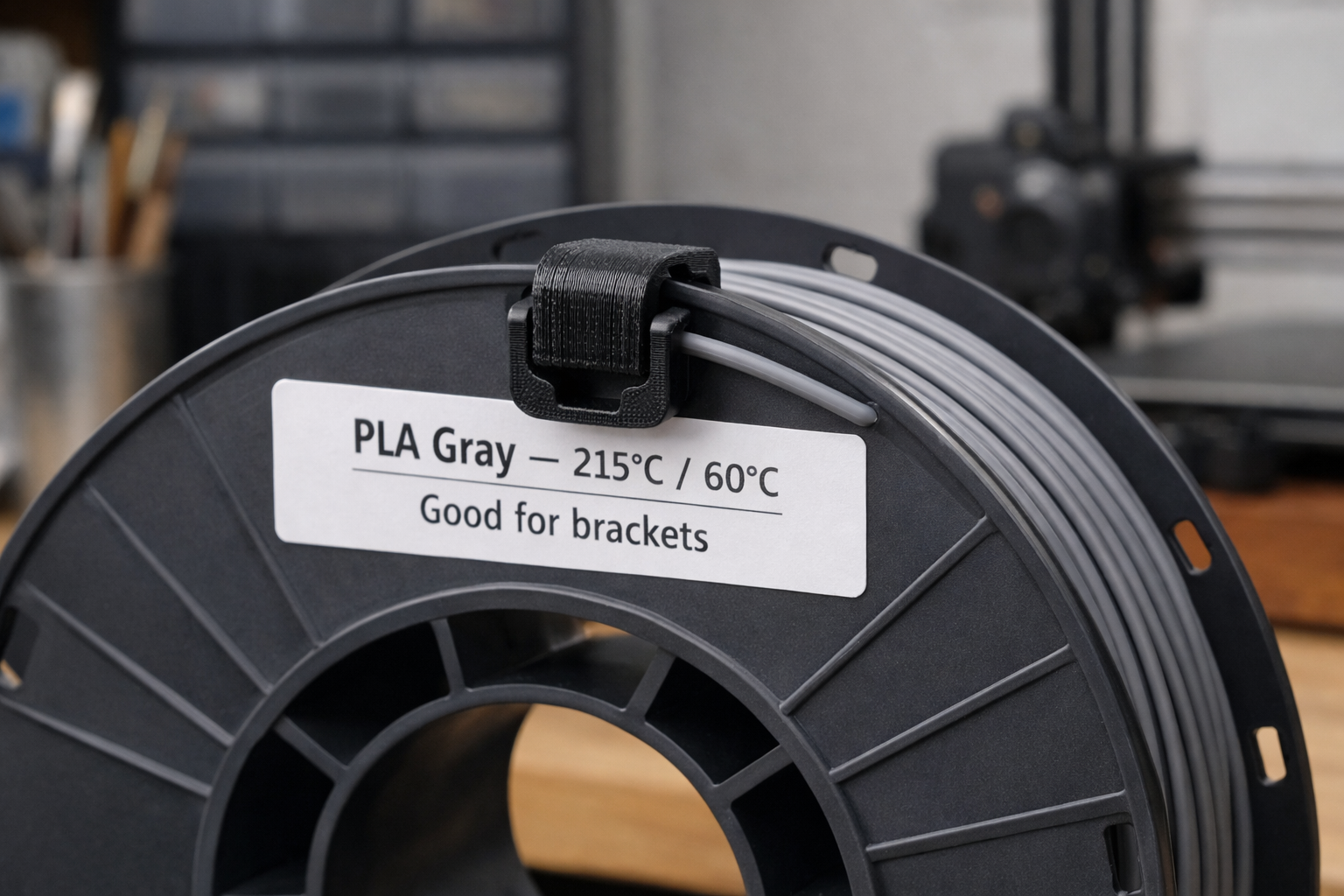
The small problem this clip actually solves
A half-used roll is easy to recognize by color. Remembering its last successful setup is harder, especially when several printers or similar-looking materials share a workspace.
A broad profile called “PLA” leaves questions unanswered. Which printer and nozzle did you use? Which build plate? Did you save that cooling adjustment, or was it only in an old project?
The tag gives you a reliable place to begin. It is most useful when you return to partly used spools or repeat earlier jobs. If you already identify every spool clearly and save matching profiles, another clip may add little.
Two different jobs: a filament-end clip holds the loose end during storage; a settings clip carries information. A design may do both, but never start feeding filament while its end is still secured.
Put the profile name on the tag first
A nozzle temperature alone is an incomplete record. For example, a note that says “215°C” does not identify the printer, nozzle, build plate, print speed, or whether it refers to the first layer.
Keep the visible label short. Use the same spool ID in your slicer profile or accompanying log so you can find the complete setup.
At-a-glance label layout
One spool. One ID. A traceable setup.
- Spool ID
- G07
- Saved profile
- G07 · Printer A · 0.4 · v2
- Last successful test
- Record the date in your log
- Storage reminder
- Remove clip before loading
On the clip: material, color, spool ID, and a readable profile reference.
In the full record: brand and batch if available, printer, nozzle, plate, temperature and cooling settings, profile version, and the result of a small test.
When something changes: update the record and its version together. Mark an untested setup “not yet tested.”
Save a project file as well when the result depends on orientation, supports, or other part-specific choices. Check what your slicer includes when it saves or exports a project; keep the relevant presets with it.
If you record temperatures on the physical tag, name the printer, nozzle, and plate alongside them. Leave detailed cooling behavior and flow limits in the full profile where they can be recorded accurately.
Printed clip, tape label, or digital record?
Try a temporary label on one stored spool first. If it solves a recurring problem, a reusable printed holder can make the habit easier to maintain.
| Method | Useful when | Main limitation |
|---|---|---|
| Removable tape label | You want to try the workflow immediately. | Can peel or become hard to read; avoid moving contact surfaces. |
| Printed settings clip | You want a reusable holder for stored spools. | Needs a fit check and removal before loading if it protrudes. |
| Saved profile and log | You need complete settings, versions, and project history. | Needs a clear link to the physical spool. |
| Clip or label plus saved record | You frequently change materials or repeat previous work. | Both references must stay in sync. |
For a cramped spool holder or enclosed feeder, put the removable card on the storage bag or an approved stationary location. Keep the original manufacturer label and any identification tag readable.
How to make a filament settings clip that fits
Start with the spool and the label you intend to use. Different rim shapes need different clips; a file described as “universal” still needs a fit check.
- Measure the interface. Check rim thickness, edge shape, and the space behind it. Look for rolled edges, ribs, cardboard compression, and nearby filament.
- Choose a readable label face. A roughly 40 × 25 mm face is a design starting point for a short ID and profile reference. Size it around your actual label and eyesight.
- Use a gentle grip. Give the clip a rounded entry and avoid sharp corners at the spring arm’s root. It should hold without crushing a cardboard edge or pressing into wound filament.
- Print a small fit test. Test the gripping section before printing the entire label holder. Adjust the gap or arm shape one change at a time.
- Check layer direction. Where the geometry permits, orient the spring arm so flexing occurs within the layer plane. Inspect the preview and test the finished part; a convenient flat face alone does not prove a strong orientation.
- Test removal before batching. Fit and remove one clip several times. Revise it if it cracks, whitens at the bend, slips, or damages the spool.
A plain label face with replaceable tape is enough. Emboss stable information such as a spool ID if useful, but keep settings editable. If you use someone else’s model, check its dimensions, orientation guidance, and license.
PLA or PETG for the clip?
PLA is a reasonable first fit prototype for room-temperature storage. For a clip that flexes repeatedly, PETG is a sensible material to test because it is generally less brittle and offers more flexibility. Prusa’s PLA guide and PETG guide explain those material tradeoffs.
The geometry still has to work. A short, stiff spring arm can fail even in a tougher material.
| Setting | Start here | What to check |
|---|---|---|
| Layer height | 0.20 mm | Rim fit and label-face quality. |
| Perimeters / walls | 3 | Toolpaths through the spring arm; adjust for its thickness. |
| Infill | 15–25% where internal space exists | Thin sections may already be entirely walls. |
| Supports | Aim for a design that avoids them | Preview unsupported areas and keep contact surfaces clean. |
| Heat, cooling, speed | Your printer’s supported profile for the exact material | Follow filament and build-plate instructions. |
These are prototype starting points, not validated settings for a particular clip. Use the sliced model to estimate filament and machine time before deciding how many to print.
Keep the tag out of the filament path
My recommended routine is straightforward: read the tag while the spool is stored, open the matching profile, then remove the tag before loading.
A rim-mounted clip can interfere with rollers, lids, guides, or an automatic filament system. A setup check should account for the spool’s full rotation and any reverse movement during unloading. A matching spool diameter alone does not establish compatibility.
Remove the clip before heated drying as well. The filament, spool, clip, and adhesive can have different temperature limits. Follow the instructions for the exact filament and spool; Prusa’s drying guidance shows why spool construction also matters.
A drying date is a history entry
Record when and how you dried a roll, then note how it was stored. A date cannot tell you whether the filament has absorbed moisture since.
Stringing alone does not prove moisture is the cause. Temperature, retraction, nozzle residue, and hardware can also contribute, as explained in Prusa’s stringing troubleshooting guide. Record symptoms and follow a controlled check instead of adding a permanent “wet” label.
For a broader diagnosis, use my guide to common 3D printing problems.
How much time can a spool tag save?
The useful measure is active setup time: searching, identifying a roll, and finding the right record. Machine printing time belongs in a separate column.
There is no measured monthly saving presented here. The example below shows how to evaluate the idea in your own workshop.
Illustrative calculation
Count the minutes you actually recover
Try the system for a month and compare similar setup tasks. If finding your profile was already quick, the main benefit may be clearer handoffs or fewer material mix-ups. Do not count a failed print as “prevented” unless you have a sound basis for that comparison.
Plan your first clip with the P.R.I.N.T. Method™
Start with one spool you often return to. Complete this short plan, test the fit, and expand only if the system helps.
- Problem: What information do you keep searching for?
- Requirements: How readable, removable, and reusable should the label be?
- Interfaces: What are the rim thickness, edge shape, and available clearance?
- Next-Best Materials & Methods: Choose a temporary label or printed clip, then a material and print orientation.
- Test & Tune: Check fit, update the profile reference, and compare setup time.
Edit the fields below, then copy your notes into your own log before leaving. Entries are not saved or submitted by this article.
Four-question knowledge check
Choose an answer to reveal its explanation. You can change your selection and try again.
Filament settings clip FAQs
Does every spool need a separate slicer profile?
No. Compatible rolls can share a validated profile. Separate spool IDs can still help track batches, storage, and observations. Create or revise a profile when testing shows a meaningful difference.
Can I use the same clip on every spool?
Only after checking each rim and the clip’s condition. Spools differ in thickness and edge shape. For a poor fit, change the design or put the record on the storage container.
Will PETG make the clip safe to leave in a dryer?
Do not assume so. The complete accessory includes its geometry, label, and adhesive. Removing it before drying avoids depending on unverified heat resistance.
Should I write “good for brackets” on the label?
Use a more specific note tied to a tested project. A material that worked for one indoor holder may be unsuitable for a warmer location, a higher load, or a different orientation.
What if I use only one printer and one filament?
A clearly named saved profile and a simple spool label may be enough. Print a holder when it solves a problem you actually encounter.
Use filament you already understand
Begin the fit test with a suitable roll you have on hand. A new material introduces another variable.
Partner disclosure: I’m a COEX filament partner and may earn a commission from qualifying purchases through my partner link. If you are already comparing materials, you can visit COEX through my partner link. Check the product’s instructions and any current offer at checkout.
Make your next setup easier to repeat
Start with one spool, one readable label, and one saved record. My practical beginner ebook develops the same habit of planning, checking, and learning from each print.
Explore the practical 3D printing ebookNew to printing? Start with the free beginner guide. For a custom holder or another practical part, request a project review.
What do you keep forgetting between prints?
Tell me in the comments: is it the profile name, build plate, drying history, or which roll produced the best result? Share your printer and the one detail you would put on a spool tag first.
Technical references
These manufacturer references support the material and troubleshooting guidance. The clip dimensions and print settings above are proposed starting points for your own fit test.
