
Speed claims decoded for real-world buyers
Desktop 3D printers now advertise motion speeds that would have sounded unrealistic a few years ago. At the same time, capable entry-level machines have become easier to buy, set up, and use.
That creates a tempting choice: pay for high-speed hardware or spend as little as possible and accept longer print times. The catch is that neither the fastest number nor the lowest sticker price tells you how many usable parts you will finish.
Quick Answer: Speed Wins Only When the Entire Workflow Keeps Up
Choose a high-speed printer when shorter turnaround will let you test more prototypes, meet deadlines, or complete enough additional parts to justify the price. Choose a value-focused printer when you print occasionally, have flexible deadlines, or would benefit more from spending the difference on filament, tools, and replacement parts.
The headline’s “10x” is a comparison of marketing extremes, not a promise. A printer rated for 600 mm/s will not complete every model ten times faster than a 60 mm/s machine. Acceleration, layer time, cooling, hotend flow, geometry, and reliability all reduce the real-world gap.
Kevin’s Practical Rule
Judge a printer by successful parts per day, not the largest speed printed on the box. A slower machine that finishes nine of ten parts can deliver more value than a faster machine that needs repeated tuning, restarts, or cleanup.
What “600 mm/s” Really Means
A maximum speed is the fastest commanded movement a manufacturer permits under specific conditions. It is not the speed used for every wall, bridge, overhang, first layer, or small feature.
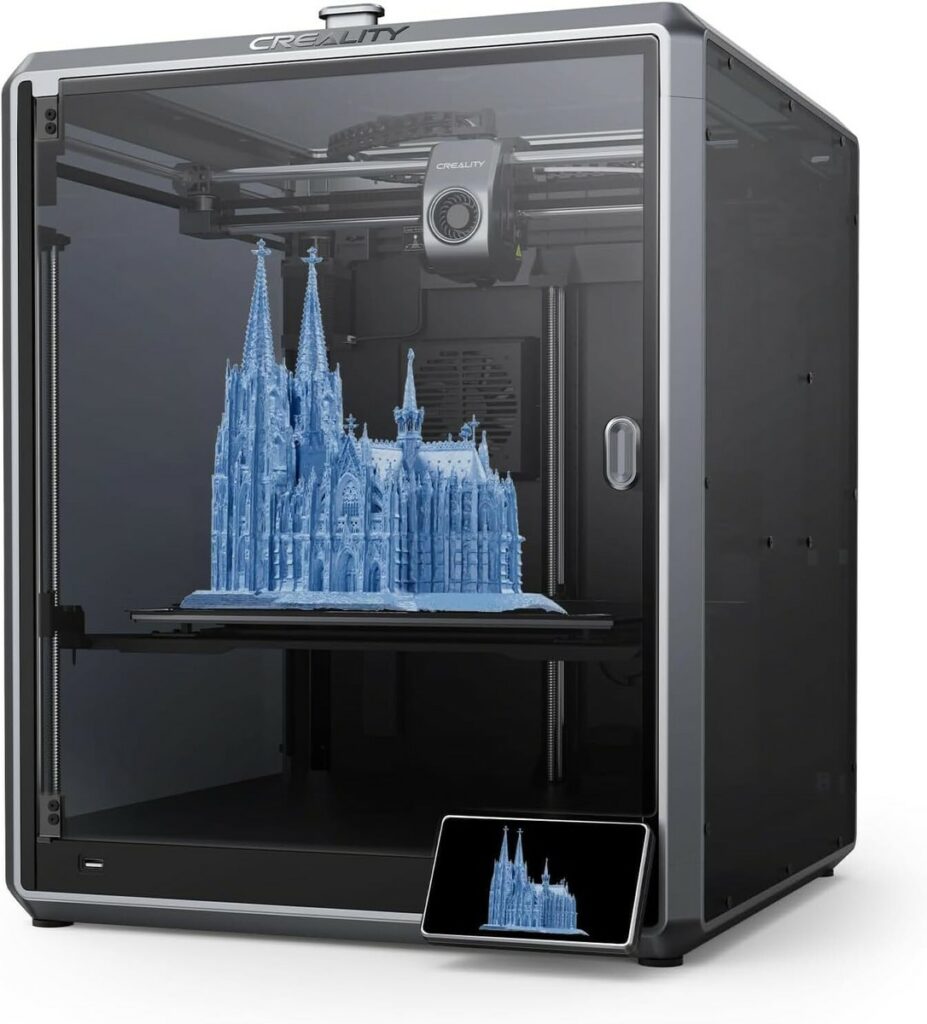
Creality, for example, lists the K1C at a maximum 600 mm/s, maximum 20,000 mm/s² acceleration, and a 300 mm/s typical speed. Those are meaningful capabilities, but the sliced model still decides how often the printer can approach them.
Small parts may never provide enough distance to accelerate to the requested speed. Overhangs need time to cool. External walls are often slowed for appearance and dimensional accuracy. As Prusa’s official speed guidance explains, acceleration, feature settings, cooling, and model size all affect the final motion speed.
High-Speed CoreXY
Best for rapid prototypes, frequent printing, larger batches, and users whose time has measurable value.
Value Bedslinger
Best for learning, occasional projects, flexible schedules, and buyers who want a lower financial entry point.
Keep and Optimize
Best when your present printer is reliable and better calibration, a larger nozzle, or smarter slicing solves the real bottleneck.
The Five Limits Behind Every High-Speed Print
The Real-World Speed Stack
1. Motion System and Acceleration
CoreXY printers move the toolhead in X and Y while the build platform usually changes height on Z. Keeping a heavy bed out of rapid Y-axis motion can make high acceleration easier to control, especially on tall or heavy prints.
A Cartesian bedslinger moves the bed back and forth. That does not make it obsolete or inaccurate. Modern bedslingers can be remarkably quick, but moving mass becomes harder to manage as the bed, print, and requested acceleration increase.
CoreXY is an architecture, not a quality guarantee. Frame stiffness, belt routing, toolhead mass, calibration, firmware, and component quality still matter.
2. Volumetric Flow: The Number Buyers Often Miss
The nozzle cannot deposit plastic faster than the hotend can melt it consistently. The essential calculation is:
At a 0.45 mm line width, 0.20 mm layer height, and 300 mm/s, the hotend must deliver about 27 mm³/s. If the selected hotend-and-filament combination can reliably supply only 15 mm³/s, the practical speed for that extrusion is closer to 167 mm/s.
The slicer should limit speed before extrusion becomes inconsistent. The Prusa Knowledge Base describes maximum volumetric speed as the amount of plastic a hotend can reliably melt and explains how the slicer uses it as a speed limiter.
Do You Need “High-Speed” Filament?
Not automatically. Standard filament may print well until its tested flow limit is reached. High-flow formulations can extend that limit, but temperature, nozzle, moisture, cooling, and the specific brand still matter. Calibrate the material rather than assuming the label guarantees a result.
3. Cooling and Minimum Layer Time
Extruding faster also means removing heat faster. If a small layer remains soft when the nozzle returns, corners can curl, overhangs can sag, and fine features can lose definition. A strong part-cooling system helps, but the slicer may still slow short layers.
4. Geometry and Toolpath
A long straight infill move provides room to accelerate. A detailed figurine with hundreds of short segments does not. Supports, bridges, seams, small holes, external walls, and top surfaces may each use different speeds.
5. Reliability and Uptime
Throughput includes warm-up, calibration, filament changes, failed prints, plate cleanup, maintenance, and operator attention. This is why successful parts per day is more useful than a peak millimeters-per-second claim.
Klipper, Input Shaping, and a Common Oversimplification
Klipper can use a host computer for higher-level processing and provides advanced motion-control tools. Its input shaping feature is designed to reduce ringing by compensating for a printer’s measured resonance. The official Klipper documentation also makes clear that input shaping requires tuning; it does not simply predict and erase every vibration on its own.
It is no longer accurate to describe the buying decision as “Klipper equals fast” and “Marlin equals slow.” Marlin also supports input shaping, and manufacturers may ship customized firmware with their own motion features.
Firmware matters, but it cannot overcome a weak frame, limited hotend, inadequate cooling, wet filament, or a poorly chosen slicer profile.
| Decision Factor | High-Speed CoreXY | Value-Focused Bedslinger | What Matters Most |
|---|---|---|---|
| Upfront cost | Usually higher for enclosure, rigid frame, sensors, and higher-flow hardware | Often lower, though current sale prices can narrow the gap | Compare complete packages, not list prices alone |
| Real print time | Strong advantage on suitable models and tuned materials | Adequate for occasional or non-urgent work | Slice your own representative parts |
| Setup | Automation may reduce first-print effort | Varies from guided setup to more hands-on adjustment | Read the exact model’s workflow |
| Maintenance | More speed can make belt, lubrication, nozzle, and calibration checks more important | Simpler hardware may be easier to understand and service | Parts availability and documentation |
| Noise and vibration | Enclosure may contain some noise, but fast fans and motion remain noticeable | Slower profiles can be quieter; open frames expose fan noise | Placement matters in shared rooms |
| Best match | Rapid prototyping, frequent use, deadlines, small production runs | Beginners, classrooms, hobby use, flexible deadlines | Your workload, not the benchmark model |
For a closer look at a specific high-speed machine, read the Creality K1 Max speed, volume, and feature analysis. If you are still comparing printer types and price levels, start with the beginner-to-pro 3D printer buying guide.
Compare Current Creality Printers Explore COEX Filaments
Total Cost of Ownership: The Cheaper Printer Can Cost More
Purchase price matters, but it is only the first line of the calculation. Add the costs that change how often you can print and how much attention each part requires.
| Cost | Questions to Ask | Why It Changes the Decision |
|---|---|---|
| Printer and accessories | Are enclosure, camera, hardened nozzle, dryer, or build plates included? | A low base price can grow after required add-ons |
| Material | Will your normal filament meet the needed flow and quality? | Specialized material may raise cost per part |
| Failed prints | How stable is the printer with your representative jobs? | Lost hours and material erase theoretical savings |
| Labor | How much time goes to setup, monitoring, removal, cleanup, and rework? | Operator time can exceed electricity costs |
| Maintenance | Are nozzles, belts, fans, sensors, and replacement parts available? | Downtime reduces throughput |
| Useful life | Will the printer still meet your expected materials, size, and output next year? | Buying twice is rarely the lowest-cost path |
A budget printer can be the sensible choice when time is flexible. It becomes expensive when you repeatedly replace weak components, lose long prints, or spend hours correcting a machine that does not match the job.
Run This Test Before You Buy
- Choose three representative models. Use a short functional part, a detailed part, and the longest part you expect to print regularly.
- Slice each model with realistic profiles. Compare normal and faster profiles while keeping layer height, walls, infill, and support strategy equivalent.
- Check volumetric flow in preview. Confirm the requested flow falls within a tested range for the hotend and filament.
- Add hands-on time. Include setup, plate preparation, removal, support cleanup, filament handling, and inspection.
- Apply a success rate. Ten six-hour attempts at 70% success produce fewer good parts than nine-hour attempts at 95% success.
- Calculate value per successful part. Divide equipment, material, maintenance, energy, and labor by the number of usable parts you realistically expect.
A Simple Throughput Example
Printer A completes a part in 4 hours with an 85% success rate. Printer B completes it in 6 hours with a 98% success rate. Over 24 unattended hours, the theoretical results are 5.1 successful parts for A and 3.92 for B. Printer A still leads—but by about 30%, not by the headline speed ratio.
Now add plate resets, operator availability, and rework. The winner may change again.
Use the P.R.I.N.T. Method™ as Your Speed-or-Savings Planner
The P.R.I.N.T. Method™ keeps the purchase centered on the part you need instead of a benchmark designed to make a printer look impressive.
| Step | Planning Question | Evidence to Record |
|---|---|---|
| P — Problem | What delay, capacity issue, or cost am I actually solving? | Current print time, backlog, missed deadline, or desired output |
| R — Requirements | What size, material, finish, strength, quantity, and deadline must the parts meet? | Three representative models and their acceptance criteria |
| I — Interfaces | What must fit, align, move, or connect accurately? | Critical dimensions, clearances, and surface requirements |
| N — Next-Best Materials & Methods | Would a fast printer, larger nozzle, second value printer, or optimized profile solve the bottleneck best? | Comparable slices, flow limits, cost estimates, and maintenance needs |
| T — Test & Tune | What small trial will prove the decision before full production? | Print time, flow, dimensional checks, failures, cleanup, and successful parts per day |
Learn how the complete P.R.I.N.T. Method™ works, or use the expanded ebook as a practical reference beside your printer.
Get P.R.I.N.T. It Practical — $15 Digital Ebook
Who Should Buy for Speed—and Who Should Save?
Buy for Speed If:
- You run repeated prototypes or small production batches.
- A shorter design-test-revise loop improves your work.
- Your typical parts are large enough to benefit from higher acceleration.
- You can validate material flow and maintain accurate profiles.
- Downtime or operator labor costs more than the hardware difference.
Choose the Value Route If:
- You print occasionally and deadlines are flexible.
- You are learning and want room in the budget for filament and tools.
- Your models are small, highly detailed, or cooling-limited.
- You prefer proven, serviceable hardware over maximum throughput.
- The faster printer would spend most of its time idle.
Keep Your Current Printer If:
- It is reliable and already meets your size and material needs.
- A 0.6 mm nozzle or optimized profile would save enough time.
- Your real bottleneck is design, slicing, post-processing, or operator availability.
- You have not yet completed a controlled calibration process.
If speed testing exposes ringing, under-extrusion, layer shifts, or weak first layers, use the 3D printing troubleshooting guide before assuming you need another printer.
Four-Question High-Speed 3D Printing Knowledge Check
Frequently Asked Questions
Does Klipper automatically make a 3D printer faster?
No. Klipper provides capable motion-control and tuning tools, but safe speed remains limited by the printer’s mechanics, hotend flow, cooling, material, model, and profile. Poorly tuned hardware does not become reliable merely because Klipper is installed.
Is CoreXY always better than a bedslinger?
No. CoreXY is generally advantageous for high acceleration because the bed is not repeatedly driven in Y. A well-built bedslinger may still be the better value for learning, occasional work, or models that cannot exploit high motion speeds.
Will a 600 mm/s printer complete a part ten times faster than a 60 mm/s printer?
Usually not. The faster printer must accelerate and decelerate, slow for specific features, respect cooling time, and remain within the hotend’s volumetric-flow limit. Compare sliced times using equivalent quality settings.
Does high-speed printing require special filament?
Not for every print. Regular filament may work within a tested temperature and flow range. High-flow filament may help at demanding extrusion rates, but it does not replace drying, calibration, cooling, or a capable hotend.
Can a larger nozzle save more time than buying a faster printer?
Sometimes. A 0.6 mm nozzle can produce wider lines and thicker layers, reducing toolpath length and layer count. The hotend must still supply the required volumetric flow, and the loss of fine detail must be acceptable.
What is the best measure of 3D printing throughput?
Use successful, acceptable parts per day or week. Include failures, setup, filament changes, cleanup, inspection, maintenance, and the operator time needed to keep the printer running.
The Bottom Line: Buy the Bottleneck You Can Prove
High-speed 3D printing is not empty marketing. Rigid motion systems, stronger processors, input shaping, higher-flow hotends, and improved cooling can shorten real jobs dramatically. The mistake is treating a peak speed as a complete production forecast.
If faster iteration or higher daily output will change what you can accomplish, a high-speed CoreXY printer can be worth the investment. If you print occasionally, a reliable value machine may deliver the better return. And if your present printer is dependable, calibration, slicing, or a larger nozzle may be the smartest “upgrade” of all.
Technical Sources and Further Reading

What Is Slowing Down Your Prints?
Is your real bottleneck motion speed, hotend flow, cooling, failed prints, or simply the time available to manage the machine? Share your printer and a typical job in the comments. Your example may help another maker avoid buying the wrong solution.