
You reach for your spool of PLA, ready to start a weekend project, only to hear a sickening “snap.” The once-flexible plastic has turned into a brittle twig that shatters under the slightest tension. If you have ever experienced a mid-print failure because your filament snapped inside the extruder, you are not alone. This is not a manufacturing defect or a sign that you need to throw the spool away. Instead, it is a clear cry for help from a material that has absorbed too much moisture from the air.
The Science of Why Good Filament Goes Bad
Most 3D printing filaments are hygroscopic, meaning they actively pull water molecules from their environment. Materials like PETG, Nylon, and even standard PLA act like sponges. When moisture settles into the polymer chain, it creates a process called hydrolysis. This weakens the internal bonds of the plastic, leading to the brittle, snapping behavior that ruins prints.
While beginners often assume they simply bought a “bad batch,” the reality is usually related to storage. For those just starting out, understanding these material properties is just as important as learning the hardware. If you are currently struggling with the basics, our guide on 3D printing for absolute beginners covers the foundational knowledge required to avoid these common pitfalls.
Symptoms of Wet Filament Beyond the Snap
Filament snapping is the most obvious sign of moisture, but it is often the final stage of degradation. Before the filament becomes brittle enough to break, you will likely notice other print quality issues. These include:
- Popping or Hissing: As the filament enters the hotend, trapped moisture turns to steam, creating audible pops.
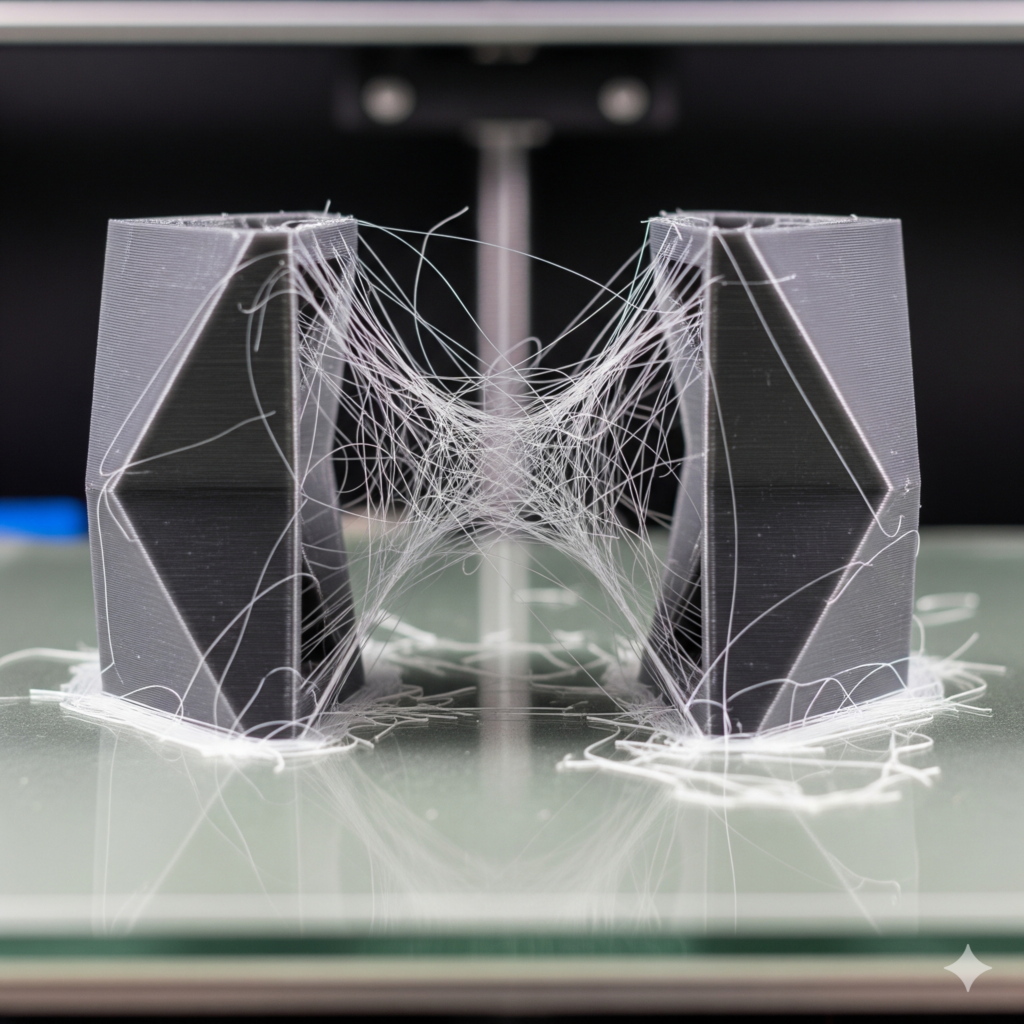
- Excessive Stringing: Moisture increases the pressure in the nozzle, making it harder to control retractions.
- Bubbles in the Print: Visible voids or a “fuzzy” texture on the surface of your objects.
- Poor Layer Adhesion: The steam interferes with the bonding process between layers.
If you see these signs, it is time to stop printing and start drying. This is a critical step in any 3D printing troubleshooting routine to ensure you are not chasing mechanical ghosts when the problem is actually the material.
Pro Tip: Start with Better Material
One of the easiest ways to ensure success is to use high-quality American-made filament that arrives perfectly sealed. I highly recommend COEX 3D filament for its consistency and durability.
Exclusive Offer: Use coupon code 3DPRINTINGBYKEVIN at checkout to save 15% on your order.
The Moisture Fix: How to Dry Your Filament
Once the moisture is in, you must force it out. You cannot simply leave the spool in a dry room and expect it to “air out.” You need controlled heat and airflow.
1. Dedicated Filament Dryers
The most reliable method is using a dedicated filament drying box. These devices allow you to set specific temperatures and timers. Many of them even allow you to print directly from the dryer, ensuring the filament remains pristine throughout a 48-hour print. This is often considered the essential tool every 3D printer owner should have to maintain professional-grade results.
2. The Heated Bed Method
If you are in a pinch, you can use your printer’s heated bed. Place the spool on the bed, cover it with a cardboard box with a few vent holes on top, and set the bed temperature to roughly 45-50°C for PLA or 65°C for PETG. Leave it for 6 to 12 hours.
While your filament is drying, it is the perfect time to optimize your machine. Applying the calibration trick that makes any 3D printer perform better will ensure that once your material is ready, your printer is tuned to deliver its best performance.
Prevention is Better than a Cure
After you have dried your filament, you must store it properly to prevent a repeat performance. Airtight bins with rechargeable desiccant packs are the gold standard. For makers living in high-humidity climates, vacuum-sealed bags are a necessity.
Proper material care directly impacts complex prints. For example, if you are working on stopping 3D print warping in PLA or PETG, wet filament will undermine all your bed adhesion efforts. Moist filament expands unevenly, creating internal stresses that pull the corners of your print off the bed.
Upgrade Your Workflow
Dealing with brittle filament is frustrating, but it is often the catalyst for makers to upgrade to more robust hardware. If your current setup is struggling with consistency, exploring the latest models from Creality can be a game-changer. Their newer extruders are designed to handle various filament conditions with much higher reliability.
Furthermore, if you are looking to move beyond downloading files and want to start designing 3D objects using software, you need a workflow that doesn’t fail due to simple material issues. Using a high-quality 3D scanner from 3DMakerpro combined with a well-maintained printer allows you to replicate complex parts with ease, provided your filament is dry and ready.
Recommended Hardware for Serious Makers
Ready to upgrade your printing experience? Check out the latest offers from our partners:
- Creality Official Store – Reliable printers for every budget.
- 3DMakerpro (Global) – Professional 3D scanning made accessible.
A Final Note on Print Speed
Sometimes, makers mistake moisture issues for speed issues. While wet filament will certainly fail at high speeds, you might be curious about what happens when you slow your 3D printer down. Slowing down can occasionally mask the symptoms of slightly damp filament by giving the steam more time to escape without causing a blow-out, but it is not a permanent solution. Fix the moisture first, then optimize your speed.
Frequently Asked Questions
Can I dry filament in my kitchen oven?
It is risky. Most kitchen ovens have wide temperature fluctuations and may accidentally melt the plastic or the spool itself. If you do use an oven, verify the temperature with a separate thermometer first.
How long does it take for filament to get “wet”?
In a humid environment (above 50% humidity), some filaments like Nylon can become unprintable in as little as 6 to 24 hours. PLA is more forgiving but will show signs of degradation over a few weeks.
Does brand new filament need drying?
Surprisingly, yes. Sometimes the water bath used during the manufacturing process isn’t fully dried before the spool is vacuum-sealed. If a brand-new spool pops or snaps, dry it immediately.
Disclosure: This post contains affiliate links. If you make a purchase through these links, I may earn a small commission at no extra cost to you. I only recommend products I use and trust, like COEX 3D, Creality, and 3DMakerpro.

