
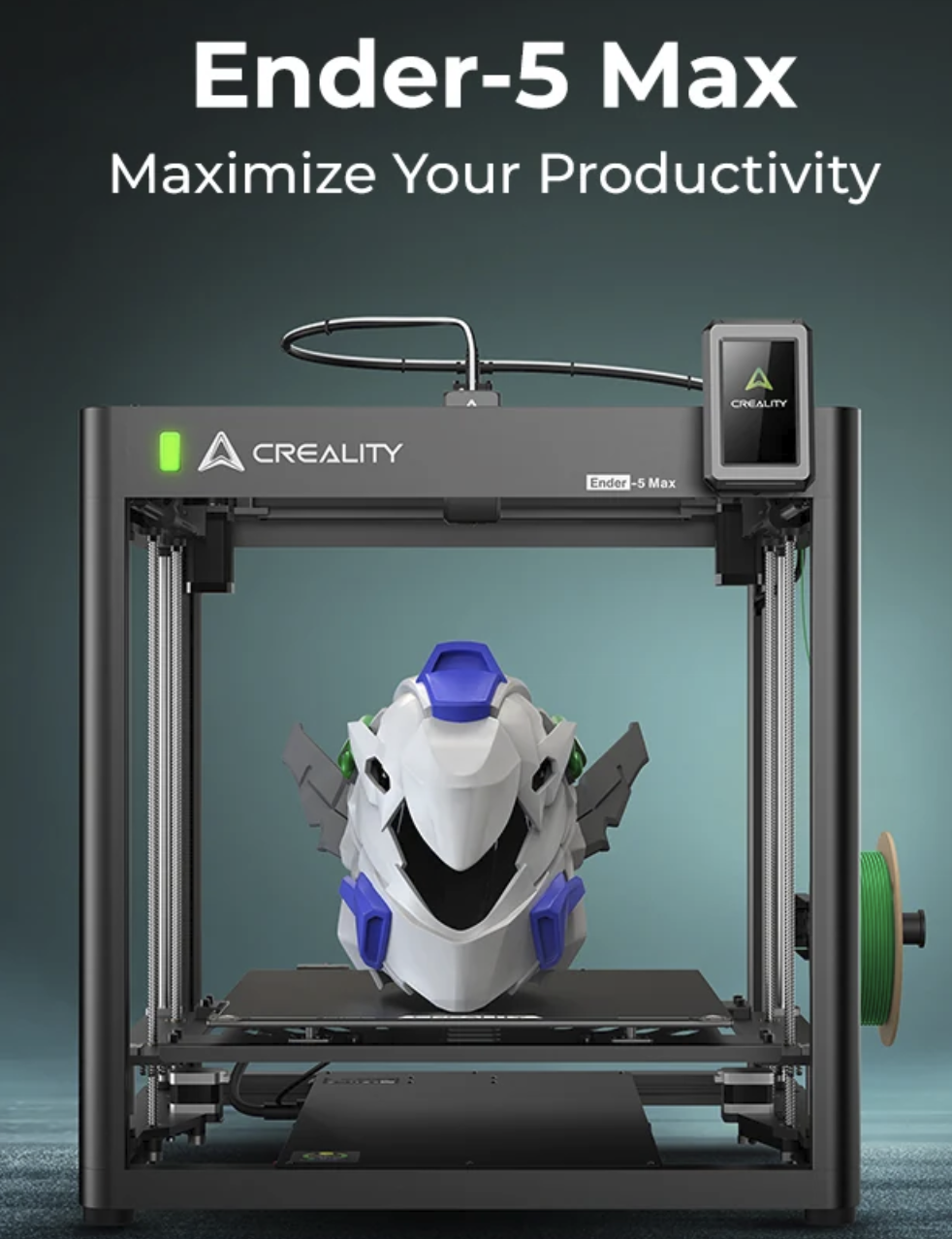
Quick answer: Yes—the Creality Ender-5 Max is worth considering when a 400 × 400 × 400 mm build volume solves a problem you repeatedly have. It is a strong fit for helmets, props, large fixtures, tall housings, prototypes, and trays of repeat parts.
It is harder to justify if most of your models already fit a 250–300 mm printer, you want an enclosed machine for ABS or ASA, or you expect the advertised 700 mm/s maximum to deliver perfect surfaces on every large print.
A large-format printer is easy to admire and surprisingly easy to underuse. The Ender-5 Max earns its bench space through capacity, not novelty: its bed can reduce seams, allow better part orientation, and fit more pieces per production run.
That capacity comes with real tradeoffs. The machine is physically large, the enclosure and camera are optional, failed prints can consume a great deal of filament, and large parts still require disciplined slicing. This review separates those practical considerations from the headline numbers.
Disclosure: This article contains an affiliate link. If you make a purchase through it, I may earn a commission at no additional cost to you. This is a specification-verified buying assessment informed by practical large-format FDM workflow experience; manufacturer performance figures are identified as such.
Updated August 26, 2026: The specification table now reflects Creality’s current 64-point leveling figure and distinguishes maximum speed from the manufacturer’s typical speed for quality.
Buy it for
- One-piece helmets, props, housings, fixtures, and display models
- Batch printing across a large bed
- PLA and PETG production with a direct-drive toolhead
- A roomy CoreXY platform without paying for a fully enclosed flagship
Skip it if
- Your normal work fits comfortably within 300 mm
- You need a compact, living-space-friendly printer
- ABS, ASA, or other warp-prone materials are your main workload
- You want an included camera, enclosure, or multicolor system
Ender-5 Max Specifications That Actually Affect the Decision
The most important correction to the earlier version of this article is the leveling system. Creality’s current product page specifies 64-point automatic leveling with automatic Z-offset, not 36-point leveling.
| Specification | Creality Ender-5 Max | Why it matters |
|---|---|---|
| Motion system | CoreXY FDM | The bed moves vertically while the toolhead handles XY motion. |
| Build volume | 400 × 400 × 400 mm | Provides 64 liters of theoretical build space for large parts or batches. |
| Speed | 500 mm/s typical for quality; up to 700 mm/s maximum | The typical figure is the more useful planning number; actual speed still depends on geometry, flow, material, acceleration, and finish goals. |
| Maximum acceleration | 20,000 mm/s² | Helps shorten moves, but it does not guarantee that every model can print at maximum speed. |
| Leveling | 64-point automatic leveling and auto Z-offset | Important on a 400 mm bed, where small height differences are more consequential. |
| Extruder | Direct drive with dual tempered gears | Shortens the filament path and supports more controlled feeding, including TPU 95A workflows. |
| Nozzle and bed limits | Up to 300°C nozzle; up to 100°C bed | Broadens material options, although temperature capability alone does not replace chamber control. |
| Build plate | Flexible epoxy build plate | Allows part removal by flexing the plate; adhesion behavior differs from textured PEI. |
| Nozzle sizes | 0.4 mm included; compatible with 0.6 and 0.8 mm | Larger nozzles can make better use of the machine’s large-format throughput. |
| File transfer | USB drive and Wi-Fi | Supports local transfer and networked workflows. |
| Recovery and sensors | Power-loss recovery and filament runout sensor | Useful safeguards for prints that may run for many hours or days. |
| Printer size and weight | 649 × 721 × 850 mm; up to 25.9 kg | You need a stable, permanent surface with additional working clearance. |
| Rated power | 1250 W | Check the intended outlet, circuit, and workspace before treating this like a small desktop appliance. |
| Camera and enclosure | Optional | Include these extras when comparing the real cost with an enclosed competitor. |
Specifications are based on Creality’s official Ender-5 Max product page. Bundles, accessories, firmware behavior, and availability can change.
What the 400 mm Build Volume Changes in Real Work
A 400 mm bed is not simply a bigger version of a normal bed. It changes which orientations are possible and how many parts can run together. A helmet may fit without a seam. A long bracket may lie in the direction that better supports its load. A small-batch job may use one coordinated plate instead of several separate starts.
The volume also creates new risk. A full bed contains more failure points, and a single tall part can tie up the printer for days. Power-loss recovery is helpful, but it cannot correct a detached part, clogged nozzle, tangled spool, or weak support structure.
Practical rule: Buy 400 mm capacity because your project history proves you need it. Measure your five largest recent models. If they repeatedly exceed 300 mm or require awkward seams, the Ender-5 Max solves a real constraint. If not, a smaller enclosed printer may be the smarter tool.
Even with a large bed, one-piece printing is not automatically better. Splitting can improve orientation, surface quality, repairability, transport, and failure isolation. My guide to one-piece versus split large prints walks through that decision.
Speed: Read the 700 mm/s Claim Correctly
Creality advertises a 700 mm/s maximum and labels 500 mm/s as the typical speed for quality. Both are manufacturer figures. Neither means every perimeter, bridge, top surface, or overhang will print at that speed.
Your finished time is constrained by more than travel speed. Acceleration, hotend flow, layer height, line width, cooling, minimum layer time, and the model’s short moves all influence the clock. A large decorative curve and a plate of small detailed parts can behave very differently under the same headline profile.
The useful advantage is not “every print at 700.” It is the machine’s combination of CoreXY motion, active input shaping, a rigid frame, and strong XY motors. That gives you room to tune for faster output while protecting the surface quality the project actually needs.
A better large-format starting strategy
- Begin with Creality’s supported profile for the exact filament and nozzle.
- Run a first-layer test across more than the center of the bed.
- Use a small representative section of the real model to judge seams, overhangs, and surface finish.
- Increase speed only after flow and cooling remain stable.
- Change one variable at a time and save the proven profile.
For big props and coarse functional parts, a 0.6 or 0.8 mm nozzle may improve throughput more predictably than pushing a 0.4 mm nozzle toward a marketing maximum. The tradeoff is reduced small-detail capability, so choose the nozzle around the project rather than the machine’s top speed.
Frame, Bed, and First-Layer Reliability
The Ender-5 Max uses a rigid all-metal frame, an X-axis linear rail, and two independently driven Z axes. Each Z side uses two leadscrews and two supporting linear rods. That is a sensible mechanical response to a bed large enough to carry substantial prints.
The 64-point mesh and automatic Z-offset reduce setup work, but automatic leveling is not a substitute for a clean build surface, correct filament preparation, sound slicer settings, and a stable machine. On a 400 mm bed, it is still wise to watch the first layer in several areas before trusting a multi-day job.
Creality says the 1000 W bed heater can reach 80°C in 200 seconds under its laboratory conditions. Treat that as a controlled test result, not a promise for every room voltage, ambient temperature, or target temperature.
Material Support: Compatible Is Not the Same as Ideal
Creality lists Hyper PLA, PLA, PETG, TPU 95A, ABS, ASA, PLA-CF, PA, and PLA-Silk among the supported materials. The 300°C nozzle, 100°C bed, and direct-drive extruder make that list technically plausible.
However, the Ender-5 Max is open-frame in its standard configuration. PLA and PETG are the easiest natural fit. ABS, ASA, and some nylon workflows benefit from a warmer, more stable environment, which is why Creality sells an optional enclosure.
An enclosure is not a complete air-safety plan. It may help with temperature stability and warping, but emissions still require attention. NIOSH recommends engineering controls such as local exhaust ventilation or enclosed ventilated racks to reduce uncontrolled 3D-printer emissions. Read the NIOSH guidance on 3D-printing emissions and controls before planning an indoor ABS, ASA, or print-farm workspace.
If engineering filaments are central to your work, compare the total cost of the printer, enclosure, ventilation, hardened wear components where required, filament drying, and monitoring. My enclosed-versus-open-frame printer guide explains when the enclosure should be a starting requirement rather than an add-on.
Ender-5 Max vs. K1 Max: Which Tradeoff Makes More Sense?
The simplest comparison is not “which printer is better?” It is “do you need more space or more integration?” The Ender-5 Max prioritizes build volume. The K1 Max prioritizes an enclosed, camera-equipped experience in a smaller 300 mm cube.
| Decision point | Ender-5 Max | K1 Max |
|---|---|---|
| Build volume | 400 × 400 × 400 mm | 300 × 300 × 300 mm |
| Theoretical build space | 64 liters | 27 liters |
| Enclosure | Optional | Included |
| Camera | Optional | Included |
| Published maximum speed | 700 mm/s | 600 mm/s |
| Best reason to choose it | Large one-piece models, improved orientation options, and batch capacity | Smaller footprint, enclosed workflow, and included monitoring features |
If your work repeatedly exceeds 300 mm, the Ender-5 Max has the clearer advantage. If your parts already fit and you value a contained setup, read my Creality K1 Max review before deciding.
Use the P.R.I.N.T. Method Before You Buy
A printer earns its cost by solving the right work. Use this five-part planning check before adding a 25.9 kg machine to your shop.
P — Problem
What repeatedly fails on your current printer: fit, orientation, seams, capacity, or throughput?
R — Requirements
List the real material, finish, strength, quantity, monitoring, ventilation, and deadline needs.
I — Interfaces
Measure the printer’s space, access clearance, spool path, network access, outlet location, and room airflow.
N — Next-Best Materials & Methods
Compare one-piece printing with keyed sections, and compare an open large-format platform with a smaller enclosed machine.
T — Test & Tune
Prove first layer, flow, cooling, fit, and finish with smaller tests before committing a full spool to the final part.
You can explore the full planning system in The Practical Guide to 3D Printing: 2026 Expanded Edition.
Pros and Cons After the Marketing Claims Are Removed
Strong reasons to buy
- True large-format capacity: the 400 mm cube is the central value, not a minor upgrade.
- CoreXY motion: the bed drops on Z instead of moving rapidly back and forth with a heavy part.
- Robust Z support: dual independent Z motors, four leadscrews, and supporting rods are appropriate for the bed size.
- Modern calibration: 64-point auto leveling, auto Z-offset, and active input shaping reduce repetitive setup work.
- Production-friendly features: Wi-Fi transfer, WLAN multi-printer management, indicator lighting, runout detection, and power-loss recovery support long workflows.
- Nozzle flexibility: 0.6 and 0.8 mm compatibility helps turn bed capacity into practical throughput.
Reasons to pause
- Large footprint: the machine itself measures 649 × 721 × 850 mm before adding service and airflow clearance.
- Open by default: the optional enclosure changes the effective price for frequent ABS or ASA use.
- Camera costs extra: remote monitoring is especially valuable for long prints, but it is not standard.
- High consequence of failure: a large plate can waste more time and material than several isolated jobs.
- Capacity can be false economy: a smaller enclosed printer may be more useful if 400 mm projects are rare.
- Speed requires judgment: 700 mm/s is a ceiling, not a universal production setting.
Seven Checks to Make Before Ordering
- Measure the route into the room. Check doors, stairs, and the final work surface—not only the build volume.
- Reserve service clearance. You need access for loading filament, cleaning, inspection, and maintenance.
- Check the electrical setup. Creality lists 1250 W rated power. Verify the intended circuit and manufacturer requirements.
- Price the complete workflow. Add any enclosure, camera, larger nozzles, spare build plate, ventilation, dryer, and backup-power equipment you actually need.
- Review five real models. Confirm that 400 mm capacity eliminates a recurring constraint.
- Estimate failure cost. Slice a representative large project and look at time and filament before buying.
- Check current support files. Visit Creality’s official support center for current manuals, software, firmware, and product resources.
Do not skip outage planning. Resume functions can help after a brief interruption, but they do not guarantee an invisible recovery. For long jobs, see my guide to power-loss recovery and UPS planning for 3D printers.
Price, Availability, and the Smarter Way to Compare Value
Printer pricing, regional inventory, and bundles change too often for a fixed number to stay useful. Compare the live price with the cost of the optional enclosure and camera, then compare that total with an enclosed alternative.
The Ender-5 Max is a good value when its build volume prevents splitting, assembly, extra setups, or missed production capacity. It is a poor value when the bed remains mostly empty and the money would have been better spent on an enclosed printer, a filament dryer, or a second smaller machine.
Affiliate reminder: Prices, shipping, bundles, and accessories vary by region. Confirm the exact contents of the listing before checkout.
Four-Question Ender-5 Max Knowledge Check
Choose your answer, then open each question to check it.
1. What is the strongest reason to choose the Ender-5 Max? A) Included camera B) 400 mm build volume C) Fully heated chamber D) Built-in multicolor printing
Answer: B — its 400 × 400 × 400 mm build volume.
The camera and enclosure are optional, and the machine is not positioned as an integrated multicolor system.
2. Which speed figure is more useful for initial planning? A) 700 mm/s maximum B) 500 mm/s typical for quality C) Every print must run at 300 mm/s D) Speed never matters
Answer: B — Creality identifies 500 mm/s as typical for quality.
Actual print speed still depends on model geometry, flow, cooling, material, acceleration, and finish goals.
3. How many leveling points does Creality currently specify? A) 16 B) 25 C) 36 D) 64
Answer: D — 64-point automatic leveling.
The current specification also lists automatic Z-offset.
4. Does adding an enclosure create a complete air-safety solution? A) Yes B) Only for PLA C) No D) Only when the camera is installed
Answer: C — no.
An enclosure can stabilize temperature, but ventilation and emissions controls still require a separate plan.
Frequently Asked Questions
Is the Creality Ender-5 Max good for beginners?
It can be manageable for a careful beginner because it includes automatic leveling, auto Z-offset, input shaping, a touchscreen, and Creality profiles. However, the size raises the cost of mistakes. A smaller printer is easier to place, learn, and supervise if you do not yet need 400 mm capacity.
Can the Ender-5 Max print a helmet in one piece?
Many helmet models should fit within its 400 mm cube, but fit depends on the specific file, scale, orientation, brim, and supports. Slice the exact model before buying. A model fitting inside the nominal volume does not guarantee a practical toolpath.
Does the Ender-5 Max include an enclosure?
No. Creality lists the enclosure as an optional accessory. Include it in your cost comparison if you need better draft and temperature control.
Does it include a camera?
No. Creality lists the 1080p monitoring and time-lapse camera as optional. For long or remote-supervised jobs, that accessory may be more useful than a cosmetic upgrade.
Can it really print at 700 mm/s?
Creality lists 700 mm/s as the maximum speed and 500 mm/s as typical for quality under its intended conditions. A model’s actual print moves may be slower because of acceleration limits, volumetric flow, cooling, geometry, and quality settings.
Is the Ender-5 Max suitable for ABS and ASA?
Creality lists both materials as supported, but the stock printer is open. An enclosure can improve temperature stability. You also need an appropriate ventilation and emissions-control plan; an enclosure alone is not the whole solution.
Should I use a 0.6 mm nozzle on a large-format printer?
A 0.6 mm nozzle is often a sensible choice for large props and functional parts because wider lines and taller practical layers can improve throughput. Keep the 0.4 mm nozzle when small detail matters more. Validate flow, walls, tolerances, and finish on a smaller test first.
Final Verdict: Is the Creality Ender-5 Max Worth It?
The Ender-5 Max is worth it for makers and small production shops that can name the projects its 400 mm build volume will improve. It offers a rare combination of large capacity, CoreXY motion, 64-point auto leveling, direct drive, active input shaping, and flexible nozzle options.
It is not the automatic best choice for everyone. The open frame, optional camera, optional enclosure, large footprint, and high cost of failed full-bed prints all belong in the decision. If your work fits inside 300 mm, a smaller enclosed machine may deliver more everyday value.
The right question is not “How big can it print?” It is “What recurring project becomes simpler, stronger, faster, or more reliable because I have that space?” If you have a clear answer, the Ender-5 Max makes sense.
Your turn: What would you print first on a 400 mm bed—a helmet, a fixture, one large prototype, or a full batch of smaller parts? Share the project in the comments, along with the printer you are comparing against.

Thank you for this detailed and insightful review of the Creality Ender 5 Max! It’s clear the printer has a lot to offer, especially with its impressive build volume and high print quality. I’m curious, how does the Ender 5 Max compare with other large-format printers in terms of ease of setup and maintenance? Also, for someone considering their first large-scale 3D printer, would the potential bed-warping and noise issues be a significant challenge, or are these fairly easy to resolve with the recommended upgrades? Looking forward to hearing more thoughts on that!
Thank you for your questions!
The Ender 5 Max confidently stands out among large-format 3D printers within the Creality ecosystem due to its effortless setup and maintenance. The assembly is straightforward, and while some fine-tuning is beneficial for achieving peak performance, it’s easy to do. Compared to the Anycubic Chiron and Artillery Sidewinder X2, the Ender 5 Max boasts a sturdier CoreXY-like frame that significantly enhances stability. It’s stock firmware and bed leveling system may need some manual adjustments, but with a little attention, you’ll achieve excellent results.
Regarding bed-warping and noise, both are common concerns with large-format printers, but they can certainly be addressed effectively:
Bed Warping –While the stock glass bed is generally reliable, some users have encountered warping over time. To mitigate this, consider adding a flexible PEI sheet or upgrading to a high-quality spring steel bed. Implementing manual or automatic mesh bed leveling with a BLTouch is highly recommended to help tackle any inconsistencies.
Noise Levels– Out of the box, the Ender 5 Max may not be the quietest printer due to its stock stepper motor drivers and fans. However, upgrading to silent stepper drivers (like TMC2208 or TMC2209) and replacing the cooling fans with quieter alternatives can make a significant difference in noise levels.
For first-time users of large-scale 3D printers, the challenges can feel overwhelming. But with the right upgrades and adjustments, you can manage them. If you want a printer that is easy to use, consider ones with built-in auto-bed leveling and quieter stepper drivers, like the Prusa XL or Bambu Lab X1 Carbon. However, if you are willing to make some changes, the Ender 5 Max offers great value for its price and size.
I hope this helps! Feel free to reach out if you have any more questions!
Just curious, why would the Ender 5 Max not have TMC stepper drivers and a modern board? It’s using Creality K1 components and motion system and is about a generation newer than the Creality Ender 5 S1 and Creality K1 (probably more on par with the K1 Max and K1C)…
Why Doesn’t the New Ender 5 Max Have TMC Drivers or a Modern Board?
Hi Jonathon,
Thanks for your thoughtful question — and you’re definitely on to something. The latest version of the Ender 5 Max (especially the 2024 refresh) *does* share a lot of DNA with Creality’s high-end K1 models, like the K1 Max and K1C. However, despite using similar components — including linear rails, a Sprite extruder, and motion systems — it doesn’t include the same electronics or firmware stack. Here’s why:
—
Not All Shared Parts Mean Shared Performance
Even though the Ender 5 Max might borrow mechanical parts from the K1 lineup, the mainboard and stepper drivers are usually not the same. Most Ender-series printers ship with a Marlin-based 32-bit board (like the V4.2.2 or 4.2.7), often paired with either A4988, TMC2208, or sometimes silent stepper drivers in standalone (non-UART) mode. That keeps costs low and simplifies firmware management.
In contrast, the K1, K1 Max, and K1C use Klipper-based boards with powerful CPUs, advanced motion planning, and TMC2209 or better drivers — often controlled via UART for features like current tuning and stealthChop/spreadCycle switching.
—
Product Tiering and Strategy
Creality tends to reserve its best electronics and smart features (like AI cameras, Klipper, high-speed input shaping) for the K1 flagship series. Even if the Ender 5 Max is *newer* than the Ender 5 S1 or the K1 itself, it’s positioned as a prosumer Cartesian machine, not a full CoreXY speedster.
So while it may look or feel like a K1 Max, the electronics are likely a generation or two simpler, to avoid cannibalizing K1 sales.
—
Firmware Plays a Role Too
The K1 series is built around Klipper, which needs faster, more capable hardware. The Ender 5 Max, by contrast, still runs Marlin. That limits the need for higher-end stepper drivers or advanced thermal control features, making it more affordable (but less flexible) out of the box.
—
Can You Upgrade It?
Yes — if you’re a power user or enjoy modding, you have some options:
* Upgrade the board to a Klipper-compatible one (like BTT Manta or Octopus)
* Install TMC2209s if your board has replaceable stepper sockets
* Add an accelerometer for input shaping
Or even just fine-tune the existing setup with better cooling, motion calibration, and slicer tuning
—
Final Thought,
You’re absolutely right: the new Ender 5 Max is mechanically impressive and shares a lot with Creality’s best printers. But electronics-wise, it’s designed to sit just below the K1 series, making it a strong performer, but not quite a flagship.
Please let me know if you’d like help identifying your current board or need guidance on upgrading it for Klipper or TMC2209 compatibility. I’d be happy to walk you through it!
All the best,
Bullwinkle