
If you’ve spent any time 3D printing, you already know how frustrating common print failures can be. After years of trial and error with bed leveling, I’ve found that there’s a straightforward method that makes a real difference. This simple approach solves most first layer problems and helps you get reliable prints, even if you’re just starting out. If you’re tired of troubleshooting failed prints, I’m going to explain how this bed leveling method can help fix about 80% of the print issues people struggle with.
Why Bed Leveling Matters in 3D Printing
Bed leveling is one of those steps that’s easy to rush or overlook, but it’s really important for getting consistent, high-quality prints. When I don’t take care with bed leveling, my prints often end up warping, not sticking, or failing in the first few layers. A properly leveled bed supports good first layer adhesion, which is at the heart of reliable printing. I’ve seen this pattern whether I’m working with budget printers or expensive setups alike.
When the bed isn’t level, the nozzle is either too far from the surface, making prints not stick, or too close, which causes filament jams and an uneven first layer. These kinds of issues can make people give up on 3D printing, especially beginners. If you nail bed leveling early, printing is a lot more fun and way less of a hassle overall. Reliable printing starts with a stable, flat surface, so this small step has a big impact on your results.
Understanding the Best Bed Leveling Methods
I’ve tried all kinds of bed leveling methods, from automatic sensors to knobs and adjustment springs. Most 3D printers still rely on some form of manual leveling, at least for initial setup or after maintenance. Some newer printers offer auto bed leveling as a feature, but even these often benefit from a simple manual check. If you’re not sure which method to trust, I can say that the classic “piece of paper” method is still my go-to and works on nearly every printer I’ve used.
- The Paper Test: Slide a standard piece of printer paper between the nozzle and the bed, adjusting until you feel just a small amount of resistance during the pass.
- Corner by Corner Adjustment: Move the hotend to each corner and the center, making tiny tweaks so the bed is evenly spaced below the nozzle everywhere.
- Auto Leveling Aids: Some printers have inductive or BLTouch probes, but manual checking can catch problems even with sensors installed.
If this is your first 3D printer, or you want to cover the basics, check out the Beginner’s Guide to 3D Printing for a full breakdown of setup essentials.
The Simple Bed Leveling Technique: The Classic Paper Method
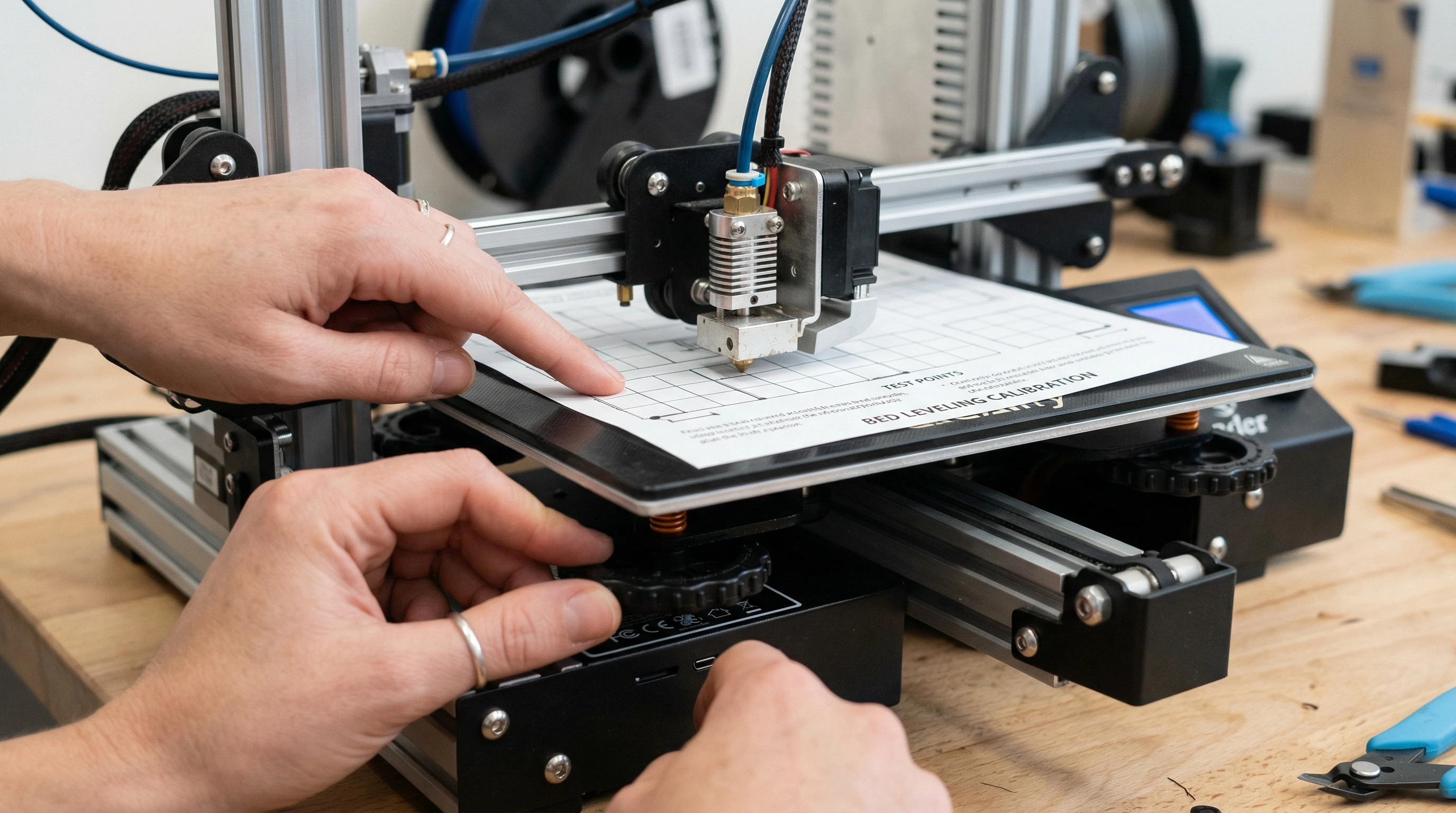
What I love about this paper method is that it doesn’t need any special tools, and you don’t have to worry about complicated calibration procedures. Here’s exactly how I do it on every machine I set up:
- Heat up both the nozzle and the bed. I set the nozzle to typical printing temperature for my filament, such as 200°C for PLA and 60°C for the bed, so thermal expansion is handled.
- Auto-home the printer using its control panel.
- Disable stepper motors to allow the bed and nozzle to move freely.
- Place a clean sheet of paper on the bed.
- Manually move the print head to one corner. Lower the nozzle until the paper slides between the nozzle and bed with a slight drag. If it’s too tight, back off the bed slightly. If it’s loose, bring the bed up just a bit.
- Repeat this for all four corners of the bed and the center. Each corner can throw off the others, so I usually do two full passes for best results.
The trick is to aim for a tiny bit of friction so the paper moves smoothly but you feel resistance. If you see the nozzle digging into the bed or leaving marks on the paper, back it off. After a couple of tries, it becomes quick and almost automatic. Even experienced makers return to this method frequently to get trouble-free prints on the first go.
Common Print Issues This Method Helps Prevent
This paper leveling technique has helped me avoid some of the biggest headaches in 3D printing. Here’s what I’ve seen improve right away after a careful bed level:
- Poor First Layer Adhesion: The first layer sticks every time when the bed is level, which means fewer failed prints and wasted filament. This also enables you to print objects with challenging shapes or overhangs more confidently.
- Print Warping: PLA and other popular filaments shrink just a little as they cool, so a good first layer helps avoid corners peeling or ‘elephants foot’ problems. Here are more tips for solving 3D print warping if this is your main challenge.
- Uneven Layers: If you see squished lines in one area and loose lines in another, bed leveling usually fixes it. Uniformity across the print bed is crucial for detailed prints and surface quality.
- Nozzle Clogs at the Start: The right distance prevents the nozzle from scraping the bed and jamming up with leftover filament.
- Blobby Corners or Strings: Leveling can give a boost to extrusion smoothness, which reduces annoying stringing and random blobs that ruin surface finish.
I’ve noticed that after a fresh bed level, my first layers almost always come out perfectly flat and smooth, giving the best possible foundation for the rest of the print. This pattern holds true whether you’re printing new designs or repeat models, making it a key part of my 3D printing process.
Quick Steps: How to Level Your 3D Printer’s Bed
Getting the bed level doesn’t have to be hard. Here are the main steps I use, which only take a few minutes each time I want reliable results:
- Warm up the printer’s nozzle and bed so the surfaces match actual printing conditions.
- Home all axes so the printer knows where zero is.
- Use the paper to check all corners and the center, making small adjustments as you go.
- Turn the bed leveling knobs at each point until the paper has just a bit of drag.
- Double-check each point, then run a test print with a “bed level test” or simple square outline to double-check your results.
Sometimes, you’ll need to repeat the process after moving the machine, changing beds, or swapping nozzles. If you’re curious about other calibration tips that can make a big difference in your results, see the guide on tuning your 3D printer for the best performance. Taking time for this step can mean the difference between a flawless print and hours of wasted plastic.
What to Know Before You Start Leveling
Before getting started with bed leveling, a few simple checks help you avoid wasted time and effort:
- Make Sure the Bed is Clean: I always clean the bed using isopropyl alcohol and a lintfree cloth before leveling and printing. Dust or oils mess with adhesion and can throw your leveling off.
- Preheat Properly: Always heat the bed and nozzle before leveling. Metal and glass expand as they warm up, so preheating matches the real printing conditions.
- Inspect the Bed Surface: Look for nicks or scratches in the glass or magnetic sheet. If your print surface is warped or damaged, bed leveling won’t fix it. Always use a flat, undamaged surface for consistent results.
- Check for Loose Screws or Wheels: If the bed moves or wobbles, even a perfect level won’t help. Tighten everything before you get started. Loose hardware can cause the bed to drift mid-print.
I’ve made the mistake of skipping these basics, only to fight with failed prints until I realized something was loose or dirty. Spending a couple of extra minutes at the beginning saves hours in the long run, and helps you enjoy your printer more.
Why First Layer Adhesion is So Important
Getting the first layer right makes everything else easier. If the first layer peels, bubbles, or lifts off the bed, the rest of the print can fail in just a few minutes. This is true for PLA, PETG, ABS, or any filament type. I always run a “first layer pattern” print to check before starting something big. This way, I can spot issues fast and avoid a ruined print. Consistent first layer adhesion prevents headaches throughout your job. For more ideas on how to keep first layer adhesion consistent, the troubleshooting guide covers even more tips. Plus, taking this step makes removing finished prints easier, since stubborn prints often mean poor first layer contact.
What Tools Might Help You Level Faster?
While the paper method is my go-to, a few simple tools can speed up the process or help if you want to go further:
- Feeler gauges, for a quick, precise gap measurement if you want something more consistent than paper.
- Bedleveling springs or silicone columns, which replace stock springs and help keep the bed stable longer so you don’t have to relevel so often.
- Auto bed leveling sensors, for those who want less manual tinkering, but manual checks are still useful and help you catch sensor errors.
If you’re ready to upgrade your machine or want to see trusted hardware recommendations, check the current deals on Creality printers (affiliate) or 3DMakerpro (Global, affiliate). For filament or print beds, COEX offers 15% off (coupon code 3DPRINTINGBYKEVIN), which is great for stocking up on supplies and trying new materials.
Tips to Keep Your Bed Level Over Time
Print beds can switch up over time, so I’ve picked up a few habits that keep things running smoothly between prints:
- Recheck bed level after moving or bumping the printer.
- Run a quick paper test before large or important prints.
- Replace springs or add silicone leveling columns to reduce drift.
- If you see the first layer change during a print, pause and check again—it’s faster than restarting everything from scratch and helps you spot minor issues before they get worse.
A stable bed means less time fiddling, which leaves more time for actual printing and creativity. If you want to improve your design skills for unique projects, check this guide on designing 3D objects using software and see how an accurately leveled bed makes complex prints much easier.
FAQ: Bed Leveling & 3D Print Quality
I get a lot of questions about bed leveling from readers, so here are a few that come up often.
Question: Do I need to level my bed every time I print?
Answer: Not always. If your printer sits in one place and you haven’t changed anything mechanically, it’s usually fine for a few prints. But if you bump the printer, switch beds, or move it, check the bed level again. Some machines do mix it up over time, and I’ve found that releveling once a week is usually enough.
Question: What should I do if prints still won’t stick after leveling?
Answer: Try cleaning the bed, raising the bed temperature, or slowing down print speed for the first layer. Sometimes, switching to a new sheet of paper can also help you feel the gap more accurately, or you might need to redo the level passes. Refer to the troubleshooting guide for common 3D printing problems.
Question: My printer has auto-leveling—is manual leveling still needed?
Answer: Yes. Even with sensors, I’ve found a manual check is often helpful. Sensors can fail or mix it up calibration, especially if you swap bed surfaces. Combining the paper method with sensor calibration gives the most consistent results and helps you catch subtle issues that sensors can miss.
How a Reliable Bed Level Boosts Your Whole 3D Printing Experience
A good first layer is the foundation for accurate, eye-catching 3D prints. In my own work, taking a little extra time on bed leveling has saved me countless hours and made printing less frustrating. When I look at machines in my own shop that run for weeks with only small tweaks, it just comes down to checking and keeping the bed level. Even after using more advanced printers and fancy tools, the simple “paper method” still works best for the everyday fixes.
Bed leveling isn’t just for beginners; experienced makers benefit too. When I help friends troubleshoot new printers, most of the time, improving the bed level fixes everything. If you want to jump into the details of printer calibration, see this guide to advanced calibration tips. If you want to better understand how print speed affects your prints, see how slower speeds can lead to better results.
Once you’re confident with bed leveling, 3D printing becomes a lot more predictable and rewarding. I now spend more time creating and less time fixing, and I think anyone, no matter their skill level, can see big benefits from getting this step right.
If you ever run into stubborn issues or want one-on-one advice, reach out through the project intake form and I’ll do my best to help. Happy printing!
Some links in this article are affiliate links, which help support my work without extra cost to you. Recommendations are based on hands-on experience and are always honest.

