
2026 Creality Comparison · Practical Workshop Buying Guide
Creality has introduced three printers with three different promises: change nozzles instead of repeatedly purging colors, produce larger parts without splitting them, or bring four-color printing into a compact toolhead.
But here’s the question I care about most: Which of those promises actually matters when the part has to work?
Picture a small replacement gear that must fit a worn mechanism. Now picture a 400 mm fixture that won’t fit your current build plate. Finally, imagine a colorful prototype requiring hundreds of filament changes.
Those are three different problems—and they don’t have the same best printer.
At 3D Printing by Kevin, I approach equipment decisions the same way I approach customer projects: identify the problem, understand the requirements, choose a practical process, and test the result.
Let’s put the Creality K3, Ender-3 V3 Mega, and SPARKX i8 through that process.
Affiliate Disclosure: This article contains affiliate links to Creality products. If you purchase through these links, I may earn a commission at no additional cost to you. My recommendations are based on practical printing considerations.
Quick Answer: Which New Creality Printer Should You Buy?
Choose the Creality K3 if independent nozzle assemblies, frequent color changes, and compatible multimaterial printing are your main priorities.
Choose the Ender-3 V3 Mega if you regularly produce oversized parts, multiple components per build plate, or flexible TPU projects.
Choose the SPARKX i8 if you want a relatively affordable four-color printing workflow without purchasing a more elaborate nozzle-changing machine.
My recommendation: Before buying any of them, identify the next three parts you actually intend to print. Their dimensions, material requirements, and fit tolerances should guide your decision.
Fact-checked against Creality’s published specifications as of October 17, 2026. This is a technical comparison, not a hands-on review of these three production machines.
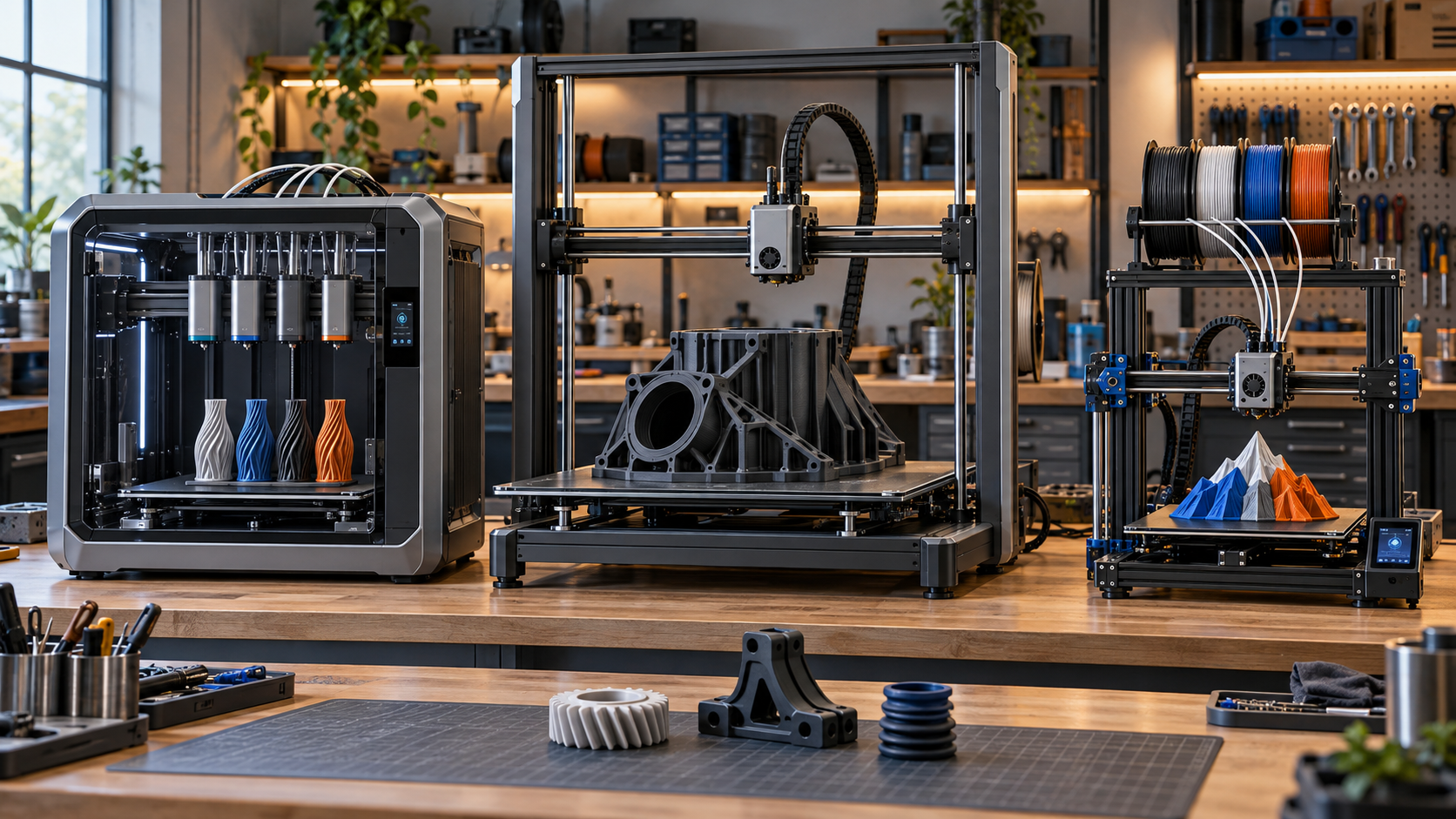
Visual Guide: Three Printers, Three Different Problems
Four independent nozzle assemblies allow the printer to select a loaded nozzle rather than repeatedly swapping filament through one shared nozzle.
Best question: Do I need separate material paths?
A 420 mm cubic build volume allows larger components and more parts per printing session.
Best question: Do I need more build space?
Four filament channels feed a compact single toolhead designed to shorten color-change operations.
Best question: Do I want affordable four-color printing?
Creality K3 vs V3 Mega vs SPARKX i8: Specifications Compared
All three printers advertise maximum printing speeds of up to 500 mm/s. However, advertised speed alone cannot predict how quickly a particular functional component will be completed.
Acceleration, flow rate, cooling, material changes, supports, and dimensional requirements all affect actual printing time.
| Feature | Creality K3 | V3 Mega | SPARKX i8 |
|---|---|---|---|
| Build Volume | 260 × 260 × 260 mm | 420 × 420 × 420 mm | 260 × 260 × 255 mm |
| Architecture | CoreXY | Open-frame, moving bed | Open-frame, moving bed |
| Color System | Four independently selectable nozzles | CFS nano with Mega Combo | Four-channel QuarTeks toolhead |
| Maximum Advertised Speed | 500 mm/s | 500 mm/s | 500 mm/s |
| Main Advantage | Independent nozzle paths | Large build area and TPU | Affordable four-color workflow |
| Reported Launch Pricing | $849 preorder | $569 standalone / $669 Combo | From $289 crowdfunding tier |
Prices reflect reported U.S. launch offers as of October 17, 2026. Crowdfunding rewards, preorders, standard retail packages, shipping charges, accessories, and product availability differ.
1. Creality K3: Four Nozzles Could Change Multimaterial Printing
The K3 may be the most technologically interesting printer of the three.
Traditional single-nozzle multicolor printing often requires unloading filament, introducing the next color, and purging the previous material from the hotend.
Repeat that process hundreds of times, and a reasonably sized object can become a surprisingly long printing project.
Creality’s KliTek four-nozzle system approaches the problem differently.
How the KliTek System Works
The K3 maintains four independently loaded nozzle assemblies and selects the appropriate nozzle automatically.
Creality advertises approximately 4.8 seconds for a nozzle change.
The company also reports up to 80% shorter printing times and 85% less filament consumption in selected multicolor comparisons.
Those percentages are manufacturer test results, not guarantees for every model.
Why Functional-Part Makers Should Pay Attention
Imagine printing a prototype enclosure with one material for the body and a second compatible material for support structures.
Or consider a specialized component where separate material paths could simplify the printing process.
That’s where the K3 becomes more interesting than a machine designed primarily for decorative color changes.
- Four independently selectable nozzle assemblies.
- 260 × 260 × 260 mm build volume.
- Maximum 300°C hotend temperature.
- Potential multimaterial and support-material workflows.
- Reduced repeated filament purging.
- Automatic nozzle calibration.
What Still Needs Verification?
The K3’s potential is impressive, but buyers should check the available accessories, material profiles, and current firmware before expecting every advertised workflow to operate immediately.
For example, mixed nozzle-diameter printing requires appropriate accessories and software support.
Specialized flexible filament use may also require optional equipment.
Kevin’s Workshop Perspective: The feature that interests me isn’t simply four colors. It’s the possibility of more controlled material changes. Before trusting the K3 with precision replacement parts or customer production orders, I’d test nozzle alignment, repeatability, material compatibility, and dimensional accuracy across multiple prints.
Launch information: Creality advertised the K3 at $849 for U.S. preorder, with shipping estimated to begin November 2, 2026.
Explore the Creality K3 →Affiliate link. Verify current pricing, shipping, accessories, and availability before ordering.
Official specifications: Creality K3 Product Information .
2. Ender-3 V3 Mega: Sometimes Bigger Really Is Better
There are projects where additional color capability doesn’t solve the problem.
You simply need more room.
The Ender-3 V3 Mega provides a substantial 420 × 420 × 420 mm build volume, making it interesting for larger housings, fixtures, templates, structural patterns, and production batches.
Why Build Volume Matters
A larger build area can eliminate the need to split certain components into smaller sections.
It can also allow more small parts to be positioned on a single build plate.
That doesn’t automatically make production faster. Larger batches increase the amount of work exposed to a possible print failure.
However, reducing setup and handling cycles can be valuable when producing repeated components.
Build-Plate Reality Check: 420 mm vs. 260 mm
A 420 mm square build plate provides approximately 2.61 times the nominal area of a 260 mm square build plate.
260 × 260 mm
67,600 mm² nominal area
Creality K3 and SPARKX i8 XY printing dimensions.
420 × 420 mm
176,400 mm² nominal area
Ender-3 V3 Mega XY printing dimensions.
The Mega’s Interesting TPU Capabilities
Creality designed the Mega around its Sprite 2 extrusion system and advertises support for flexible TPU materials ranging from 85A to 95A.
That could be useful for protective pads, flexible bumpers, covers, and other parts requiring controlled flexibility.
However, material suitability still depends on the specific application.
Understanding the Mega Combo
The standalone Ender-3 V3 Mega and the Mega Combo are not identical packages.
The Mega Combo includes CFS nano for automatic four-color printing.
The standalone printer does not include that system.
Additionally, TPU requires direct feeding and cannot be relayed through CFS nano.
Other advertised features include:
- High-rigidity metal frame.
- Dual Z motors and dual Y motors.
- Vibration compensation.
- 81-point automatic leveling.
- Filament monitoring.
- Quick-swap nozzle design.
Kevin’s Workshop Perspective: Having experience with a Creality CR-M4, I understand the appeal of large-format printing. But bigger doesn’t necessarily mean better. I’d compare usable build volume, PETG performance, first-layer consistency, warping, and dimensional repeatability before deciding whether the Mega represents a meaningful workshop upgrade.
Launch information: U.S. launch listings advertised approximately $569 for the standalone machine and $669 for the Mega Combo. Availability and promotional pricing may change.
Explore the Ender-3 V3 Mega / Mega Combo →Affiliate link. Check the selected configuration to confirm whether CFS nano is included.
Official specifications: Creality Ender-3 V3 Mega .
3. SPARKX i8: Four Colors Without Four Separate Nozzles
The SPARKX i8 approaches multicolor printing differently from the K3.
Instead of exchanging four independent nozzle assemblies, Creality’s QuarTeks technology brings four filament channels together inside a compact single toolhead.
The goal is to reduce filament travel and shorten color-changing operations.
How Fast Is Color Switching?
Creality advertises filament-channel switching in less than one second.
That’s an impressive engineering target, but it shouldn’t be directly compared with the K3’s 4.8-second nozzle-change figure.
The machines perform different operations using different mechanisms.
Does the SPARKX i8 Really Produce Zero Waste?
This is where I would look carefully at the fine print.
Creality advertises very low material waste and the ability to eliminate external purge waste in suitable printing scenarios.
However, some printing workflows can redirect transition material into the object’s infill.
That means no external purge waste doesn’t necessarily mean no additional material consumption.
For a fair comparison, I would measure the total weight of filament consumed, including material used during priming and color transitions.
What Does the SPARKX i8 Offer?
- 260 × 260 × 255 mm build volume.
- Four-channel, single-toolhead color system.
- Maximum advertised printing speed of 500 mm/s.
- Maximum 300°C hotend temperature.
- Maximum 100°C heated-bed temperature.
- Built-in monitoring features.
- Optional filament-management accessories.
Kevin’s Workshop Perspective: The i8 looks interesting for educational models, multicolor demonstration parts, and affordable creative projects. For mechanical replacements, I would still prioritize material performance, repeatability, dimensional accuracy, and long-term reliability over multicolor capability.
Launch information: The SPARKX i8 debuted through Indiegogo with a limited $289 introductory tier, additional crowdfunding options, and an advertised $399 MSRP. Crowdfunding fulfillment carries additional uncertainty.
Explore the Creality SPARKX i8 →Affiliate link. Confirm the destination, final price, delivery conditions, and return policy before ordering.
Official information: Creality SPARKX i8 .
Which Creality Printer Fits Your Actual Project?
Instead of asking which machine is the best overall, ask which one best supports your next project.
A machine that works beautifully for multicolor display models isn’t automatically the right choice for a production bracket or replacement gear.
| Project | Printer to Investigate | Important Test |
|---|---|---|
| Large replacement housing | V3 Mega | Warping and dimensional stability |
| Batch of brackets | V3 Mega | Repeatability across the build plate |
| Multimaterial prototype | K3 | Compatibility and material interfaces |
| Four-color educational model | SPARKX i8 | Print time and color transitions |
| Flexible bumper | V3 Mega | TPU feed, hardness, and performance |
| Small replacement gear | Depends on requirements | Fit, tolerances, material, and load |
That final example deserves attention.
A small replacement gear doesn’t automatically benefit from a large print bed, four colors, or multiple nozzle assemblies.
What matters is the geometry, shaft connection, material selection, printing orientation, and whether the replacement performs correctly under load.
Start with accurate part measurements and follow a controlled replacement-part test-fit process .
Before You Buy: Use the P.R.I.N.T. Method™
At 3D Printing by Kevin, I use the P.R.I.N.T. Method™ to solve practical manufacturing challenges.
The same framework can help you avoid purchasing a printer that doesn’t match your actual needs.
Your Five-Minute Printer Buying Worksheet
Before placing an order, answer these questions:
- What are the next three parts I intend to print?
- What are the largest required dimensions?
- Which materials do those parts require?
- Do I genuinely need four colors, multiple nozzles, or a bigger build area?
- How will I test the completed components?
- What is my total ownership budget, including accessories, filament, maintenance, and likely failures?
Remember that the printer’s advertised build volume is not its complete operating footprint. Allow space for bed movement, filament, power, ventilation, and maintenance.
If you’re preparing for your first purchase, my printer buying guide covers additional planning considerations.
Why I’m Not Declaring One Universal Winner
All three printers look interesting, but specifications and promotional videos do not establish long-term reliability.
I haven’t personally tested production units of the K3, V3 Mega, or SPARKX i8 for this comparison.
Before trusting any new machine with customer work, these are the areas I would evaluate.
- Dimensional repeatability: Can the printer repeatedly produce the same critical hole, slot, or bracket?
- Real production time: How long does a completed, inspected part actually take?
- Material performance: Does the selected filament meet the application’s requirements?
- Maintenance: How accessible are replacement nozzles, spare parts, firmware updates, and service procedures?
- Failure risk: How much time and material could be lost if a large or complex print fails?
For repeated production work, see my guide to understanding why repeat 3D prints don’t match .
Safety consideration: Heated filament printing can generate airborne particles and gases. Ventilation, appropriate material selection, and safe equipment placement are important. Consult NIOSH additive manufacturing safety guidance .
Four-Question Interactive Knowledge Check
Ready to test what you’ve learned? Choose your answer before opening each question to see the explanation.
1. Which printer uses four independently selectable nozzle assemblies?
A. Ender-3 V3 Mega
B. Creality K3
C. SPARKX i8
Correct Answer: B — Creality K3.
The K3 uses the KliTek four-nozzle system. The SPARKX i8 instead brings four filament channels into one toolhead.
2. How must TPU be fed into the Ender-3 V3 Mega Combo?
A. Through CFS nano
B. Through direct spool feeding
C. Through a separate resin system
Correct Answer: B — Direct spool feeding.
Creality specifies that TPU cannot be relayed through the CFS nano system.
3. Does zero external purge waste always mean zero additional filament consumption?
A. Yes
B. No
C. Only when printing PETG
Correct Answer: B — No.
Some systems can redirect transition material into infill. Startup and priming operations may also consume filament.
4. What’s the smartest first step when choosing a printer?
A. Select the highest advertised speed
B. Choose the lowest introductory price
C. Identify project requirements and acceptance tests
Correct Answer: C.
The printer must support the part’s dimensions, material, tolerances, and intended function.
How did you do? Four correct answers means you’re already evaluating these machines like a practical maker.
Frequently Asked Questions
Is the Creality K3 better than the SPARKX i8?
Not automatically. The K3 offers independent nozzle assemblies and greater potential for advanced multimaterial workflows. The SPARKX i8 emphasizes a lower-cost four-color workflow using one compact toolhead.
Is the Ender-3 V3 Mega worth buying for production?
Its larger build area may benefit batch printing and oversized components. Production suitability still depends on material performance, dimensional repeatability, reliability, and acceptable failure rates.
Are these printers really capable of printing at 500 mm/s?
All three advertise maximum printing speeds up to 500 mm/s. However, actual printing speeds depend on acceleration, filament flow, geometry, cooling, and quality requirements.
Can the Creality K3 print functional multimaterial parts?
Creality markets the K3 for compatible multimaterial printing, subject to accessories, filament selection, software support, and suitable settings.
The ability to extrude two different materials does not guarantee adequate bonding or mechanical performance between them.
Should I preorder one of these printers?
Preordering may appeal to buyers comfortable with early-product uncertainty. Anyone depending on a machine for customer deadlines may prefer to wait for independent reviews, stable software, and established replacement-part availability.
Do I need a new 3D printer for a replacement part?
Not necessarily. If you only need a replacement component, prototype, or short production run, working with an established printing service may be more economical than purchasing and maintaining another machine.
You can submit a custom 3D printing project for review .
Make Your Next 3D Printing Project More Successful
Buying the right printer is only the beginning.
Learning how to measure parts, select materials, prepare models, adjust slicing settings, and troubleshoot failures makes a much bigger difference over time.
My ebook, P.R.I.N.T. It Practical — 3D Printing for Beginners, uses the P.R.I.N.T. Method™ and practical planning worksheets to help beginners build those skills.
Explore the P.R.I.N.T. It Practical Ebook →My Final Verdict: Choose the Part Before the Printer
Creality’s three new printers represent interesting approaches to familiar 3D printing problems.
The K3 targets more efficient nozzle and material changes.
The Ender-3 V3 Mega emphasizes large-format printing and flexible-material capability.
The SPARKX i8 offers a different approach to accessible four-color printing.
But before buying any of them, ask yourself one question:
Will this printer’s special feature improve my next ten projects—or am I simply attracted to the newest technology?
Sometimes the smartest upgrade is a new printer.
Sometimes it’s a different material, better measurements, an improved model, or a more reliable slicing process.
And sometimes it’s keeping the machine you already own.
At 3D Printing by Kevin, the goal isn’t to own every new machine. It’s to select the right process and produce parts that work.
When replacement parts disappear, we make the next one.
Let’s Talk About These New Creality Printers
Which machine interests you most: the K3, Ender-3 V3 Mega, or SPARKX i8?
More importantly, what would you print with it first?
A replacement gear? A large housing? A flexible bumper? A short production run? Or something completely different?
Leave your thoughts in the comments below. I would especially like to hear from readers considering one of these printers for practical replacement parts or functional prototypes.
Your experiences and questions can help other makers make smarter equipment decisions.
Have a Custom 3D Printing Project? →Editorial Fact-Check — October 17, 2026: This article compares published manufacturer specifications, promotional claims, and practical engineering considerations. The author has not conducted hands-on testing of production units of these three printers. Manufacturer performance claims are identified as such. Pricing, firmware features, accessories, availability, and delivery estimates may change.
Image note: The featured image is a conceptual editorial illustration representing the three printer designs, not an exact manufacturer photograph.
Sources and Technical References
